
Best ChatGPT Email Prompts for Sales Teams in 2026 - The GTM with Clay Blog
Claygent Builder: The easiest way to build, test, and deploy GTM Agents
Build production-ready Claygents in natural language with Sculptor. Test on real data for free, track versions, and deploy once across every workflow. All inside Clay.
How Clay Uses Clay Ads: From $250 to $25 CPL
See how Clay uses its own Ads feature to cut LinkedIn CPL from $250 to $25 and unlock Meta with enriched CRM audiences. No manual uploads needed.
HG Insights Corporate Hierarchy: GTM Precision in Clay
Use HG Insights corporate hierarchy data in Clay to clean CRMs, map parent-child accounts, and trigger expansion plays. See how it works.
Sales GTM Engineering: How Clay Built the Role From Scratch
Learn what sales GTM engineering is, how it collapses SDR, AE, and SE roles into one, and how Clay built and hires for this high-leverage function. See how it works.
How to Automate Inbound Lead Outreach: The Clay Playbook
Learn how to automate inbound lead outreach with enrichment, scoring, and personalized sequences. See the exact Clay workflow that runs without manual work.
demandDrive Joins Clay’s Partner Ecosystem as an Official Clay Studio Partner
demandDrive joins Clay’s partner ecosystem to help B2B teams turn account intelligence into pipeline and revenue with GTM engineering and automation.
B2B Sales Prospecting: 15 Strategies to Drive More Conversions
Master B2B sales prospecting with 15 proven strategies covering ICP building, multi-channel outreach, and list hygiene. Build a pipeline that converts.
AI Sales Assistants: 11 Ways to Accelerate Your Outbound
Discover 11 ways AI sales assistants automate lead research, enrichment, and email personalization. See how top B2B teams use them to accelerate outbound.
The Three Laws of GTM: How to Win in the AI Era
The three laws of GTM explain why uniqueness, saturation, and iteration speed determine who wins. Learn how AI changes the rules and what to do about it.
Best Work Email Finders by Segment: SMB vs. Enterprise
We tested 12 email finders across 4,700+ contacts to find the best work emails by segment. See accuracy, cost, and coverage winners for SMB and enterprise.
How Clay Converts Trial Users Into Customers With Automated Outreach
See how Clay uses automated outreach to convert trial users into customers, with enrichment, lead scoring, and personalized HubSpot campaigns. Learn how.
Best Mobile Phone Data Providers for B2B Sales Teams
We tested 9,806 numbers across 10 B2B mobile phone data providers. See which wins on accuracy, coverage, and cost for NAMER, EMEA, and APAC.
How to Build a Complete AI Outbound Sales Funnel
Learn how to build a complete AI outbound sales funnel—from account scoring to personalized outreach—using Clay waterfalls and automation. See how it works.
How to Get More Customers Using Outbound Sales: A Complete Guide
Learn how outbound sales works, who it's right for, and how to build a strategy from prospecting to closing. Covers cold calling, email, and more.
How to Automate 6 Cold Email Campaigns in One Clay Workflow
Learn how to automate 6 cold email campaigns from a single Clay table — with enrichment, AI classification, and deduplication built in. See how it works.
How Clay Identifies Tier 1 Accounts: A Three-Score System
See how Clay identifies tier 1 accounts using a three-score system: fit, engagement, and contract value. Learn how sales and marketing align on the same priorities.
Lead Scoring in Clay: A Step-by-Step Formula Guide
Learn how to build lead scoring formulas in Clay to prioritize your ICP leads by employee count, job postings, and more. See how it works.
How to Validate Cold Outbound Offers and Find Message-Market Fit
Learn how to validate cold outbound offers by finding message-market fit — from breaking down your value prop to testing with a phased email approach. See how it works.
Troubleshooting Outbound Sales and Prospecting: A Comprehensive Guide
Fix broken outbound sales campaigns with this guide. Diagnose open and reply rates, reduce no-shows, qualify prospects with MEDDIC, and optimize what's working.
Bulk Enrichment: Enrich Millions of CRM Records in Clay
Bulk enrichment lets Enterprise teams enrich millions of Salesforce records with firmographics, tech stack, and AI research — then write results back automatically.
Clay Templates: Automate, Customize, and Replicate Any GTM Workflow
Clay Templates let you replicate full GTM workflows in hours, not days. Automate prospecting from data scraping to AI messaging, free and fully customizable.
How to Optimize Your Credit Usage in Clay
Learn how to optimize your credit usage in Clay with conditional formulas, Clearbit waterfall lookups, and smarter enrichment workflows. Save credits fast.
AI for sales prospecting
Learn about how to use AI for sales prospecting in this comprehensive guide, including framework for creating AI prompts and examples of cold email templates using AI that real sales teams have used successfully to land clients. AI sales prospecting can save your team thousands of hours—and double or triple your positive response rates.
The Reverse Demo: How Clay Replaced Traditional B2B Sales Demos
A reverse demo lets prospects solve real problems live, guided by your rep. Learn how Clay used 100+ sessions to boost conversion, retention, and product quality.
Data Waterfalls: How to Maximize Contact Coverage with Clay
Data waterfalls query multiple providers in sequence so you only pay for matches. See how Clay pushes coverage from 30% to 80%+ without annual contracts.
How Clay Runs ABM Campaigns: A Step-by-Step Playbook
See how Clay runs ABM campaigns — scoring 300 accounts, personalizing mailers and landing pages, and automating SDR follow-up. Learn how.
How We Built Clay's GTM Engineering Function
See how Clay built its GTM engineering function with sprint-based delivery, founder-level reporting, and full sales automation. A practical inside look.
Best Personal Email Finder Tools: Tested and Ranked
We tested 5 personal email finder tools across 2,354 prospects. See accuracy, coverage, and pricing data — plus the waterfall order that hit 79% coverage.
How to Use OpenAI to Write Cold Emails from Scratch with Clay
Learn how to use OpenAI to write personalized cold emails at scale with Clay. Set up the integration, craft better prompts, and boost deliverability.
How to Run a Personalized Demo Play at Scale with Clay
Learn how to automate a personalized demo play using Clay, Claygent, and AI enrichment to build custom mockups at scale. See how it works.
Automated Slide Deck Creation: How Clay Builds QBRs from Your Data
Clay's automated slide deck creation pulls from Snowflake, Salesforce, and Gong to build QBRs in minutes. Save 90+ hours per quarter. See how it works.
HG Insights + Clay: B2B Technographic and Firmographic Data
HG Insights surfaces deep technographic and firmographic data from billions of documents. Use it in Clay workflows to enrich accounts and power GTM. See how it works.
B2B Cold Email Deliverability: 21 Best Practices
Master B2B cold email deliverability with 21 proven best practices: domain setup, inbox warmup, authentication, and copy tips that keep you out of spam. Learn how.
Basics of Google Search Operators: A Practical Guide
Learn the basics of Google Search Operators and how to use them in Clay for prospecting, list building, and company research. See how it works.
AI Lead Generation: The Complete B2B Guide
Learn how AI lead generation automates list building, enrichment, and personalized outreach for B2B teams. Scale your pipeline without scaling headcount. See how it works.
Clay MCP: Ops-built workflows, consumable by reps
Clay MCP: Ops-built workflows, consumable by reps
How to Manage and Enrich Inbound Leads Automatically
Learn how to manage and enrich inbound leads automatically using a four-phase workflow that scores, segments, and triggers outreach from one email. See how it works.
GTM Alpha: How Winning Teams Build a Competitive Edge
GTM alpha is the edge winning teams build with unique data and signal-based plays. Learn how to find hidden signals, run better plays, and outpace competitors.
Why Good CRM Data Matters and How Clay Helps
Poor CRM data kills outreach. Learn why CRM data coverage fails and how Clay's waterfall enrichment lifts coverage rates from 20% to 80%. See how it works.
How to Use Formulas in Clay: AI Generator and Manual Entry
Learn how to use formulas in Clay with the AI Formula Generator or manual entry. Transform and clean your data faster. See how it works.
GTM Engineering: What It Is, How It Works, and How to Hire
GTM engineering turns ops teams into revenue builders using AI and automation. Learn what GTM engineers do, how to structure the role, and how to hire one.
Formulas in Clay: A Beginner's Intro for Non-Engineers
Learn how to use formulas in Clay without coding. This intro covers conditional statements, combining columns, and auto-qualifying leads. Start in 30 minutes.
How Clay Uses Clay for SEO and AEO: 3 Systems That Scale
See how Clay uses Clay for SEO and AEO: automated content refresh, video-to-page conversion, and a custom AI visibility dashboard. Learn how.
Turn Web Visitors into Leads: A Warm Outbound Play for B2B Sales
Learn how to turn web visitors into leads using a warm outbound play for B2B sales — with RB2B, Clay, and Lemlist. See how it works.
How to Use Web Scraping to Enrich Your Data with Clay
Learn how to use web scraping to enrich your data without code. Clay's Claygent answers deep GTM research questions at scale. See how it works.
How to Create a Sales Prospect List in Minutes
Learn how to create your own sales prospect list in minutes using Clay. Pull from 40+ sources, enrich with ICP data, and export to your CRM. See how it works.
Best B2B Email List Providers: Tested and Ranked (2026)
We tested 8 B2B email list providers head-to-head. See accuracy results, per-email pricing, and how to waterfall providers for maximum coverage.
Outbound Sales Automation: How to 10x Pipeline Without More SDRs
Learn how outbound sales automation replaces manual SDR work, cuts cost per email by 100x, and scales pipeline without growing headcount. See how it works.
The Wake the Dead Play: Reactivate Closed-Lost Deals with Clay
The wake the dead play uses Clay + ChatGPT to send automated, personalized emails to closed-lost prospects. Restart stalled deals in a few steps. Learn how.
Three Tips to Guarantee Email Deliverability for Cold Outbound
Split volume, verify contacts, and personalize copy to guarantee email deliverability for cold outbound. Three actionable tips that keep you out of spam.
How Clay Uses Clay for Customer Support: 3 Real Workflows
See how Clay's customer support team uses Clay to enrich Intercom tickets, automate QA, and draft help articles. Real workflows, real results.
B2B Cold Email Copywriting: The Complete Guide
Master B2B cold email copywriting with proven templates, a research framework, and a checklist used to send 800k+ emails a month. Start writing emails that get replies.
Introducing Clay Functions
Build Your GTM Logic Once, Apply It Everywhere
Clay and Apollo Integration: Enrichment, Sequencing, and More
The Clay and Apollo integration unlocks 5X faster enrichment and direct sequencer API access. See how joint customers go from data to booked meetings.
The Many Lives of Spreadsheets: A History and What Comes Next
Explore the many lives of spreadsheets — from VisiCalc in 1979 to self-filling automation tools today. See how the no-code vision keeps evolving.
AI recruiting strategies
Learn our top AI recruiting workflows to help you identify, research, and reach out to qualified candidates for open roles. AI can eliminate manual work and help you reach out to—and land—better employees for your clients.
How to Hire a GTM Engineer: The Complete Guide
Learn how to hire a GTM engineer: when to make the hire, what skills to screen for, red flags to avoid, and where to find the best candidates. See how it works.
Inside Clay's GTM Engineering Lab: Plays, Principles, and Automation
See how Clay's GTM engineering lab turns internal problems into revenue plays using AI, automation, and data-driven principles. Learn how it works.
How to Build the Most Targeted Account Lists Possible
Generic tools leave bad-fit companies in your account list. Learn how to build targeted account lists using AI enrichment and real workflow examples in Clay.
Personalized Direct Mail at Scale: The Gifting Play with Clay
Learn how to run personalized direct mail campaigns using Clay — validate contacts, generate AI gift copy, and export to email. See how it works.
How to Set Up Your Full Inbound Sales Process on Clay
Learn how to set up your full inbound sales process on Clay — enrich leads, tag MQLs, and automate email campaigns from form to demo. See how it works.
AI-Enabled GTM for Private Equity: The Value Creation Playbook
Learn how AI-enabled GTM for private equity drives value creation across portfolios—from data quality to agentic workflows. See how it works.
Do More With Your Data: Clay's Post-Data-Provider Approach
Clay's post-data-provider approach combines 150+ providers, waterfall enrichment, and AI scraping to maximize data coverage. See how it works.
Google Maps Lead Generation for Niche Local Businesses
Learn how to use Google Maps lead generation to find niche local businesses, enrich owner contacts, and send personalized outreach at scale with Clay.
24 AI Email Personalization Examples for Cold Outreach (With Prompts)
Get 24 AI email personalization examples for cold outreach, with ChatGPT prompts you can run at scale in Clay. Learn how to write emails that actually convert.
How to Ace Your Follow-Ups: A Practical Sales Guide
Learn how to ace your follow-ups with value-driven outreach, personalization tips, multi-channel tactics, and automation tools that keep deals moving. See how it works.
How to Prioritize Your Waitlist with Lead Enrichment
Learn how to prioritize your waitlist using lead enrichment. Turn raw signups into qualified leads by company, title, and role — no long forms needed. See how.
B2B Cold Email Templates: Frameworks That Get Replies
Learn how to write B2B cold email templates that convert with a proven 5-part framework, follow-up strategy, and real examples. See how it works.
Audiences: now in Enterprise beta
Clay Audiences unifies your CRM, product data, and intent signals into one layer — so reps and agents can run precise, personalized GTM plays at scale.
The thinking behind our new pricing: our internal memo
Clay pricing memo: INTERNAL
Introducing Clay’s new pricing
Today, we’re launching a pricing update that reduces data costs, and simplifies and improves the value of our plans. Our goal is to have Clay be your default tool for GTM Engineering.
Clay partners with Lusha and Beauhurst to expand European data coverage
Lusha adds lookalike prospecting, contact enrichment, and signals in EMEA. Beauhurst adds private funding and corporate structure data in the UK and Germany.
Source your precise TAM from lookalikes you can trust with Ocean.io and Clay
Clay + Ocean now enable preview-based B2B lookalike discovery. Preview leads before committing credits and expand your TAM with greater precision.
Clay doubles down on supporting European GTM teams
Clay's waterfall enrichment delivers 2–3x more mobile phone coverage than leading solo providers across Europe. Plus new data partnerships, a London office, and timezone-aligned support.
In Nigeria, she built a life where money wouldn’t decide
Clay blog | In Nigeria, she built a life where money wouldn’t decide
Sculptor Analyst Mode: Turning Context-Rich Data Into Actionable GTM Insights
Gather business intelligence and share documents of this analysis directly from Sculptor
In a place where girls often choose between career or marriage, she carved her own path
Javeria Shah won the Clay Cup 2025 despite being denied a US visa and competing remotely from Pakistan. Learn how she transitioned from electronics engineering into GTM engineering and built her own business.
How we designed Sculpt
Our first conference, Sculpt, is where the analog soul of Clay met the digital mind of Clay.
Clay announces second employee tender offer in nine months at a $5B valuation
A rare repeat employee liquidity event, designed to give builders flexibility as Clay accelerates
Clay is now available as a connector in Claude
Bring Clay's contact databases, enrichment providers, and AI agents into your Claude workflow.
Sellers have a new AI edge: Clay in ChatGPT
Use Clay directly in ChatGPT to find the right buyers, research people and companies, and draft personalized outbound. One conversation, powered by live GTM data.
Clay reaches $100M ARR
Clay has crossed $100M ARR, growing from $1M to $100M in two years after six years of foundational product work. The milestone reflects durable customer adoption, efficient growth, and an ecosystem of GTM builders using Clay to power their business.
Clay Certifications: Turning mastery into credentials that matter
The Clay education team has built a certification program that runs entirely on Clay and gives users credentials that actually matter
Mobile Phone Verification Methodology
Clay has partnered with The Kiln to setup a series of large-scale data test across mobile phone, work email, personal email, email verification, and more. Below, we explain the approach to these tests.
Work Email Verification Methodology
Clay has partnered with The Kiln to setup a series of large-scale data test across mobile phone, work email, personal email, email verification, and more. Below, we explain the approach to these tests.
Stop Guessing, Start Analyzing: How Sculptor Turns Your GTM Data Into Your Competitive Advantage
Analyze your GTM data with Sculptor to turn fragmented information into actionable insight.
Find and outreach local businesses with Openmart and Clay Sequencer
Get the right contacts for local businesses without stitching together multiple tools or wasting valuable time on setup instead of selling.
Announcing Web Intent
Use Website Intent in Clay to see which companies visit your site, track engagement, and trigger personalized GTM plays. Turn website traffic into real buyer intent data.
How Clay Uses Clay: Conversational Data
How we use Clay to mine millions of pages of call transcripts to generate revenue, and how you can use it too.
Sculpting GTM’s future with six major launches
Today at Sculpt, we're launching six major features that will help teams turn any growth idea into reality faster.
Introducing Claygent Navigator
A new Claygent model that can use a browser to take actions and extract information from webpages.
Announcing the Clay Partner Program
The Clay Partner Program is to a partner, what a toolbox is to an artist. It keeps essential resources within reach and grows more sophisticated as your expertise develops. We've designed everything around one simple principle: helping you grow your business as Clay grows.
Introducing GPT-5 in Claygent: sharper research, stronger formulas, better outbound
GPT-5 is now a model option across Clay, bringing the best research and conversational writing we've ever shipped to your GTM workflows.
Clay Series C announcement. The GTM engineering era begins now
We raised a $100M Series C at a $3.1B valuation to power GTM engineering!
Claygent surpasses 1 billion runs
The world's most loved AI research agent in GTM has passes a huge milestone at 1 billion runs.
Announcing Sculpt: Clay’s first annual user conference
Join us for Sculpt, Clay’s first annual user conference on Sept 17 in San Francisco where GTM leaders build AI workflows, share creative tactics, and get early access to new features.
Announcing custom signals at Clay
Clay's new custom signals platform helps sales teams track unique data changes that indicate buying opportunities. Turn any data point into a sales signal, enrich with context, and automate personalized outreach to find GTM alpha your competitors miss.
Clay announces employee tender offer led by Sequoia at $1.5B valuation
Clay allows employees to sell vested shares for immediate liquidity through a $20M tender offer at a $1.5B valuation. With 10x revenue growth in 2022-2023 and serving 8,000+ customers including OpenAI and Hubspot, Clay continues to change how businesses approach go-to-market strategies with their AI agent Claygent.
Create personalized presentations at scale with Clay and Google Slides
Automate personalized sales decks with Clay’s Google Slides integration. Instantly generate tailored presentations for leads, customers, QBRs, and internal updates. Use one template to create hundreds of presentations at scale.
Turn Gong conversations into automated GTM workflows
Clay now integrates with Gong—turn messy call transcripts into powerful automations in Salesforce, HubSpot, Notion, Slack, Google Sheets, and 100+ other integrations.

Product
Use Cases
Solutions
Resources
Company
Pricing
Features





Additional
How Clay uses Clay
LinkedIn + Meta Ads on Autopilot









CRM enrichment
Keep your CRM clean with the highest quality data
BY TEAM



BY STAGE


BY CUSTOMERS

OpenAI
Link long form description will go in this slot here.

A-LIGN
Link long form description will go in this slot here.

AlertMedia
Link long form description will go in this slot here.

ElevenLabs
Link long form description will go in this slot here.

Coverflex
Link long form description will go in this slot here.
Intercom
Grew their outbound-sourced pipeline by +140%

START GROWING




DISCOVER
Community
PARTNER WITH US
Clay Commnity
In Nigeria, she built a life where money wouldn’t decide

OUR COMPANY



GET IN TOUCH


SOCIALS



Article – NY Times
Clay allows employees to sell shares at a $5b valuation.

ChatGPT Email Prompts: Best Examples for Sales Teams

Crafting emails is an important task on every sales pro's to-do list. Whether you're introducing yourself to leads, notifying customers about a product launch, or following up on a conversation, your emails need to be engaging, informative, and personalized. 💌
Writing such emails can take time and effort, especially if you have a lot of potential and existing customers. To improve your efficiency without compromising on email quality, you can use ChatGPT. The AI chatbot can automate email creation, but only if you use the correct prompts.
Take it from us. We've used AI in sales campaigns to save at least four hours a day on emails that would otherwise require extensive research and writing. Now, we want to share the knowledge with other sales teams. In this guide, we'll offer the best ChatGPT email prompts, focusing on the most popular use cases in sales.
TL;DR
- ChatGPT email prompts can automate sales email writing across six key use cases: customer discovery, prospecting, follow-ups, referrals, email summarization, and feedback requests.
- Effective prompts include a role assignment, clear context about your company and offer, a word count target, and a specific goal for the email.
- The quality of data you feed into your prompts directly determines the quality of the output. Inaccurate placeholders produce emails that miss the mark.
- Clay's AI email writer integrates directly with OpenAI, letting you generate hundreds of personalized emails from enriched data without copying and pasting between tools.
Why you should use ChatGPT prompts for writing emails
Here are a few benefits of leveraging ChatGPT prompts for email writing in sales:
Best ChatGPT email prompts for every sales scenario

You can use ChatGPT email writing prompts for various scenarios and sales pipeline stages. We've compiled a list of examples covering:
ChatGPT email prompts for customer discovery
Customer discovery is an imperative presales process that contributes to the overall success of your sales campaigns.
During this phase, you collect information about potential customers to understand their needs and challenges. These insights can later help you qualify leads more precisely, assign points to prioritize specific accounts, and reach the correct lead with the right message.
ChatGPT can make customer discovery easier and generate emails that help you gather the exact info you need. Here are some prompts you can use for different scenarios:
"You're an SDR who wants to learn more about a lead via a phone call. Write an email that contains no more than 150 words and expresses interest in your lead's needs and challenges. Explain that you work for [your company], which specializes in [line of work], and offer some general info on [your product or service]. Finish the email by inviting them on a brief call."
"Write a customer discovery email that doesn't exceed 120 words. The goal of the email is to obtain more information about the recipient to use for lead qualification purposes. The email should invite the recipient to participate in a survey about [the survey's subject]. Explain that the survey is short and easy to fill out. Finish the email by thanking the recipient for their participation."
ChatGPT email prompts for sales prospecting
Sales prospecting is a key stage in your campaigns as this is where you introduce your offer for the very first time and try to engage your prospects. The more efficient the prospecting is, the more prospects you'll be able to add to your funnel and ultimately enhance conversions.
Since the stakes are high, writing sales prospecting emails is no joke. You have to be precise, hit the right note with the recipients, make the emails stand out, and clearly state your offer's unique value. ChatGPT can lend a helping hand here. Based on your prompts, it can write unique sales prospecting emails that will generate interest. 👌
Here are a few examples of sales prospecting prompts:
"Write a cold outreach email introducing myself [your name and job title] and explaining how [your product or service] can [a few notable benefits of your product or service]. Address the prospect's challenges, specifically [the recipient's challenge], and explain how exactly [your product or service] can help. Finish the email by asking the prospect to schedule a quick call to learn more."
"Write a 130-word cold outreach email that targets [the prospect's job title and line of work]. The email aims to highlight the unique value of [your product or service]. More specifically, focus on [your product's key characteristics] and explain how [the prospect] can benefit from it and stand out from their competition. Wrap up the email by inviting the recipient to schedule a call."
ChatGPT email prompts for following up with prospects
Email follow-ups are excellent for lead nurturing, and they allow you to provide additional value to your recipients. However, writing them can be tricky because you need to:
ChatGPT prompts can automate writing follow-up messages for leads. Here are two prompt examples you can copy and, if necessary, adjust to your circumstances:
"Generate a follow-up email to [recipient's name] as a response to my previous email focusing on [the first email's topic]. State that I'm aware that the recipient has a busy schedule, and briefly discuss the gist of the email, which was [a few details mentioned in the first email]. Restate [your product or service] benefits and invite the recipient to schedule a meeting. The email should be professional and contain no more than 150 words."
"Write a 130-word follow-up email to [recipient's name] with the main goal of providing additional value to the recipient and emphasizing my availability for potential questions. Start the email by referencing [your previous conversation, meeting, or phone call] and briefly summarize [main topics you've covered during those interactions]. Ask the recipient if they have questions, inform them about the steps that follow, and invite them to set up a meeting."
ChatGPT email prompts for asking for a referral

For many sales pros, asking for referrals is a great way to open doors to new opportunities. 🚪
However, the process can be unpleasant if you're not careful about your approach, timing, and language. You don't want to target new customers who don't know you yet or to sound too pushy and create unnecessary pressure that could bounce back and result in losing accounts.
ChatGPT can help you create clear and professional emails to ask your customers for referrals and avoid awkward situations.
Here's an example of one such prompt:
"Write an email to [the recipient's name] to ask for a referral. Express gratitude for the successful collaboration over the years and state [notable results the recipient has achieved thanks to your product or service]. Explain that I want to help others achieve similar results and ask if they know someone who might be interested. State that I'm looking for [type of business or person you're targeting and offer relevant details like job title or company size] and mention [benefits the recipient would get from the referral]."
ChatGPT prompts for summarizing long emails
Depending on the length of your lead lists and the size of your customer base, email communication can quickly become too time-consuming. You could be buried in emails, and ignoring them or replying to them days or weeks later could result in missed opportunities.
ChatGPT can streamline email communication by summarizing lengthy emails for you and capturing the main points. By reviewing ChatGPT's email summaries, you can easily prioritize particular email responses, follow-ups, or objections to better organize your work. 🧘
Here are two examples of prompts for summarizing emails:
"Create a short summary of the email I pasted below. Focus on the email's main points and key takeaways to help me understand the gist without reading it in its entirety." + paste the email below the prompt
"Write a summary of the email I pasted below. Focus on the email's main points, decisions, and action items. Advise on whether there are particular points I should prioritize and offer suggestions on how to reply to the email." + paste the email below the prompt
ChatGPT email prompts for asking for feedback
Asking customers for feedback helps you understand your strengths and weaknesses and improve your approach, enhancing customer satisfaction and retention in the long run. 📈
To get honest, objective, and relevant feedback from your customers, you need a well-put request, and this is exactly what ChatGPT can help you with. Here are two examples of prompts you can paste into ChatGPT to get emails that focus on asking customers for feedback:
"Write an email to [customer's name] to ask for feedback on their recent purchase. Thank the customer for their trust and ask about their opinion on [your product's quality, overall experience, customer service, or another aspect you're interested in]. State that their feedback is valuable for continuous improvement, and mention that I'm there for any questions or concerns."
"Create an email for [customer's name] to collect feedback on their [satisfaction with your company, recent purchase, or something else]. Express my gratitude for their business and ask them to fill out a short survey and rate [satisfaction with your product or service, your approach, or another aspect], stating that the primary purpose is improvement. Finish the email by restating I'm always available to answer their questions."
Expert tips for writing better ChatGPT email prompts

Prompt writing can be frustrating at first, especially if you don't have experience with ChatGPT and similar tools. In the beginning, you may have to refine your prompts more than a few times to get the desired output, which may take more time than planned. To minimize the need for adjusting and get the results you want from the get-go, follow these tips:
Offer details
ChatGPT can't read your mind. Its output depends on your input. If you have an idea of what the output should look like, provide the chatbot with detailed and clear instructions on how to achieve the results you want. Here's what you can do:
Oversee ChatGPT's output
While ChatGPT can be an incredible tool in the hands of a capable user, it's not perfect. The chatbot lacks emotional intelligence and can be tone-deaf in some situations. For this reason, human involvement is not only desirable but essential to ensure the chatbot's output makes sense and is context-appropriate. 📣
Don't just copy and paste its output and send emails to your potential and new customers without checking. Review its work regularly and make adjustments to ensure high quality.
Practice with your team
To adopt ChatGPT without difficulty and maximize its functionalities, give yourself time to explore the chatbot. You can prepare training materials with your fellow team members and practice prompt writing to ensure everyone's comfortable using the chatbot in daily work. 👌
Collect quality data

Most of the prompts we've shared have placeholders where you need to insert a recipient's job title, line of work, needs, challenges, or another data point. Having accurate and relevant data readily available to fill the placeholders is the key to making your prompts effective. 💯
This is because ChatGPT can't estimate whether a specific data point is accurate. The chatbot will use whatever you feed it. So, if you use inaccurate data in your ChatGPT prompts, you'll end up with emails that miss the mark, which won't leave a positive impression on your new and existing customers.
To ensure you have quality data to integrate into your email prompts, use a sales tool with robust enrichment options. This way, you'll be able to collect the desired information from various sources within seconds.
If you'd like to maximize convenience and eliminate copying and pasting data from your sales tool to ChatGPT for each email you want to generate, find a tool that fully integrates with the chatbot. One such tool is Clay, a sales automation platform that offers everything you need to generate personalized emails based on high-quality data.
Streamline email communication with Clay
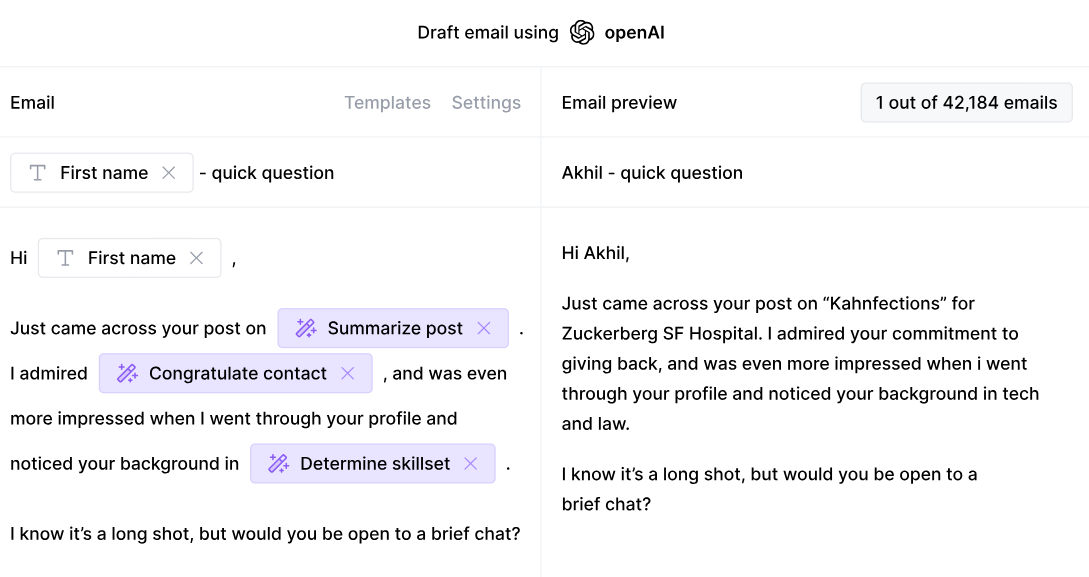
Clay is a top-rated sales automation with several AI features that allow you to automate work and improve efficiency.
In terms of email communication, Clay offers an AI email writer that allows you to effortlessly create hyper-personalized messages for each recipient on your list. The AI writer is powered by OpenAI (the company behind ChatGPT), and you use it just like ChatGPT. You provide the prompts, and the feature generates unique emails based on them.
The major difference between using ChatGPT as a standalone solution and Clay's AI email writer lies in data. Clay takes the data you've collected on your recipients to create unique emails right within the platform. You choose which data points to include in your emails, and the AI email writer can quickly generate hundreds of personalized emails based on your input. ✍️
Other AI-powered options you'll get with Clay
Besides the AI email writer, Clay offers other AI-based options for streamlining various sales-related processes.
One of them is the integration with OpenAI. With this integration, you can complete various ChatGPT-based actions without ever leaving the platform, such as generating text for your emails or creating images to include in your emails.
If you want to automate data scraping and enrichment with the help of AI, Claygent is the way to go. This AI-based research agent can scan every corner of the internet and retrieve the info you need within seconds. Its superpowers come in handy for:
Like ChatGPT, Claygent is operated by prompts, so you can easily tell it what info to focus on in its search. 🔍
Streamlined data enrichment
We've mentioned that the quality of data you use in your prompts dictates the output's efficiency. Clay ensures the data you base your emails on is fresh and accurate thanks to its integrations with over 50 data providers. You can tap into any integration within Clay, with no extra subscriptions or account setups. ✅
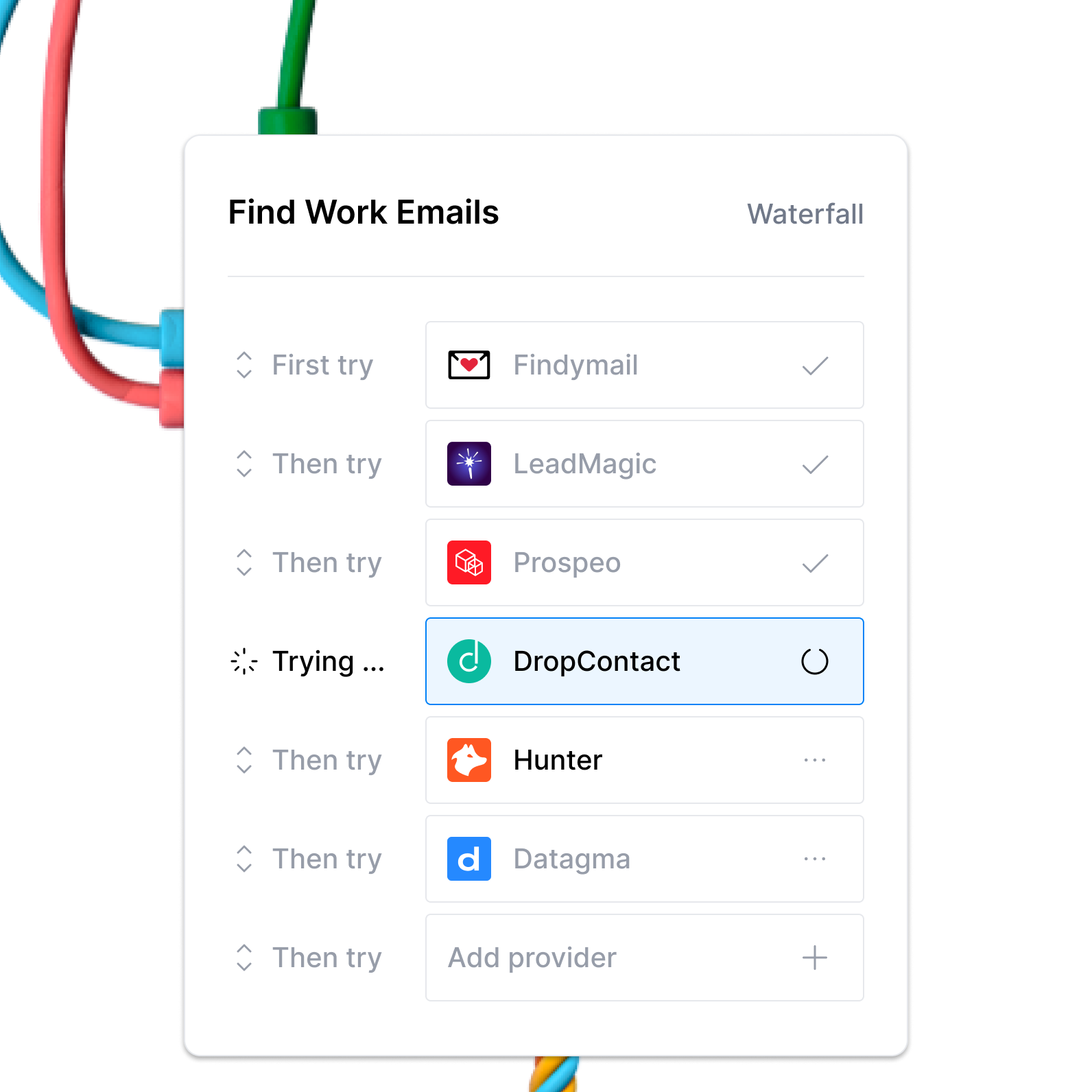
With the integrations, you'll easily find the desired info on your leads, from general details like email addresses to specifics like podcast appearances. If you'd like to automate the enrichment process, opt for waterfall enrichment. The feature taps into multiple databases one by one to find the info you need. The search stops the second there's a valid match, so you don't waste any time or money. 💪
Flexible & transparent pricing
Clay offers a free forever plan that lets you explore its core features without any costs. To unlock extra functionalities, choose one of the paid plans:
Clay plans are data credit-based. You use data credits to purchase data points and actions, optimizing costs. Each plan lets you choose from different data credit amounts to get the best value for your money. 💰
There's no cap on the number of users each plan supports, so you can grow your team without restrictions.
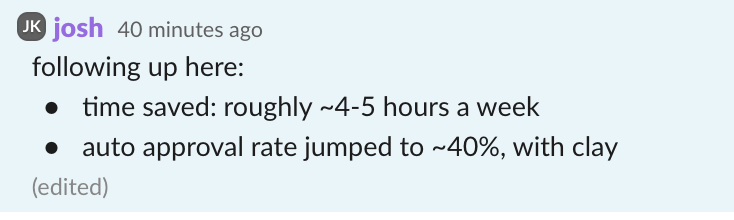
Clay has received excellent reviews so far, and thousands of people use it to streamline their entire sales campaigns. Here's what one user says about the benefits they've enjoyed since they started using Clay:
Frequently asked questions
What are the best ChatGPT prompts for sales emails?
The most effective ChatGPT email prompts assign the chatbot a role (such as "You're an experienced SDR"), specify a word count, provide context about your company and offer, and state a clear goal for the email. The post covers ready-to-use prompt templates for customer discovery, cold outreach, follow-ups, referral requests, email summarization, and feedback collection.
How do I make my ChatGPT email prompts more specific?
Include as much relevant detail as possible: your company name, the recipient's job title and challenges, the desired tone, and the email's primary purpose. The prompts in this guide use bracketed placeholders for exactly this reason. The more accurate the data you insert into those placeholders, the better the output.
Can ChatGPT write personalized emails at scale?
ChatGPT can generate personalized emails quickly, but doing it at scale requires accurate data for each recipient. Tools like Clay integrate directly with OpenAI so you can pull enriched contact data into your prompts and generate hundreds of unique emails without manually copying and pasting between platforms.
Does ChatGPT always produce email-ready output?
Not always. ChatGPT lacks emotional intelligence and can be tone-deaf in certain situations. Always review its output before sending, and adjust for context, tone, and accuracy. Human oversight is essential, not optional.
Set up your Clay account today
If you're ready to optimize every step of your sales campaigns, from data collection to outreach, all you need to do is create your Clay account. Here's how:
To discover more about Clay's fantastic options, visit Clay University, where you can see detailed feature walkthroughs and understand how to use each functionality efficiently.
You should also join the platform's Slack community and check out Claybooks to see how other users leverage Clay and get insider tips on building high-performing campaigns.
💡 Keep reading: Interested in learning more about applying AI in sales? Read our comprehensive guides below:
Crafting emails is an important task on every sales pro's to-do list. Whether you're introducing yourself to leads, notifying customers about a product launch, or following up on a conversation, your emails need to be engaging, informative, and personalized. 💌
Writing such emails can take time and effort, especially if you have a lot of potential and existing customers. To improve your efficiency without compromising on email quality, you can use ChatGPT. The AI chatbot can automate email creation, but only if you use the correct prompts.
Take it from us. We've used AI in sales campaigns to save at least four hours a day on emails that would otherwise require extensive research and writing. Now, we want to share the knowledge with other sales teams. In this guide, we'll offer the best ChatGPT email prompts, focusing on the most popular use cases in sales.
TL;DR
- ChatGPT email prompts can automate sales email writing across six key use cases: customer discovery, prospecting, follow-ups, referrals, email summarization, and feedback requests.
- Effective prompts include a role assignment, clear context about your company and offer, a word count target, and a specific goal for the email.
- The quality of data you feed into your prompts directly determines the quality of the output. Inaccurate placeholders produce emails that miss the mark.
- Clay's AI email writer integrates directly with OpenAI, letting you generate hundreds of personalized emails from enriched data without copying and pasting between tools.
Why you should use ChatGPT prompts for writing emails
Here are a few benefits of leveraging ChatGPT prompts for email writing in sales:
Best ChatGPT email prompts for every sales scenario
You can use ChatGPT email writing prompts for various scenarios and sales pipeline stages. We've compiled a list of examples covering:
ChatGPT email prompts for customer discovery
Customer discovery is an imperative presales process that contributes to the overall success of your sales campaigns.
During this phase, you collect information about potential customers to understand their needs and challenges. These insights can later help you qualify leads more precisely, assign points to prioritize specific accounts, and reach the correct lead with the right message.
ChatGPT can make customer discovery easier and generate emails that help you gather the exact info you need. Here are some prompts you can use for different scenarios:
"You're an SDR who wants to learn more about a lead via a phone call. Write an email that contains no more than 150 words and expresses interest in your lead's needs and challenges. Explain that you work for [your company], which specializes in [line of work], and offer some general info on [your product or service]. Finish the email by inviting them on a brief call."
"Write a customer discovery email that doesn't exceed 120 words. The goal of the email is to obtain more information about the recipient to use for lead qualification purposes. The email should invite the recipient to participate in a survey about [the survey's subject]. Explain that the survey is short and easy to fill out. Finish the email by thanking the recipient for their participation."
ChatGPT email prompts for sales prospecting
Sales prospecting is a key stage in your campaigns as this is where you introduce your offer for the very first time and try to engage your prospects. The more efficient the prospecting is, the more prospects you'll be able to add to your funnel and ultimately enhance conversions.
Since the stakes are high, writing sales prospecting emails is no joke. You have to be precise, hit the right note with the recipients, make the emails stand out, and clearly state your offer's unique value. ChatGPT can lend a helping hand here. Based on your prompts, it can write unique sales prospecting emails that will generate interest. 👌
Here are a few examples of sales prospecting prompts:
"Write a cold outreach email introducing myself [your name and job title] and explaining how [your product or service] can [a few notable benefits of your product or service]. Address the prospect's challenges, specifically [the recipient's challenge], and explain how exactly [your product or service] can help. Finish the email by asking the prospect to schedule a quick call to learn more."
"Write a 130-word cold outreach email that targets [the prospect's job title and line of work]. The email aims to highlight the unique value of [your product or service]. More specifically, focus on [your product's key characteristics] and explain how [the prospect] can benefit from it and stand out from their competition. Wrap up the email by inviting the recipient to schedule a call."
ChatGPT email prompts for following up with prospects
Email follow-ups are excellent for lead nurturing, and they allow you to provide additional value to your recipients. However, writing them can be tricky because you need to:
ChatGPT prompts can automate writing follow-up messages for leads. Here are two prompt examples you can copy and, if necessary, adjust to your circumstances:
"Generate a follow-up email to [recipient's name] as a response to my previous email focusing on [the first email's topic]. State that I'm aware that the recipient has a busy schedule, and briefly discuss the gist of the email, which was [a few details mentioned in the first email]. Restate [your product or service] benefits and invite the recipient to schedule a meeting. The email should be professional and contain no more than 150 words."
"Write a 130-word follow-up email to [recipient's name] with the main goal of providing additional value to the recipient and emphasizing my availability for potential questions. Start the email by referencing [your previous conversation, meeting, or phone call] and briefly summarize [main topics you've covered during those interactions]. Ask the recipient if they have questions, inform them about the steps that follow, and invite them to set up a meeting."
ChatGPT email prompts for asking for a referral
For many sales pros, asking for referrals is a great way to open doors to new opportunities. 🚪
However, the process can be unpleasant if you're not careful about your approach, timing, and language. You don't want to target new customers who don't know you yet or to sound too pushy and create unnecessary pressure that could bounce back and result in losing accounts.
ChatGPT can help you create clear and professional emails to ask your customers for referrals and avoid awkward situations.
Here's an example of one such prompt:
"Write an email to [the recipient's name] to ask for a referral. Express gratitude for the successful collaboration over the years and state [notable results the recipient has achieved thanks to your product or service]. Explain that I want to help others achieve similar results and ask if they know someone who might be interested. State that I'm looking for [type of business or person you're targeting and offer relevant details like job title or company size] and mention [benefits the recipient would get from the referral]."
ChatGPT prompts for summarizing long emails
Depending on the length of your lead lists and the size of your customer base, email communication can quickly become too time-consuming. You could be buried in emails, and ignoring them or replying to them days or weeks later could result in missed opportunities.
ChatGPT can streamline email communication by summarizing lengthy emails for you and capturing the main points. By reviewing ChatGPT's email summaries, you can easily prioritize particular email responses, follow-ups, or objections to better organize your work. 🧘
Here are two examples of prompts for summarizing emails:
"Create a short summary of the email I pasted below. Focus on the email's main points and key takeaways to help me understand the gist without reading it in its entirety." + paste the email below the prompt
"Write a summary of the email I pasted below. Focus on the email's main points, decisions, and action items. Advise on whether there are particular points I should prioritize and offer suggestions on how to reply to the email." + paste the email below the prompt
ChatGPT email prompts for asking for feedback
Asking customers for feedback helps you understand your strengths and weaknesses and improve your approach, enhancing customer satisfaction and retention in the long run. 📈
To get honest, objective, and relevant feedback from your customers, you need a well-put request, and this is exactly what ChatGPT can help you with. Here are two examples of prompts you can paste into ChatGPT to get emails that focus on asking customers for feedback:
"Write an email to [customer's name] to ask for feedback on their recent purchase. Thank the customer for their trust and ask about their opinion on [your product's quality, overall experience, customer service, or another aspect you're interested in]. State that their feedback is valuable for continuous improvement, and mention that I'm there for any questions or concerns."
"Create an email for [customer's name] to collect feedback on their [satisfaction with your company, recent purchase, or something else]. Express my gratitude for their business and ask them to fill out a short survey and rate [satisfaction with your product or service, your approach, or another aspect], stating that the primary purpose is improvement. Finish the email by restating I'm always available to answer their questions."
Expert tips for writing better ChatGPT email prompts
Prompt writing can be frustrating at first, especially if you don't have experience with ChatGPT and similar tools. In the beginning, you may have to refine your prompts more than a few times to get the desired output, which may take more time than planned. To minimize the need for adjusting and get the results you want from the get-go, follow these tips:
Offer details
ChatGPT can't read your mind. Its output depends on your input. If you have an idea of what the output should look like, provide the chatbot with detailed and clear instructions on how to achieve the results you want. Here's what you can do:
Oversee ChatGPT's output
While ChatGPT can be an incredible tool in the hands of a capable user, it's not perfect. The chatbot lacks emotional intelligence and can be tone-deaf in some situations. For this reason, human involvement is not only desirable but essential to ensure the chatbot's output makes sense and is context-appropriate. 📣
Don't just copy and paste its output and send emails to your potential and new customers without checking. Review its work regularly and make adjustments to ensure high quality.
Practice with your team
To adopt ChatGPT without difficulty and maximize its functionalities, give yourself time to explore the chatbot. You can prepare training materials with your fellow team members and practice prompt writing to ensure everyone's comfortable using the chatbot in daily work. 👌
Collect quality data
Most of the prompts we've shared have placeholders where you need to insert a recipient's job title, line of work, needs, challenges, or another data point. Having accurate and relevant data readily available to fill the placeholders is the key to making your prompts effective. 💯
This is because ChatGPT can't estimate whether a specific data point is accurate. The chatbot will use whatever you feed it. So, if you use inaccurate data in your ChatGPT prompts, you'll end up with emails that miss the mark, which won't leave a positive impression on your new and existing customers.
To ensure you have quality data to integrate into your email prompts, use a sales tool with robust enrichment options. This way, you'll be able to collect the desired information from various sources within seconds.
If you'd like to maximize convenience and eliminate copying and pasting data from your sales tool to ChatGPT for each email you want to generate, find a tool that fully integrates with the chatbot. One such tool is Clay, a sales automation platform that offers everything you need to generate personalized emails based on high-quality data.
Streamline email communication with Clay
Clay is a top-rated sales automation with several AI features that allow you to automate work and improve efficiency.
In terms of email communication, Clay offers an AI email writer that allows you to effortlessly create hyper-personalized messages for each recipient on your list. The AI writer is powered by OpenAI (the company behind ChatGPT), and you use it just like ChatGPT. You provide the prompts, and the feature generates unique emails based on them.
The major difference between using ChatGPT as a standalone solution and Clay's AI email writer lies in data. Clay takes the data you've collected on your recipients to create unique emails right within the platform. You choose which data points to include in your emails, and the AI email writer can quickly generate hundreds of personalized emails based on your input. ✍️
Other AI-powered options you'll get with Clay
Besides the AI email writer, Clay offers other AI-based options for streamlining various sales-related processes.
One of them is the integration with OpenAI. With this integration, you can complete various ChatGPT-based actions without ever leaving the platform, such as generating text for your emails or creating images to include in your emails.
If you want to automate data scraping and enrichment with the help of AI, Claygent is the way to go. This AI-based research agent can scan every corner of the internet and retrieve the info you need within seconds. Its superpowers come in handy for:
Like ChatGPT, Claygent is operated by prompts, so you can easily tell it what info to focus on in its search. 🔍
Streamlined data enrichment
We've mentioned that the quality of data you use in your prompts dictates the output's efficiency. Clay ensures the data you base your emails on is fresh and accurate thanks to its integrations with over 50 data providers. You can tap into any integration within Clay, with no extra subscriptions or account setups. ✅
With the integrations, you'll easily find the desired info on your leads, from general details like email addresses to specifics like podcast appearances. If you'd like to automate the enrichment process, opt for waterfall enrichment. The feature taps into multiple databases one by one to find the info you need. The search stops the second there's a valid match, so you don't waste any time or money. 💪
Flexible & transparent pricing
Clay offers a free forever plan that lets you explore its core features without any costs. To unlock extra functionalities, choose one of the paid plans:
Clay plans are data credit-based. You use data credits to purchase data points and actions, optimizing costs. Each plan lets you choose from different data credit amounts to get the best value for your money. 💰
There's no cap on the number of users each plan supports, so you can grow your team without restrictions.
Clay has received excellent reviews so far, and thousands of people use it to streamline their entire sales campaigns. Here's what one user says about the benefits they've enjoyed since they started using Clay:
Frequently asked questions
What are the best ChatGPT prompts for sales emails?
The most effective ChatGPT email prompts assign the chatbot a role (such as "You're an experienced SDR"), specify a word count, provide context about your company and offer, and state a clear goal for the email. The post covers ready-to-use prompt templates for customer discovery, cold outreach, follow-ups, referral requests, email summarization, and feedback collection.
How do I make my ChatGPT email prompts more specific?
Include as much relevant detail as possible: your company name, the recipient's job title and challenges, the desired tone, and the email's primary purpose. The prompts in this guide use bracketed placeholders for exactly this reason. The more accurate the data you insert into those placeholders, the better the output.
Can ChatGPT write personalized emails at scale?
ChatGPT can generate personalized emails quickly, but doing it at scale requires accurate data for each recipient. Tools like Clay integrate directly with OpenAI so you can pull enriched contact data into your prompts and generate hundreds of unique emails without manually copying and pasting between platforms.
Does ChatGPT always produce email-ready output?
Not always. ChatGPT lacks emotional intelligence and can be tone-deaf in certain situations. Always review its output before sending, and adjust for context, tone, and accuracy. Human oversight is essential, not optional.
Set up your Clay account today
If you're ready to optimize every step of your sales campaigns, from data collection to outreach, all you need to do is create your Clay account. Here's how:
To discover more about Clay's fantastic options, visit Clay University, where you can see detailed feature walkthroughs and understand how to use each functionality efficiently.
You should also join the platform's Slack community and check out Claybooks to see how other users leverage Clay and get insider tips on building high-performing campaigns.
💡 Keep reading: Interested in learning more about applying AI in sales? Read our comprehensive guides below:
More Articles
Claygent Builder: The easiest way to build, test, and deploy GTM Agents

How Clay Uses Clay Ads: From $250 to $25 CPL

HG Insights Corporate Hierarchy: GTM Precision in Clay

Sales GTM Engineering: How Clay Built the Role From Scratch

How to Automate Inbound Lead Outreach: The Clay Playbook
demandDrive Joins Clay’s Partner Ecosystem as an Official Clay Studio Partner

B2B Sales Prospecting: 15 Strategies to Drive More Conversions

AI Sales Assistants: 11 Ways to Accelerate Your Outbound

The Three Laws of GTM: How to Win in the AI Era

Best Work Email Finders by Segment: SMB vs. Enterprise

How Clay Converts Trial Users Into Customers With Automated Outreach

Best Mobile Phone Data Providers for B2B Sales Teams

How to Build a Complete AI Outbound Sales Funnel

How to Get More Customers Using Outbound Sales: A Complete Guide

How to Automate 6 Cold Email Campaigns in One Clay Workflow
How Clay Identifies Tier 1 Accounts: A Three-Score System

Lead Scoring in Clay: A Step-by-Step Formula Guide

How to Validate Cold Outbound Offers and Find Message-Market Fit

Troubleshooting Outbound Sales and Prospecting: A Comprehensive Guide
Bulk Enrichment: Enrich Millions of CRM Records in Clay

Clay Templates: Automate, Customize, and Replicate Any GTM Workflow

How to Optimize Your Credit Usage in Clay

AI for sales prospecting

The Reverse Demo: How Clay Replaced Traditional B2B Sales Demos

Data Waterfalls: How to Maximize Contact Coverage with Clay
How Clay Runs ABM Campaigns: A Step-by-Step Playbook

How We Built Clay's GTM Engineering Function

Best Personal Email Finder Tools: Tested and Ranked

How to Use OpenAI to Write Cold Emails from Scratch with Clay

How to Run a Personalized Demo Play at Scale with Clay

Automated Slide Deck Creation: How Clay Builds QBRs from Your Data

HG Insights + Clay: B2B Technographic and Firmographic Data

B2B Cold Email Deliverability: 21 Best Practices

Basics of Google Search Operators: A Practical Guide

AI Lead Generation: The Complete B2B Guide
Clay MCP: Ops-built workflows, consumable by reps
How to Manage and Enrich Inbound Leads Automatically

GTM Alpha: How Winning Teams Build a Competitive Edge

Why Good CRM Data Matters and How Clay Helps

How to Use Formulas in Clay: AI Generator and Manual Entry

GTM Engineering: What It Is, How It Works, and How to Hire

Formulas in Clay: A Beginner's Intro for Non-Engineers

How Clay Uses Clay for SEO and AEO: 3 Systems That Scale

Turn Web Visitors into Leads: A Warm Outbound Play for B2B Sales

How to Use Web Scraping to Enrich Your Data with Clay

How to Create a Sales Prospect List in Minutes

Best B2B Email List Providers: Tested and Ranked (2026)

Outbound Sales Automation: How to 10x Pipeline Without More SDRs

The Wake the Dead Play: Reactivate Closed-Lost Deals with Clay

Three Tips to Guarantee Email Deliverability for Cold Outbound
How Clay Uses Clay for Customer Support: 3 Real Workflows

B2B Cold Email Copywriting: The Complete Guide

Introducing Clay Functions
Clay and Apollo Integration: Enrichment, Sequencing, and More

The Many Lives of Spreadsheets: A History and What Comes Next

AI recruiting strategies
How to Hire a GTM Engineer: The Complete Guide

Inside Clay's GTM Engineering Lab: Plays, Principles, and Automation

How to Build the Most Targeted Account Lists Possible

Personalized Direct Mail at Scale: The Gifting Play with Clay

How to Set Up Your Full Inbound Sales Process on Clay

AI-Enabled GTM for Private Equity: The Value Creation Playbook

Do More With Your Data: Clay's Post-Data-Provider Approach

Google Maps Lead Generation for Niche Local Businesses

24 AI Email Personalization Examples for Cold Outreach (With Prompts)

How to Ace Your Follow-Ups: A Practical Sales Guide

How to Prioritize Your Waitlist with Lead Enrichment

B2B Cold Email Templates: Frameworks That Get Replies

Audiences: now in Enterprise beta
The thinking behind our new pricing: our internal memo
Introducing Clay’s new pricing
Clay partners with Lusha and Beauhurst to expand European data coverage
Source your precise TAM from lookalikes you can trust with Ocean.io and Clay
Clay doubles down on supporting European GTM teams
In Nigeria, she built a life where money wouldn’t decide
Sculptor Analyst Mode: Turning Context-Rich Data Into Actionable GTM Insights

In a place where girls often choose between career or marriage, she carved her own path

How we designed Sculpt
Clay announces second employee tender offer in nine months at a $5B valuation
Clay is now available as a connector in Claude
Sellers have a new AI edge: Clay in ChatGPT

Clay reaches $100M ARR

Clay Certifications: Turning mastery into credentials that matter
Mobile Phone Verification Methodology
Work Email Verification Methodology
Stop Guessing, Start Analyzing: How Sculptor Turns Your GTM Data Into Your Competitive Advantage
Find and outreach local businesses with Openmart and Clay Sequencer

Announcing Web Intent
How Clay Uses Clay: Conversational Data

Sculpting GTM’s future with six major launches

Introducing Claygent Navigator

Announcing the Clay Partner Program

Introducing GPT-5 in Claygent: sharper research, stronger formulas, better outbound
Clay Series C announcement. The GTM engineering era begins now

Claygent surpasses 1 billion runs

Announcing Sculpt: Clay’s first annual user conference
Announcing custom signals at Clay

Clay announces employee tender offer led by Sequoia at $1.5B valuation

Create personalized presentations at scale with Clay and Google Slides