Instant Data Scraper: Honest Review 2026 - The GTM with Clay Blog
Instant Data Scraper — бесплатное расширение для Chrome, использующее эвристический ИИ для извлечения данных с любых сайтов без написания кода. Среди ключевых функций — автоматическая пагинация, настройка скорости обхода, предпросмотр данных, кастомизация колонок и экспорт в CSV/XLSX. Однако пользователи отмечают нестабильность результатов и ограниченность функционала только скрейпингом — для обогащения лидов, outbound-рассылок и синхронизации с CRM нужны дополнительные инструменты. В качестве альтернативы статья продвигает платформу Clay, которая объединяет Chrome-расширение, AI-скрейпер Claygent, каскадное обогащение данных через 150+ провайдеров и автоматизацию outbound в одном продукте. Clay достигла $100M ARR и оценки в $5 млрд.
Claygent Builder: The easiest way to build, test, and deploy GTM Agents
Claygent Builder: самый простой способ создавать, тестировать и развёртывать GTM-агентов
Build production-ready Claygents in natural language with Sculptor. Test on real data for free, track versions, and deploy once across every workflow. All inside Clay.
Создавайте готовых к продакшену Claygent-агентов на естественном языке с помощью Sculptor. Бесплатно тестируйте на реальных данных, отслеживайте версии и разворачивайте сразу во всех рабочих процессах. Всё внутри Clay.
How Clay Uses Clay Ads: From $250 to $25 CPL
Как Clay использует Clay Ads: с $250 до $25 за лид
See how Clay uses its own Ads feature to cut LinkedIn CPL from $250 to $25 and unlock Meta with enriched CRM audiences. No manual uploads needed.
Узнайте, как Clay использует собственную рекламную функцию, чтобы снизить CPL в LinkedIn с $250 до $25 и запустить Meta с обогащёнными CRM-аудиториями. Без ручной загрузки данных.
HG Insights Corporate Hierarchy: GTM Precision in Clay
HG Insights Corporate Hierarchy: точность GTM в Clay
Use HG Insights corporate hierarchy data in Clay to clean CRMs, map parent-child accounts, and trigger expansion plays. See how it works.
Используйте данные корпоративной иерархии HG Insights в Clay для очистки CRM, построения связей между материнскими и дочерними аккаунтами и запуска стратегий расширения. Узнайте, как это работает.
Sales GTM Engineering: How Clay Built the Role From Scratch
Sales GTM Engineering: как Clay создала эту роль с нуля
Learn what sales GTM engineering is, how it collapses SDR, AE, and SE roles into one, and how Clay built and hires for this high-leverage function. See how it works.
Узнайте, что такое sales GTM engineering, как эта роль объединяет функции SDR, AE и SE, и как Clay создавала и нанимает на эту высокоэффективную позицию. Узнайте, как это работает.
How to Automate Inbound Lead Outreach: The Clay Playbook
Как автоматизировать outbound-коммуникацию с входящими лидами: плейбук Clay
Learn how to automate inbound lead outreach with enrichment, scoring, and personalized sequences. See the exact Clay workflow that runs without manual work.
Узнайте, как автоматизировать outbound-коммуникацию с входящими лидами с помощью обогащения, скоринга и персонализированных цепочек. Посмотрите точный рабочий процесс Clay, который работает без ручного труда.
demandDrive Joins Clay’s Partner Ecosystem as an Official Clay Studio Partner
demandDrive присоединяется к партнёрской экосистеме Clay как официальный партнёр Clay Studio
demandDrive joins Clay’s partner ecosystem to help B2B teams turn account intelligence into pipeline and revenue with GTM engineering and automation.
demandDrive присоединяется к партнёрской экосистеме Clay, чтобы помогать B2B-командам превращать аналитику по аккаунтам в пайплайн и выручку с помощью GTM-инженерии и автоматизации.
B2B Sales Prospecting: 15 Strategies to Drive More Conversions
B2B-проспектинг в продажах: 15 стратегий для увеличения конверсий
Master B2B sales prospecting with 15 proven strategies covering ICP building, multi-channel outreach, and list hygiene. Build a pipeline that converts.
Освойте B2B-проспектинг с 15 проверенными стратегиями, охватывающими построение ICP, многоканальный outreach и гигиену списков. Постройте пайплайн, который конвертирует.
AI Sales Assistants: 11 Ways to Accelerate Your Outbound
ИИ-ассистенты для продаж: 11 способов ускорить outbound
Discover 11 ways AI sales assistants automate lead research, enrichment, and email personalization. See how top B2B teams use them to accelerate outbound.
Откройте для себя 11 способов, которыми ИИ-ассистенты для продаж автоматизируют исследование лидов, обогащение данных и персонализацию писем. Узнайте, как лучшие B2B-команды используют их для ускорения outbound.
The Three Laws of GTM: How to Win in the AI Era
Три закона GTM: как побеждать в эпоху ИИ
The three laws of GTM explain why uniqueness, saturation, and iteration speed determine who wins. Learn how AI changes the rules and what to do about it.
Три закона GTM объясняют, почему уникальность, насыщение и скорость итераций определяют победителя. Узнайте, как ИИ меняет правила и что с этим делать.
Best Work Email Finders by Segment: SMB vs. Enterprise
Лучшие сервисы поиска рабочих email по сегментам: SMB vs. Enterprise
We tested 12 email finders across 4,700+ contacts to find the best work emails by segment. See accuracy, cost, and coverage winners for SMB and enterprise.
Мы протестировали 12 сервисов поиска email на 4 700+ контактах, чтобы найти лучшие рабочие адреса по сегментам. Смотрите результаты по точности, стоимости и покрытию для SMB и enterprise.
How Clay Converts Trial Users Into Customers With Automated Outreach
Как Clay конвертирует пробных пользователей в клиентов с помощью автоматизированного outreach
See how Clay uses automated outreach to convert trial users into customers, with enrichment, lead scoring, and personalized HubSpot campaigns. Learn how.
Узнайте, как Clay использует автоматизированный outreach для конверсии пробных пользователей в клиентов с обогащением, скорингом лидов и персонализированными кампаниями в HubSpot.
Best Mobile Phone Data Providers for B2B Sales Teams
Лучшие провайдеры данных мобильных номеров для B2B-команд продаж
We tested 9,806 numbers across 10 B2B mobile phone data providers. See which wins on accuracy, coverage, and cost for NAMER, EMEA, and APAC.
Мы протестировали 9 806 номеров у 10 B2B-провайдеров мобильных данных. Узнайте, кто лидирует по точности, покрытию и стоимости для NAMER, EMEA и APAC.
How to Build a Complete AI Outbound Sales Funnel
Как построить полную воронку outbound-продаж на ИИ
Learn how to build a complete AI outbound sales funnel—from account scoring to personalized outreach—using Clay waterfalls and automation. See how it works.
Узнайте, как построить полную воронку outbound-продаж на ИИ — от скоринга аккаунтов до персонализированного outreach — с помощью каскадного обогащения и автоматизации Clay. Узнайте, как это работает.
How to Get More Customers Using Outbound Sales: A Complete Guide
Как привлечь больше клиентов с помощью outbound-продаж: полное руководство
Learn how outbound sales works, who it's right for, and how to build a strategy from prospecting to closing. Covers cold calling, email, and more.
Узнайте, как работают outbound-продажи, кому они подходят и как выстроить стратегию от проспектинга до закрытия сделки. Охватывает холодные звонки, email и многое другое.
How to Automate 6 Cold Email Campaigns in One Clay Workflow
Как автоматизировать 6 кампаний холодных писем в одном рабочем процессе Clay
Learn how to automate 6 cold email campaigns from a single Clay table — with enrichment, AI classification, and deduplication built in. See how it works.
Узнайте, как автоматизировать 6 кампаний холодных писем из одной таблицы Clay — с обогащением, ИИ-классификацией и дедупликацией. Узнайте, как это работает.
How Clay Identifies Tier 1 Accounts: A Three-Score System
Как Clay определяет аккаунты Tier 1: система трёх оценок
See how Clay identifies tier 1 accounts using a three-score system: fit, engagement, and contract value. Learn how sales and marketing align on the same priorities.
Узнайте, как Clay определяет аккаунты Tier 1 с помощью системы трёх оценок: соответствие, вовлечённость и ценность контракта. Узнайте, как продажи и маркетинг выстраивают единые приоритеты.
Lead Scoring in Clay: A Step-by-Step Formula Guide
Скоринг лидов в Clay: пошаговое руководство по формулам
Learn how to build lead scoring formulas in Clay to prioritize your ICP leads by employee count, job postings, and more. See how it works.
Узнайте, как создавать формулы скоринга лидов в Clay для приоритизации лидов по ICP — по численности сотрудников, вакансиям и другим параметрам. Узнайте, как это работает.
How to Validate Cold Outbound Offers and Find Message-Market Fit
Как валидировать офферы холодного outbound и найти message-market fit
Learn how to validate cold outbound offers by finding message-market fit — from breaking down your value prop to testing with a phased email approach. See how it works.
Узнайте, как валидировать офферы холодного outbound, находя message-market fit — от декомпозиции ценностного предложения до тестирования поэтапным email-подходом. Узнайте, как это работает.
Troubleshooting Outbound Sales and Prospecting: A Comprehensive Guide
Устранение проблем в outbound-продажах и проспектинге: исчерпывающее руководство
Fix broken outbound sales campaigns with this guide. Diagnose open and reply rates, reduce no-shows, qualify prospects with MEDDIC, and optimize what's working.
Исправьте неработающие outbound-кампании с помощью этого руководства. Диагностируйте показатели открытий и ответов, сократите неявки, квалифицируйте лидов по MEDDIC и оптимизируйте рабочие процессы.
Bulk Enrichment: Enrich Millions of CRM Records in Clay
Массовое обогащение: обогатите миллионы записей CRM в Clay
Bulk enrichment lets Enterprise teams enrich millions of Salesforce records with firmographics, tech stack, and AI research — then write results back automatically.
Массовое обогащение позволяет Enterprise-командам обогатить миллионы записей Salesforce фирмографическими данными, технологическим стеком и ИИ-исследованиями — а затем автоматически записать результаты обратно.
Clay Templates: Automate, Customize, and Replicate Any GTM Workflow
Шаблоны Clay: автоматизируйте, настраивайте и тиражируйте любой GTM-процесс
Clay Templates let you replicate full GTM workflows in hours, not days. Automate prospecting from data scraping to AI messaging, free and fully customizable.
Шаблоны Clay позволяют тиражировать полные GTM-процессы за часы, а не дни. Автоматизируйте проспектинг от парсинга данных до ИИ-сообщений — бесплатно и с полной настройкой.
How to Optimize Your Credit Usage in Clay
Как оптимизировать расход кредитов в Clay
Learn how to optimize your credit usage in Clay with conditional formulas, Clearbit waterfall lookups, and smarter enrichment workflows. Save credits fast.
Узнайте, как оптимизировать расход кредитов в Clay с помощью условных формул, каскадных запросов Clearbit и более умных процессов обогащения. Экономьте кредиты быстро.
AI for sales prospecting
ИИ для проспектинга в продажах
Learn about how to use AI for sales prospecting in this comprehensive guide, including framework for creating AI prompts and examples of cold email templates using AI that real sales teams have used successfully to land clients. AI sales prospecting can save your team thousands of hours—and double or triple your positive response rates.
Узнайте, как использовать ИИ для проспектинга в продажах, из этого исчерпывающего руководства, включающего фреймворк для создания ИИ-промптов и примеры шаблонов холодных писем с ИИ, которые реальные команды продаж успешно использовали для привлечения клиентов. ИИ-проспектинг может сэкономить вашей команде тысячи часов — и удвоить или утроить долю положительных ответов.
The Reverse Demo: How Clay Replaced Traditional B2B Sales Demos
Обратное демо: как Clay заменила традиционные B2B-демонстрации продаж
A reverse demo lets prospects solve real problems live, guided by your rep. Learn how Clay used 100+ sessions to boost conversion, retention, and product quality.
Обратное демо позволяет потенциальным клиентам решать реальные задачи в реальном времени под руководством вашего менеджера. Узнайте, как Clay провела 100+ сессий, повысив конверсию, удержание и качество продукта.
Data Waterfalls: How to Maximize Contact Coverage with Clay
Каскадное обогащение данных: как максимизировать покрытие контактов с Clay
Data waterfalls query multiple providers in sequence so you only pay for matches. See how Clay pushes coverage from 30% to 80%+ without annual contracts.
Каскадное обогащение последовательно опрашивает нескольких провайдеров, и вы платите только за найденные совпадения. Узнайте, как Clay увеличивает покрытие с 30% до 80%+ без годовых контрактов.
How Clay Runs ABM Campaigns: A Step-by-Step Playbook
Как Clay проводит ABM-кампании: пошаговый плейбук
See how Clay runs ABM campaigns — scoring 300 accounts, personalizing mailers and landing pages, and automating SDR follow-up. Learn how.
Узнайте, как Clay проводит ABM-кампании — скоринг 300 аккаунтов, персонализация рассылок и лендингов, автоматизация follow-up SDR.
How We Built Clay's GTM Engineering Function
Как мы построили функцию GTM-инженерии в Clay
See how Clay built its GTM engineering function with sprint-based delivery, founder-level reporting, and full sales automation. A practical inside look.
Узнайте, как Clay создала функцию GTM-инженерии со спринтовой моделью, отчётностью на уровне основателей и полной автоматизацией продаж. Практический взгляд изнутри.
Best Personal Email Finder Tools: Tested and Ranked
Лучшие инструменты поиска личных email: протестировано и ранжировано
We tested 5 personal email finder tools across 2,354 prospects. See accuracy, coverage, and pricing data — plus the waterfall order that hit 79% coverage.
Мы протестировали 5 инструментов поиска личных email на 2 354 проспектах. Смотрите данные по точности, покрытию и ценам — а также порядок каскада, достигший 79% покрытия.
How to Use OpenAI to Write Cold Emails from Scratch with Clay
Как использовать OpenAI для написания холодных писем с нуля в Clay
Learn how to use OpenAI to write personalized cold emails at scale with Clay. Set up the integration, craft better prompts, and boost deliverability.
Узнайте, как использовать OpenAI для написания персонализированных холодных писем в масштабе с Clay. Настройте интеграцию, улучшите промпты и повысьте доставляемость.
How to Run a Personalized Demo Play at Scale with Clay
Как запустить персонализированное демо в масштабе с Clay
Learn how to automate a personalized demo play using Clay, Claygent, and AI enrichment to build custom mockups at scale. See how it works.
Узнайте, как автоматизировать персонализированное демо с помощью Clay, Claygent и ИИ-обогащения для создания кастомных макетов в масштабе. Узнайте, как это работает.
Automated Slide Deck Creation: How Clay Builds QBRs from Your Data
Автоматическое создание слайд-презентаций: как Clay собирает QBR из ваших данных
Clay's automated slide deck creation pulls from Snowflake, Salesforce, and Gong to build QBRs in minutes. Save 90+ hours per quarter. See how it works.
Автоматическое создание презентаций в Clay использует данные из Snowflake, Salesforce и Gong для сборки QBR за минуты. Экономьте 90+ часов в квартал. Узнайте, как это работает.
HG Insights + Clay: B2B Technographic and Firmographic Data
HG Insights + Clay: технографические и фирмографические данные для B2B
HG Insights surfaces deep technographic and firmographic data from billions of documents. Use it in Clay workflows to enrich accounts and power GTM. See how it works.
HG Insights извлекает глубокие технографические и фирмографические данные из миллиардов документов. Используйте их в рабочих процессах Clay для обогащения аккаунтов и усиления GTM. Узнайте, как это работает.
B2B Cold Email Deliverability: 21 Best Practices
Доставляемость холодных B2B-писем: 21 лучшая практика
Master B2B cold email deliverability with 21 proven best practices: domain setup, inbox warmup, authentication, and copy tips that keep you out of spam. Learn how.
Освойте доставляемость холодных B2B-писем с 21 проверенной практикой: настройка домена, прогрев ящика, аутентификация и советы по текстам, которые уберегут от спама.
Basics of Google Search Operators: A Practical Guide
Основы операторов поиска Google: практическое руководство
Learn the basics of Google Search Operators and how to use them in Clay for prospecting, list building, and company research. See how it works.
Изучите основы операторов поиска Google и узнайте, как использовать их в Clay для проспектинга, построения списков и исследования компаний. Узнайте, как это работает.
AI Lead Generation: The Complete B2B Guide
ИИ-генерация лидов: полное руководство для B2B
Learn how AI lead generation automates list building, enrichment, and personalized outreach for B2B teams. Scale your pipeline without scaling headcount. See how it works.
Узнайте, как ИИ-генерация лидов автоматизирует построение списков, обогащение и персонализированный outreach для B2B-команд. Масштабируйте пайплайн без увеличения штата. Узнайте, как это работает.
Clay MCP: Ops-built workflows, consumable by reps
Clay MCP: процессы, созданные операционными командами, доступные менеджерам
Clay MCP: Ops-built workflows, consumable by reps
Clay MCP: процессы, созданные операционными командами, доступные менеджерам
How to Manage and Enrich Inbound Leads Automatically
Как автоматически управлять и обогащать входящие лиды
Learn how to manage and enrich inbound leads automatically using a four-phase workflow that scores, segments, and triggers outreach from one email. See how it works.
Узнайте, как автоматически управлять входящими лидами и обогащать их с помощью четырёхфазного рабочего процесса, который оценивает, сегментирует и запускает outreach из одного письма. Узнайте, как это работает.
GTM Alpha: How Winning Teams Build a Competitive Edge
GTM Alpha: как лучшие команды создают конкурентное преимущество
GTM alpha is the edge winning teams build with unique data and signal-based plays. Learn how to find hidden signals, run better plays, and outpace competitors.
GTM alpha — это преимущество, которое лучшие команды создают с помощью уникальных данных и сигнальных сценариев. Узнайте, как находить скрытые сигналы, запускать лучшие сценарии и опережать конкурентов.
Why Good CRM Data Matters and How Clay Helps
Почему качественные данные в CRM важны и как Clay помогает
Poor CRM data kills outreach. Learn why CRM data coverage fails and how Clay's waterfall enrichment lifts coverage rates from 20% to 80%. See how it works.
Плохие данные в CRM убивают outreach. Узнайте, почему покрытие данных в CRM падает и как каскадное обогащение Clay поднимает его с 20% до 80%. Узнайте, как это работает.
How to Use Formulas in Clay: AI Generator and Manual Entry
Как использовать формулы в Clay: ИИ-генератор и ручной ввод
Learn how to use formulas in Clay with the AI Formula Generator or manual entry. Transform and clean your data faster. See how it works.
Узнайте, как использовать формулы в Clay с помощью ИИ-генератора формул или ручного ввода. Трансформируйте и очищайте данные быстрее. Узнайте, как это работает.
GTM Engineering: What It Is, How It Works, and How to Hire
GTM-инженерия: что это, как работает и как нанимать
GTM engineering turns ops teams into revenue builders using AI and automation. Learn what GTM engineers do, how to structure the role, and how to hire one.
GTM-инженерия превращает операционные команды в генераторов выручки с помощью ИИ и автоматизации. Узнайте, чем занимаются GTM-инженеры, как структурировать роль и как нанять специалиста.
Formulas in Clay: A Beginner's Intro for Non-Engineers
Формулы в Clay: введение для нетехнических специалистов
Learn how to use formulas in Clay without coding. This intro covers conditional statements, combining columns, and auto-qualifying leads. Start in 30 minutes.
Узнайте, как использовать формулы в Clay без программирования. Это введение охватывает условные конструкции, объединение колонок и автоматическую квалификацию лидов. Начните за 30 минут.
How Clay Uses Clay for SEO and AEO: 3 Systems That Scale
Как Clay использует Clay для SEO и AEO: 3 масштабируемые системы
See how Clay uses Clay for SEO and AEO: automated content refresh, video-to-page conversion, and a custom AI visibility dashboard. Learn how.
Узнайте, как Clay использует Clay для SEO и AEO: автоматическое обновление контента, конвертация видео в страницы и кастомный дашборд видимости ИИ.
Turn Web Visitors into Leads: A Warm Outbound Play for B2B Sales
Превратите посетителей сайта в лидов: стратегия тёплого outbound для B2B-продаж
Learn how to turn web visitors into leads using a warm outbound play for B2B sales — with RB2B, Clay, and Lemlist. See how it works.
Узнайте, как превращать посетителей сайта в лидов с помощью стратегии тёплого outbound для B2B-продаж — с RB2B, Clay и Lemlist. Узнайте, как это работает.
How to Use Web Scraping to Enrich Your Data with Clay
Как использовать веб-скрейпинг для обогащения данных с Clay
Learn how to use web scraping to enrich your data without code. Clay's Claygent answers deep GTM research questions at scale. See how it works.
Узнайте, как использовать веб-скрейпинг для обогащения данных без кода. Claygent от Clay отвечает на сложные вопросы GTM-исследований в масштабе. Узнайте, как это работает.
How to Create a Sales Prospect List in Minutes
Как создать список проспектов для продаж за считанные минуты
Learn how to create your own sales prospect list in minutes using Clay. Pull from 40+ sources, enrich with ICP data, and export to your CRM. See how it works.
Узнайте, как создать собственный список проспектов за считанные минуты с помощью Clay. Извлекайте данные из 40+ источников, обогащайте по ICP и экспортируйте в CRM. Узнайте, как это работает.
Best B2B Email List Providers: Tested and Ranked (2026)
Лучшие провайдеры B2B-списков email: протестировано и ранжировано (2026)
We tested 8 B2B email list providers head-to-head. See accuracy results, per-email pricing, and how to waterfall providers for maximum coverage.
Мы протестировали 8 провайдеров B2B-списков email в прямом сравнении. Смотрите результаты по точности, стоимость за email и как каскадировать провайдеров для максимального покрытия.
Outbound Sales Automation: How to 10x Pipeline Without More SDRs
Автоматизация outbound-продаж: как увеличить пайплайн в 10 раз без дополнительных SDR
Learn how outbound sales automation replaces manual SDR work, cuts cost per email by 100x, and scales pipeline without growing headcount. See how it works.
Узнайте, как автоматизация outbound-продаж заменяет ручную работу SDR, снижает стоимость email в 100 раз и масштабирует пайплайн без увеличения штата. Узнайте, как это работает.
The Wake the Dead Play: Reactivate Closed-Lost Deals with Clay
Стратегия «Воскреси мертвецов»: реактивация проигранных сделок с Clay
The wake the dead play uses Clay + ChatGPT to send automated, personalized emails to closed-lost prospects. Restart stalled deals in a few steps. Learn how.
Стратегия «Воскреси мертвецов» использует Clay + ChatGPT для автоматической отправки персонализированных писем проспектам с закрытыми сделками. Перезапустите застопорившиеся сделки за несколько шагов.
Three Tips to Guarantee Email Deliverability for Cold Outbound
Три совета для гарантии доставляемости email в холодном outbound
Split volume, verify contacts, and personalize copy to guarantee email deliverability for cold outbound. Three actionable tips that keep you out of spam.
Разделяйте объёмы, верифицируйте контакты и персонализируйте тексты, чтобы гарантировать доставляемость email в холодном outbound. Три практических совета, которые уберегут от спама.
How Clay Uses Clay for Customer Support: 3 Real Workflows
Как Clay использует Clay для клиентской поддержки: 3 реальных рабочих процесса
See how Clay's customer support team uses Clay to enrich Intercom tickets, automate QA, and draft help articles. Real workflows, real results.
Узнайте, как команда клиентской поддержки Clay использует Clay для обогащения тикетов Intercom, автоматизации QA и создания черновиков справочных статей. Реальные процессы, реальные результаты.
B2B Cold Email Copywriting: The Complete Guide
Копирайтинг холодных B2B-писем: полное руководство
Master B2B cold email copywriting with proven templates, a research framework, and a checklist used to send 800k+ emails a month. Start writing emails that get replies.
Освойте копирайтинг холодных B2B-писем с проверенными шаблонами, фреймворком исследования и чек-листом, который используется для отправки 800 000+ писем в месяц. Начните писать письма, на которые отвечают.
Introducing Clay Functions
Представляем Clay Functions
Build Your GTM Logic Once, Apply It Everywhere
Создайте свою GTM-логику один раз — применяйте везде
Clay and Apollo Integration: Enrichment, Sequencing, and More
Интеграция Clay и Apollo: обогащение, секвенсинг и другое
The Clay and Apollo integration unlocks 5X faster enrichment and direct sequencer API access. See how joint customers go from data to booked meetings.
Интеграция Clay и Apollo обеспечивает 5-кратное ускорение обогащения и прямой доступ к API секвенсера. Узнайте, как совместные клиенты переходят от данных к назначенным встречам.
The Many Lives of Spreadsheets: A History and What Comes Next
Множество жизней электронных таблиц: история и что будет дальше
Explore the many lives of spreadsheets — from VisiCalc in 1979 to self-filling automation tools today. See how the no-code vision keeps evolving.
Исследуйте историю электронных таблиц — от VisiCalc в 1979 году до современных инструментов автоматического заполнения. Узнайте, как идея no-code продолжает эволюционировать.
AI recruiting strategies
Стратегии ИИ-рекрутинга
Learn our top AI recruiting workflows to help you identify, research, and reach out to qualified candidates for open roles. AI can eliminate manual work and help you reach out to—and land—better employees for your clients.
Изучите наши лучшие рабочие процессы ИИ-рекрутинга, которые помогут вам находить, исследовать и связываться с квалифицированными кандидатами на открытые позиции. ИИ может устранить ручную работу и помочь вам привлечь — и нанять — лучших сотрудников для ваших клиентов.
How to Hire a GTM Engineer: The Complete Guide
Как нанять GTM-инженера: полное руководство
Learn how to hire a GTM engineer: when to make the hire, what skills to screen for, red flags to avoid, and where to find the best candidates. See how it works.
Узнайте, как нанять GTM-инженера: когда делать наём, какие навыки проверять, каких кандидатов избегать и где искать лучших специалистов. Узнайте, как это работает.
Inside Clay's GTM Engineering Lab: Plays, Principles, and Automation
Внутри GTM Engineering Lab от Clay: сценарии, принципы и автоматизация
See how Clay's GTM engineering lab turns internal problems into revenue plays using AI, automation, and data-driven principles. Learn how it works.
Узнайте, как GTM Engineering Lab от Clay превращает внутренние задачи в сценарии генерации выручки с помощью ИИ, автоматизации и принципов, основанных на данных.
How to Build the Most Targeted Account Lists Possible
Как составить максимально целевые списки аккаунтов
Generic tools leave bad-fit companies in your account list. Learn how to build targeted account lists using AI enrichment and real workflow examples in Clay.
Стандартные инструменты оставляют неподходящие компании в вашем списке аккаунтов. Узнайте, как создавать целевые списки аккаунтов с помощью ИИ-обогащения и реальных примеров рабочих процессов в Clay.
Personalized Direct Mail at Scale: The Gifting Play with Clay
Персонализированная директ-рассылка в масштабе: стратегия подарков с Clay
Learn how to run personalized direct mail campaigns using Clay — validate contacts, generate AI gift copy, and export to email. See how it works.
Узнайте, как проводить кампании персонализированной директ-рассылки с помощью Clay — валидируйте контакты, генерируйте ИИ-тексты для подарков и экспортируйте в email. Узнайте, как это работает.
How to Set Up Your Full Inbound Sales Process on Clay
Как настроить полный процесс входящих продаж в Clay
Learn how to set up your full inbound sales process on Clay — enrich leads, tag MQLs, and automate email campaigns from form to demo. See how it works.
Узнайте, как настроить полный процесс входящих продаж в Clay — обогащайте лидов, размечайте MQL и автоматизируйте email-кампании от формы до демо. Узнайте, как это работает.
AI-Enabled GTM for Private Equity: The Value Creation Playbook
GTM на базе ИИ для частного капитала: плейбук создания ценности
Learn how AI-enabled GTM for private equity drives value creation across portfolios—from data quality to agentic workflows. See how it works.
Узнайте, как GTM на базе ИИ для частного капитала создаёт ценность в портфелях — от качества данных до агентных рабочих процессов. Узнайте, как это работает.
Do More With Your Data: Clay's Post-Data-Provider Approach
Делайте больше с вашими данными: пост-провайдерный подход Clay
Clay's post-data-provider approach combines 150+ providers, waterfall enrichment, and AI scraping to maximize data coverage. See how it works.
Пост-провайдерный подход Clay объединяет 150+ провайдеров, каскадное обогащение и ИИ-скрейпинг для максимизации покрытия данных. Узнайте, как это работает.
Google Maps Lead Generation for Niche Local Businesses
Генерация лидов через Google Maps для нишевого локального бизнеса
Learn how to use Google Maps lead generation to find niche local businesses, enrich owner contacts, and send personalized outreach at scale with Clay.
Узнайте, как использовать генерацию лидов через Google Maps для поиска нишевого локального бизнеса, обогащения контактов владельцев и отправки персонализированного outreach в масштабе с Clay.
24 AI Email Personalization Examples for Cold Outreach (With Prompts)
24 примера ИИ-персонализации email для холодного outreach (с промптами)
Get 24 AI email personalization examples for cold outreach, with ChatGPT prompts you can run at scale in Clay. Learn how to write emails that actually convert.
Получите 24 примера ИИ-персонализации email для холодного outreach с промптами ChatGPT, которые можно запускать в масштабе в Clay. Узнайте, как писать письма, которые действительно конвертируют.
How to Ace Your Follow-Ups: A Practical Sales Guide
Как мастерски проводить follow-up: практическое руководство по продажам
Learn how to ace your follow-ups with value-driven outreach, personalization tips, multi-channel tactics, and automation tools that keep deals moving. See how it works.
Узнайте, как мастерски проводить follow-up с помощью ценностного outreach, советов по персонализации, многоканальных тактик и инструментов автоматизации, которые продвигают сделки. Узнайте, как это работает.
How to Prioritize Your Waitlist with Lead Enrichment
Как приоритизировать список ожидания с помощью обогащения лидов
Learn how to prioritize your waitlist using lead enrichment. Turn raw signups into qualified leads by company, title, and role — no long forms needed. See how.
Узнайте, как приоритизировать список ожидания с помощью обогащения лидов. Превращайте сырые регистрации в квалифицированных лидов по компании, должности и роли — без длинных форм. Узнайте, как.
B2B Cold Email Templates: Frameworks That Get Replies
Шаблоны холодных B2B-писем: фреймворки, которые получают ответы
Learn how to write B2B cold email templates that convert with a proven 5-part framework, follow-up strategy, and real examples. See how it works.
Узнайте, как писать шаблоны холодных B2B-писем, которые конвертируют, с проверенным фреймворком из 5 частей, стратегией follow-up и реальными примерами. Узнайте, как это работает.
Audiences: now in Enterprise beta
Audiences: теперь в бета-версии Enterprise
Clay Audiences unifies your CRM, product data, and intent signals into one layer — so reps and agents can run precise, personalized GTM plays at scale.
Clay Audiences объединяет ваши CRM-данные, данные продукта и сигналы намерений в один слой — чтобы менеджеры и агенты могли запускать точные, персонализированные GTM-сценарии в масштабе.
The thinking behind our new pricing: our internal memo
Логика нашего нового ценообразования: наш внутренний меморандум
Clay pricing memo: INTERNAL
Меморандум Clay по ценообразованию: ДЛЯ ВНУТРЕННЕГО ПОЛЬЗОВАНИЯ
Introducing Clay’s new pricing
Представляем новое ценообразование Clay
Today, we’re launching a pricing update that reduces data costs, and simplifies and improves the value of our plans. Our goal is to have Clay be your default tool for GTM Engineering.
Сегодня мы запускаем обновление ценообразования, которое снижает стоимость данных, упрощает и повышает ценность наших тарифных планов. Наша цель — сделать Clay вашим основным инструментом для GTM-инженерии.
Clay partners with Lusha and Beauhurst to expand European data coverage
Clay заключает партнёрство с Lusha и Beauhurst для расширения покрытия европейских данных
Lusha adds lookalike prospecting, contact enrichment, and signals in EMEA. Beauhurst adds private funding and corporate structure data in the UK and Germany.
Lusha добавляет поиск похожих компаний, обогащение контактов и сигналы в EMEA. Beauhurst добавляет данные о частном финансировании и корпоративной структуре в Великобритании и Германии.
Source your precise TAM from lookalikes you can trust with Ocean.io and Clay
Найдите точный TAM по доверенным аналогам с Ocean.io и Clay
Clay + Ocean now enable preview-based B2B lookalike discovery. Preview leads before committing credits and expand your TAM with greater precision.
Clay + Ocean теперь обеспечивают B2B-поиск аналогичных компаний с предварительным просмотром. Просматривайте лидов перед списанием кредитов и расширяйте TAM с большей точностью.
Clay doubles down on supporting European GTM teams
Clay удваивает поддержку европейских GTM-команд
Clay's waterfall enrichment delivers 2–3x more mobile phone coverage than leading solo providers across Europe. Plus new data partnerships, a London office, and timezone-aligned support.
Каскадное обогащение Clay обеспечивает в 2–3 раза больше покрытия мобильных номеров, чем ведущие одиночные провайдеры в Европе. Плюс новые партнёрства по данным, офис в Лондоне и поддержка в европейских часовых поясах.
In Nigeria, she built a life where money wouldn’t decide
В Нигерии она построила жизнь, в которой деньги не решают
Clay blog | In Nigeria, she built a life where money wouldn’t decide
Блог Clay | В Нигерии она построила жизнь, в которой деньги не решают
Sculptor Analyst Mode: Turning Context-Rich Data Into Actionable GTM Insights
Режим аналитика Sculptor: превращение контекстно-богатых данных в действенные GTM-инсайты
Gather business intelligence and share documents of this analysis directly from Sculptor
Собирайте бизнес-аналитику и делитесь документами с анализом прямо из Sculptor
In a place where girls often choose between career or marriage, she carved her own path
Там, где девушки часто выбирают между карьерой и замужеством, она проложила свой собственный путь
Javeria Shah won the Clay Cup 2025 despite being denied a US visa and competing remotely from Pakistan. Learn how she transitioned from electronics engineering into GTM engineering and built her own business.
Javeria Shah выиграла Clay Cup 2025, несмотря на отказ в визе США, и участвовала удалённо из Пакистана. Узнайте, как она перешла из электронной инженерии в GTM-инженерию и построила собственный бизнес.
How we designed Sculpt
Как мы разработали дизайн Sculpt
Our first conference, Sculpt, is where the analog soul of Clay met the digital mind of Clay.
Наша первая конференция Sculpt — это место, где аналоговая душа Clay встретилась с цифровым разумом Clay.
Clay announces second employee tender offer in nine months at a $5B valuation
Clay объявляет о второй программе продажи акций сотрудников за девять месяцев при оценке в $5 млрд
A rare repeat employee liquidity event, designed to give builders flexibility as Clay accelerates
Редкий повторный раунд ликвидности для сотрудников, призванный дать создателям гибкость в период ускоренного роста Clay
Clay is now available as a connector in Claude
Clay теперь доступен как коннектор в Claude
Bring Clay's contact databases, enrichment providers, and AI agents into your Claude workflow.
Подключайте базы контактов Clay, провайдеров обогащения и ИИ-агентов к вашему рабочему процессу в Claude.
Sellers have a new AI edge: Clay in ChatGPT
У продавцов появилось новое ИИ-преимущество: Clay в ChatGPT
Use Clay directly in ChatGPT to find the right buyers, research people and companies, and draft personalized outbound. One conversation, powered by live GTM data.
Используйте Clay прямо в ChatGPT, чтобы находить нужных покупателей, исследовать людей и компании и создавать персонализированный outbound. Один диалог на основе актуальных GTM-данных.
Clay reaches $100M ARR
Clay достигает $100M ARR
Clay has crossed $100M ARR, growing from $1M to $100M in two years after six years of foundational product work. The milestone reflects durable customer adoption, efficient growth, and an ecosystem of GTM builders using Clay to power their business.
Clay преодолела отметку $100M ARR, вырастя с $1M до $100M за два года после шести лет фундаментальной продуктовой работы. Этот рубеж отражает устойчивое привлечение клиентов, эффективный рост и экосистему GTM-строителей, использующих Clay для развития своего бизнеса.
Clay Certifications: Turning mastery into credentials that matter
Сертификация Clay: превращаем мастерство в значимые квалификации
The Clay education team has built a certification program that runs entirely on Clay and gives users credentials that actually matter
Образовательная команда Clay создала программу сертификации, полностью работающую на Clay, которая даёт пользователям квалификации, которые действительно имеют значение
Mobile Phone Verification Methodology
Методология верификации мобильных номеров
Clay has partnered with The Kiln to setup a series of large-scale data test across mobile phone, work email, personal email, email verification, and more. Below, we explain the approach to these tests.
Clay в партнёрстве с The Kiln провела серию масштабных тестов данных — мобильные номера, рабочие email, личные email, верификация email и другие. Ниже мы описываем подход к этим тестам.
Work Email Verification Methodology
Методология верификации рабочих email
Clay has partnered with The Kiln to setup a series of large-scale data test across mobile phone, work email, personal email, email verification, and more. Below, we explain the approach to these tests.
Clay в партнёрстве с The Kiln провела серию масштабных тестов данных — мобильные номера, рабочие email, личные email, верификация email и другие. Ниже мы описываем подход к этим тестам.
Stop Guessing, Start Analyzing: How Sculptor Turns Your GTM Data Into Your Competitive Advantage
Хватит гадать — начните анализировать: как Sculptor превращает ваши GTM-данные в конкурентное преимущество
Analyze your GTM data with Sculptor to turn fragmented information into actionable insight.
Анализируйте ваши GTM-данные с помощью Sculptor, чтобы превращать разрозненную информацию в действенные инсайты.
Find and outreach local businesses with Openmart and Clay Sequencer
Находите и связывайтесь с локальным бизнесом через Openmart и Clay Sequencer
Get the right contacts for local businesses without stitching together multiple tools or wasting valuable time on setup instead of selling.
Получайте нужные контакты локального бизнеса без необходимости склеивать несколько инструментов или тратить ценное время на настройку вместо продаж.
Announcing Web Intent
Представляем Web Intent
Use Website Intent in Clay to see which companies visit your site, track engagement, and trigger personalized GTM plays. Turn website traffic into real buyer intent data.
Используйте Website Intent в Clay, чтобы видеть, какие компании посещают ваш сайт, отслеживать вовлечённость и запускать персонализированные GTM-сценарии. Превращайте трафик сайта в реальные данные о намерениях покупателей.
How Clay Uses Clay: Conversational Data
Как Clay использует Clay: диалоговые данные
How we use Clay to mine millions of pages of call transcripts to generate revenue, and how you can use it too.
Как мы используем Clay для анализа миллионов страниц расшифровок звонков для генерации выручки, и как вы тоже можете это делать.
Sculpting GTM’s future with six major launches
Формируем будущее GTM с шестью крупными запусками
Today at Sculpt, we're launching six major features that will help teams turn any growth idea into reality faster.
Сегодня на Sculpt мы запускаем шесть крупных функций, которые помогут командам быстрее воплощать любые идеи роста в реальность.
Introducing Claygent Navigator
Представляем Claygent Navigator
A new Claygent model that can use a browser to take actions and extract information from webpages.
Новая модель Claygent, которая умеет использовать браузер для выполнения действий и извлечения информации с веб-страниц.
Announcing the Clay Partner Program
Объявляем партнёрскую программу Clay
The Clay Partner Program is to a partner, what a toolbox is to an artist. It keeps essential resources within reach and grows more sophisticated as your expertise develops. We've designed everything around one simple principle: helping you grow your business as Clay grows.
Партнёрская программа Clay для партнёра — то же, что набор инструментов для художника. Она держит необходимые ресурсы под рукой и становится более продвинутой по мере роста вашей экспертизы. Мы спроектировали всё вокруг одного простого принципа: помогать вам развивать ваш бизнес вместе с ростом Clay.
Introducing GPT-5 in Claygent: sharper research, stronger formulas, better outbound
Представляем GPT-5 в Claygent: более точные исследования, сильные формулы, лучший outbound
GPT-5 is now a model option across Clay, bringing the best research and conversational writing we've ever shipped to your GTM workflows.
GPT-5 теперь доступен как модель во всей экосистеме Clay, привнося лучшее качество исследований и разговорного письма, которое мы когда-либо выпускали, в ваши GTM-процессы.
Clay Series C announcement. The GTM engineering era begins now
Объявление о раунде Series C от Clay. Эра GTM-инженерии начинается сейчас
We raised a $100M Series C at a $3.1B valuation to power GTM engineering!
Мы привлекли $100M в раунде Series C при оценке $3,1 млрд для развития GTM-инженерии!
Claygent surpasses 1 billion runs
Claygent превысил 1 миллиард запусков
The world's most loved AI research agent in GTM has passes a huge milestone at 1 billion runs.
Самый любимый в мире ИИ-исследовательский агент в GTM преодолел огромный рубеж — 1 миллиард запусков.
Announcing Sculpt: Clay’s first annual user conference
Объявляем Sculpt: первую ежегодную пользовательскую конференцию Clay
Join us for Sculpt, Clay’s first annual user conference on Sept 17 in San Francisco where GTM leaders build AI workflows, share creative tactics, and get early access to new features.
Присоединяйтесь к Sculpt — первой ежегодной пользовательской конференции Clay 17 сентября в Сан-Франциско, где лидеры GTM создают ИИ-процессы, делятся креативными тактиками и получают ранний доступ к новым функциям.
Announcing custom signals at Clay
Объявляем кастомные сигналы в Clay
Clay's new custom signals platform helps sales teams track unique data changes that indicate buying opportunities. Turn any data point into a sales signal, enrich with context, and automate personalized outreach to find GTM alpha your competitors miss.
Новая платформа кастомных сигналов Clay помогает командам продаж отслеживать уникальные изменения данных, указывающие на возможности покупки. Превращайте любую точку данных в сигнал продаж, обогащайте контекстом и автоматизируйте персонализированный outreach, чтобы находить GTM alpha, которую упускают конкуренты.
Clay announces employee tender offer led by Sequoia at $1.5B valuation
Clay объявляет о программе продажи акций сотрудников под руководством Sequoia при оценке $1,5 млрд
Clay allows employees to sell vested shares for immediate liquidity through a $20M tender offer at a $1.5B valuation. With 10x revenue growth in 2022-2023 and serving 8,000+ customers including OpenAI and Hubspot, Clay continues to change how businesses approach go-to-market strategies with their AI agent Claygent.
Clay предоставляет сотрудникам возможность продать вестированные акции для немедленной ликвидности через тендерное предложение на $20M при оценке $1,5 млрд. С 10-кратным ростом выручки в 2022–2023 годах и обслуживанием 8 000+ клиентов, включая OpenAI и HubSpot, Clay продолжает менять подход бизнеса к go-to-market стратегиям с помощью ИИ-агента Claygent.
Create personalized presentations at scale with Clay and Google Slides
Создавайте персонализированные презентации в масштабе с Clay и Google Slides
Automate personalized sales decks with Clay’s Google Slides integration. Instantly generate tailored presentations for leads, customers, QBRs, and internal updates. Use one template to create hundreds of presentations at scale.
Автоматизируйте персонализированные презентации для продаж с интеграцией Clay и Google Slides. Мгновенно генерируйте адаптированные презентации для лидов, клиентов, QBR и внутренних обновлений. Используйте один шаблон для создания сотен презентаций в масштабе.
Turn Gong conversations into automated GTM workflows
Превращайте разговоры в Gong в автоматизированные GTM-процессы
Clay now integrates with Gong—turn messy call transcripts into powerful automations in Salesforce, HubSpot, Notion, Slack, Google Sheets, and 100+ other integrations.
Clay теперь интегрирован с Gong — превращайте необработанные расшифровки звонков в мощные автоматизации в Salesforce, HubSpot, Notion, Slack, Google Sheets и 100+ других интеграциях.

Product
Продукт
Use Cases
Сценарии использования
Solutions
Решения
Resources
Ресурсы
Company
Компания
Pricing
Цены
Features
Функции


ClaygentsИсследуйте целевые компании и людей с помощью ИИWaterfallОбъединяйте нескольких провайдеров данных для лучшего покрытияСигналы и намеренияОтслеживайте смену работы, повышения и другие сигналыМаркетплейс данныхПокупайте данные у 150+ провайдеров в одном месте



РекламаСинхронизируйте целевые рекламные аудитории в LinkedIn, Meta и GoogleАудиторииЦентрализуйте ваши собственные и сторонние источники данных в ClayСеквенсерИспользуйте встроенный секвенсер Clay или автоматизируйте рассылкиSculptorСоздавайте GTM-процессы на естественном языке
Additional
Дополнительно
FunctionsОписание ссылки будет размещено здесь.ИИ-форматированиеОписание ссылки будет размещено здесь.Clay MCPОписание ссылки будет размещено здесь.Clay для SalesforceОписание ссылки будет размещено здесь.Журнал измененийОписание ссылки будет размещено здесь.Безопасность в ClayОписание ссылки будет размещено здесь.
How Clay uses Clay
Как Clay использует Clay
LinkedIn + Meta Ads on Autopilot
Реклама в LinkedIn + Meta на автопилоте




Обогащение CRMОписание ссылки будет размещено здесь.Проспектинг менеджеровОписание ссылки будет размещено здесь.Автоматизация входящихСоздавайте рекламные аудитории и синхронизируйте их с основными рекламными платформамиABMОписание ссылки будет размещено здесь.



Reverse ETLОписание ссылки будет размещено здесь.OutboundОписание ссылки будет размещено здесь.PLG-поддержкаОписание ссылки будет размещено здесь.Определение TAMОписание ссылки будет размещено здесь.



Исследование аккаунтовОписание ссылки будет размещено здесь.Помощь менеджерамОписание ссылки будет размещено здесь.Планирование территорийОписание ссылки будет размещено здесь.
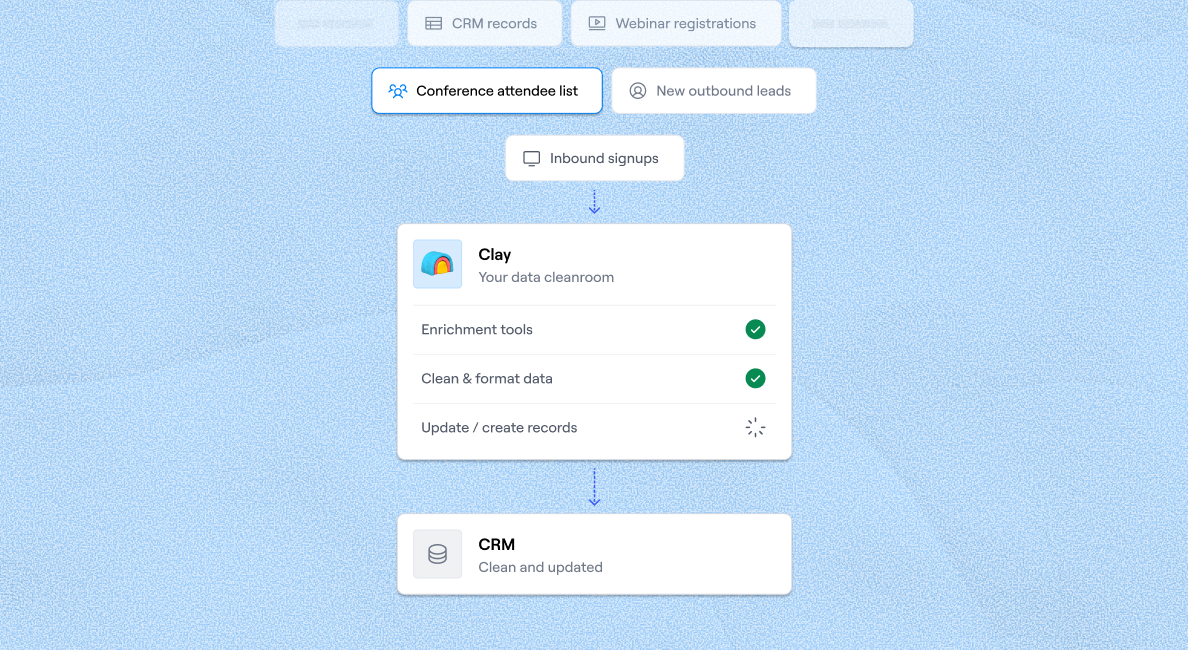
CRM enrichment
Обогащение CRM
Keep your CRM clean with the highest quality data
Поддерживайте чистоту CRM с данными высочайшего качества
BY TEAM
ПО КОМАНДАМ



GTM OpsОписание ссылки будет размещено здесь.МаркетингОписание ссылки будет размещено здесь.ПродажиОписание ссылки будет размещено здесь.
BY STAGE
ПО СТАДИЯМ


BY CUSTOMERS
ПО КЛИЕНТАМ


Anthropic
Anthropic
Link long form description will go in this slot here.
Описание ссылки будет размещено здесь.

OpenAI
OpenAI
Link long form description will go in this slot here.
Описание ссылки будет размещено здесь.

Rootly
Rootly
Link long form description will go in this slot here.
Описание ссылки будет размещено здесь.

Recharge
Recharge
Link long form description will go in this slot here.
Описание ссылки будет размещено здесь.

Sana
Sana
Link long form description will go in this slot here.
Описание ссылки будет размещено здесь.
Intercom
Intercom
Grew their outbound-sourced pipeline by +140%
Увеличили пайплайн из outbound-источников на +140%

START GROWING
НАЧНИТЕ РАСТИ




ТрансляцииОписание ссылки будет размещено здесь.Живые когортные занятияОписание ссылки будет размещено здесь.Найти экспертов ClayОписание ссылки будет размещено здесь.Нанять GTM-специалистовОписание ссылки будет размещено здесь.Доска вакансий GTMEОписание ссылки будет размещено здесь.
DISCOVER
УЗНАТЬ БОЛЬШЕ
УниверситетОписание ссылки будет размещено здесь.ШаблоныОписание ссылки будет размещено здесь.Блог GTMEОписание ссылки будет размещено здесь.Документация поддержкиОписание ссылки будет размещено здесь.
Community
Сообщество
Живые мероприятияОписание ссылки будет размещено здесь.Clay CupОписание ссылки будет размещено здесь.Сообщество ClayОписание ссылки будет размещено здесь.SlackОписание ссылки будет размещено здесь.
PARTNER WITH US
СТАТЬ ПАРТНЁРОМ
Стать партнёромОписание ссылки будет размещено здесь.Партнёры по решениямОписание ссылки будет размещено здесь.Партнёры по интеграциямОписание ссылки будет размещено здесь.Программа для креаторовОписание ссылки будет размещено здесь.Программа для стартаповОписание ссылки будет размещено здесь.Частный капиталОписание ссылки будет размещено здесь.
Clay Commnity
Сообщество Clay
In Nigeria, she built a life where money wouldn’t decide
В Нигерии она построила жизнь, в которой деньги не решают

OUR COMPANY
О КОМПАНИИ



О насОписание ссылки будет размещено здесь.КарьераОписание ссылки будет размещено здесь.Открытые вакансииОписание ссылки будет размещено здесь.
GET IN TOUCH
СВЯЗАТЬСЯ С НАМИ


SOCIALS
СОЦСЕТИ



LinkedInОписание ссылки будет размещено здесь.YouTubeОписание ссылки будет размещено здесь.XОписание ссылки будет размещено здесь.
Article – NY Times
Статья – NY Times
Clay allows employees to sell shares at a $5b valuation.
Clay разрешает сотрудникам продавать акции при оценке в $5 млрд.

Instant Data Scraper: A Detailed Review and Alternative
Instant Data Scraper: подробный обзор и альтернатива

Web scraping extensions are a popular way to extract data from different websites. They're typically affordable and easy to use and require no coding knowledge. Among popular solutions, Instant Data Scraper stands out as it offers advanced options and is suitable for various use cases.
Расширения для веб-скрейпинга — популярный способ извлечения данных с различных сайтов. Они, как правило, доступны по цене, просты в использовании и не требуют навыков программирования. Среди популярных решений Instant Data Scraper выделяется продвинутыми возможностями и подходит для различных сценариев использования.
In this guide, we'll offer a detailed review of Instant Data Scraper and explore its uses and features. We'll also zoom in on a potentially superior alternative that goes beyond data scraping and can help you effortlessly scale outbound campaigns. 📈
В этом руководстве мы предлагаем подробный обзор Instant Data Scraper и рассматриваем его возможности и функции. Мы также подробнее остановимся на потенциально более мощной альтернативе, выходящей за рамки извлечения данных, которая поможет вам легко масштабировать outbound-кампании. 📈
TL;DR
- Instant Data Scraper is a free Chrome extension that uses heuristic AI to detect and extract data from any website, with no coding required.
- Key features include pagination automation, adjustable crawling speed, data preview, column customization, and CSV/XLSX export.
- The extension has real limitations: inconsistent output and no support for lead management, enrichment, or outbound workflows beyond raw scraping.
- Clay goes further, combining a Chrome extension, Claygent (AI web scraper), waterfall enrichment across 150+ data providers, and outbound automation in one platform.
TL;DRInstant Data Scraper — бесплатное расширение для Chrome, которое использует эвристический ИИ для обнаружения и извлечения данных с любого сайта без необходимости программирования.Ключевые функции включают автоматизацию пагинации, настройку скорости обхода, предпросмотр данных, кастомизацию колонок и экспорт в CSV/XLSX.У расширения есть реальные ограничения: нестабильность результатов и отсутствие поддержки управления лидами, обогащения или outbound-процессов помимо базового скрейпинга.Clay идёт дальше, объединяя Chrome-расширение, Claygent (ИИ-скрейпер), каскадное обогащение через 150+ провайдеров данных и автоматизацию outbound на одной платформе.
What went into the making of this review?
Что легло в основу этого обзора?
To ensure objectivity in this review, our team crafted a unique approach:
Чтобы обеспечить объективность данного обзора, наша команда разработала уникальный подход:
Мы детально изучили платформу, чтобы получить чёткое представление о её функциях и о том, как с их помощью можно улучшить ваши рабочие процессы 🔍 Мы опросили нашу сеть отраслевых профессионалов и инфлюенсеров, чтобы узнать их честное мнение о расширении 🧑🤝🧑 Мы проанализировали отзывы о расширении в Chrome Web Store, чтобы понять его сильные стороны и потенциальные недостатки 📝
Instant Data Scraper at a glance
Instant Data Scraper: обзор
Instant Data Scraper is a Chrome extension designed to scrape data from websites and export it in CSV or Excel files. The extension is equally efficient for smaller, lesser-known web pages and popular websites like Amazon or Twitter. It's popular because, unlike many other web-scraping Chrome extensions, it offers advanced features at no cost.
Instant Data Scraper — это расширение для Chrome, предназначенное для извлечения данных с сайтов и экспорта их в файлы CSV или Excel. Расширение одинаково эффективно работает как с небольшими, малоизвестными веб-страницами, так и с популярными сайтами вроде Amazon или Twitter. Оно популярно потому, что, в отличие от многих других Chrome-расширений для веб-скрейпинга, предлагает продвинутые функции совершенно бесплатно.
See the table below for an overview of the main features of the Instant Data Scraper Chrome extension:
В таблице ниже представлен обзор основных функций расширения Instant Data Scraper для Chrome:
Let's review each feature in more detail! 👇
Давайте рассмотрим каждую функцию подробнее! 👇
AI Use
Использование ИИ
Instead of relying on website-specific scripts to scrape data, the Instant Data Scraper employs heuristic AI to solve problems and identify relevant information on a page. With AI, the extension performs a detailed analysis of the HTML content to detect data for extraction.
Вместо того чтобы полагаться на скрипты, специфичные для каждого сайта, Instant Data Scraper использует эвристический ИИ для решения задач и определения релевантной информации на странице. С помощью ИИ расширение выполняет детальный анализ HTML-контента для обнаружения данных, подлежащих извлечению.
This approach is convenient and efficient. Users won't end up with a bunch of outdated or irrelevant information. Instead, they only get what they need.
Этот подход удобен и эффективен. Пользователи не получат кучу устаревшей или нерелевантной информации — только то, что им нужно.
While Instant Data Scraper predicts which data is relevant, you can customize the selection if you consider the prediction is wrong and want to scrape additional data. This gives you control over the scraping process. ⛏️
Хотя Instant Data Scraper предсказывает, какие данные релевантны, вы можете настроить выборку, если считаете, что предсказание неверно и хотите извлечь дополнительные данные. Это даёт вам контроль над процессом скрейпинга. ⛏️
Pagination Automation
Автоматизация пагинации
Website pages overloaded with info can be slower to load and can drain memory from your browser. Websites solve this issue by breaking up data into pages. Users can press the next button to move to other pages and explore content.
Веб-страницы, перегруженные информацией, могут загружаться медленнее и потреблять больше памяти браузера. Сайты решают эту проблему, разбивая данные на страницы. Пользователи нажимают кнопку «далее», чтобы переходить на другие страницы и изучать контент.
While pagination can improve user experience and overall website organization, it can be an issue when you scrape data. Many scrapers require you to manually move to other pages.
Хотя пагинация может улучшить пользовательский опыт и общую организацию сайта, она может стать проблемой при скрейпинге данных. Многие скрейперы требуют ручного перехода на следующие страницы.
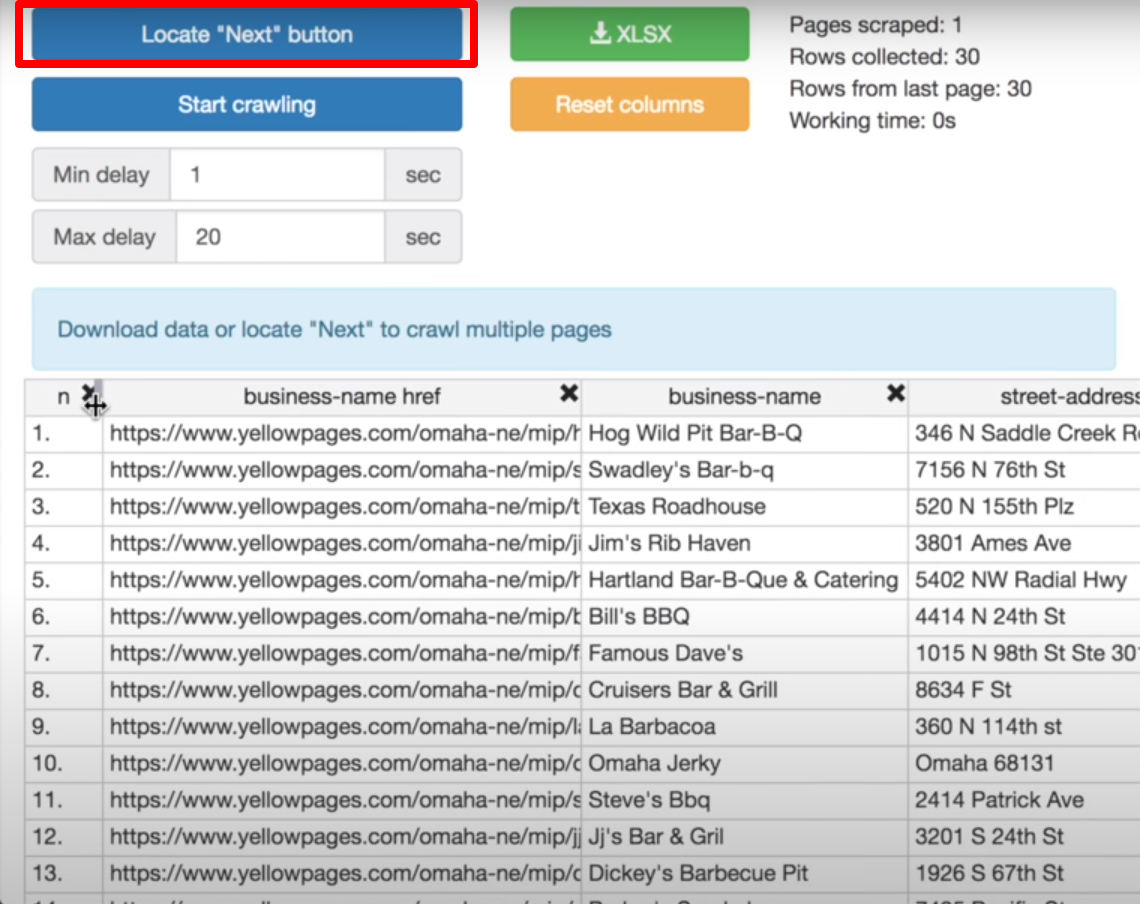
Instant Data Scraper offers a convenient feature called Locate the Next button to help you overcome this challenge. You can instruct the extension on where the Next button is and help it automatically jump to other pages without your assistance. 📌
Instant Data Scraper предлагает удобную функцию Locate the Next button (Найти кнопку «Далее»), помогающую преодолеть эту проблему. Вы можете указать расширению, где находится кнопка «Далее», и оно будет автоматически переходить на следующие страницы без вашего участия. 📌
Here's how to use this handy feature:
Вот как использовать эту удобную функцию:
Нажмите Locate "Next" buttonКликните на иконку, обозначающую следующую страницу (это может быть стрелка, цифра два или слово «next») → иконка станет зелёнойРасширение автоматически пролистает страницы и извлечёт доступные данные
Crawling Speed, Data Preview, and Column Customization
Скорость обхода, предпросмотр данных и настройка колонок
Instant Data Scraper lets you adjust the minimum and maximum crawling delay by entering the desired period (in seconds) in the designated fields. This feature lets you control the crawling speed to avoid burdening the servers and triggering interruptions.
Instant Data Scraper позволяет регулировать минимальную и максимальную задержку обхода, вводя желаемый период (в секундах) в соответствующие поля. Эта функция позволяет контролировать скорость обхода, чтобы не перегружать серверы и не вызывать прерывания.
All collected data is previewed within the extension. If you find any data points you don't need, you can remove them by deleting the column. 🚫
Все собранные данные доступны для предварительного просмотра прямо в расширении. Если вы обнаружите ненужные данные, вы можете удалить их, убрав колонку. 🚫
For easier organization, you can also rename columns before downloading the data.
Для удобства организации вы также можете переименовывать колонки перед скачиванием данных.
Data Export
Экспорт данных
Seamless data export is another convenient feature of the Instant Data Scraper Chrome extension. You have three exporting options:
Удобный экспорт данных — ещё одна практичная функция расширения Instant Data Scraper для Chrome. У вас есть три варианта экспорта:
Скачать данные в формате CSVСкачать данные в формате XLSX (Excel)Скопировать все данные (и вставить в существующий документ или таблицу)
💡 Note: These options are only one click away. You can find them above the table with the scraped data.
💡 Примечание: Эти опции доступны в один клик. Вы найдёте их над таблицей с извлечёнными данными.
What can you use Instant Data Scraper for?
Для чего можно использовать Instant Data Scraper?
As Instant Data Scraper offers extraction of data from any online source, you can use it for different purposes, including:
Поскольку Instant Data Scraper позволяет извлекать данные из любого онлайн-источника, вы можете использовать его для различных целей, включая:
How to use Instant Data Scraper: step-by-step
Как использовать Instant Data Scraper: пошаговая инструкция
Using the Instant Data Scraper is a breeze. You don't need a technical background, developing skills, or extensive training. Here are the steps:
Использовать Instant Data Scraper проще простого. Вам не нужна техническая подготовка, навыки разработки или длительное обучение. Вот шаги:
Перейдите в Chrome Web Store и скачайте и установите расширениеОткройте сайт, с которого хотите извлечь данные, и активируйте расширение, нажав на иконку с покеболомПодождите, пока расширение извлечёт данныеНастройте параметры расширения, задав минимальную и максимальную задержку и управляя пагинациейПросмотрите и экспортируйте извлечённые данные
Instant Data Scraper reviews and potential drawbacks
Отзывы об Instant Data Scraper и потенциальные недостатки
Many users agree that the Instant Data Scraper extension is useful and a massive time saver. Still, not all reviews are glowing.
Многие пользователи соглашаются, что расширение Instant Data Scraper полезно и значительно экономит время. Тем не менее не все отзывы восторженные.
Here are some of the most notable drawbacks:
Вот некоторые из наиболее заметных недостатков:
❌ Нестабильность результатов: иногда расширение работает отлично, а иногда не работает вовсе или извлекает данные лишь частично❌ Ограниченный функционал: расширение можно использовать только для скрейпинга, оно не помогает с другими процессами
Since the extension is designed solely for scraping, generating leads and managing outbound campaigns requires at least a few more tools. So, although this extension is free, you'll likely need to purchase a few subscriptions to cover the entire process. 💰
Поскольку расширение предназначено исключительно для скрейпинга, генерация лидов и управление outbound-кампаниями требуют как минимум нескольких дополнительных инструментов. Поэтому, хотя расширение бесплатно, вам, скорее всего, придётся приобрести несколько подписок для покрытия всего процесса. 💰
Instead of constantly jumping between apps to handle different phases of your processes and wasting money on subscriptions, try Clay, a multifunctional platform for streamlining your outbound efforts. 🌈
Вместо того чтобы постоянно переключаться между приложениями для выполнения разных этапов процессов и тратить деньги на подписки, попробуйте Clay, многофункциональную платформу для оптимизации ваших outbound-процессов. 🌈
How can Clay help you scrape data?
Как Clay может помочь с извлечением данных?
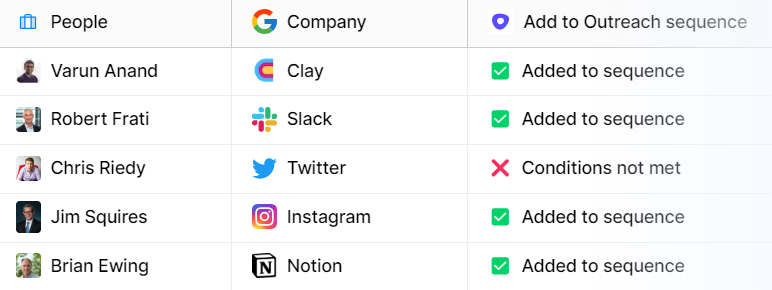
As a platform that combines data providing, enrichment, and sales automation features, Clay has advanced scraping capabilities.
Как платформа, объединяющая функции предоставления данных, обогащения и автоматизации продаж, Clay обладает продвинутыми возможностями скрейпинга.
The platform offers a Chrome extension that allows you to scrape data from any website. It's easy to use:
Платформа предлагает расширение для Chrome, которое позволяет извлекать данные с любого сайта. Им легко пользоваться:
Установите расширениеОткройте сайт, с которого хотите извлечь данныеЗапустите расширение и соберите данные в вашу таблицу Clay
You can use it to find company and people data and extract relevant data points in seconds. The internet is your data source, as you can use it to scrape any websites. ✨
Вы можете использовать его для поиска данных о компаниях и людях и извлечения нужных данных за секунды. Весь интернет — ваш источник данных, поскольку расширение позволяет парсить любые сайты. ✨
Another impressive scraping feature you'll get with Clay is Claygent, an AI web scraper. Tell Claygent what kind of data you need, and it will search every corner of the internet and deliver the info, automating the scraping process. You can get the desired data in seconds with zero manual research. 💪
Ещё одна впечатляющая функция скрейпинга, которую вы получите с Clay, — это Claygent, ИИ-скрейпер. Скажите Claygent, какие данные вам нужны, и он обыщет каждый уголок интернета и доставит информацию, автоматизируя процесс скрейпинга. Вы получите нужные данные за секунды без какого-либо ручного поиска. 💪
Wondering what you can ask Claygent to find out? Here are some examples:
Хотите узнать, что можно спросить у Claygent? Вот несколько примеров:
Какова тема последнего блога [компании]?Кто конкуренты [компании]?Как долго [человек] работает в [компании]?
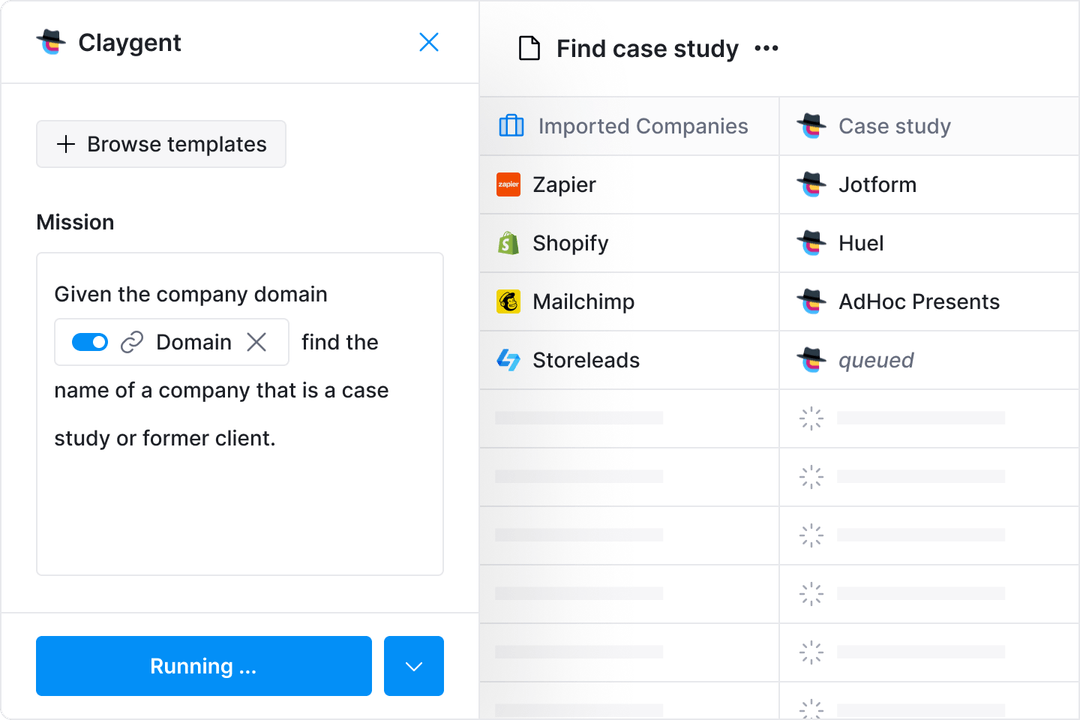
If you're on the hunt for specific data points, you can easily get them from Clay. You don't even need to scrape. This is possible thanks to Clay's integrations with 50+ data providers, allowing you to tap into dozens of databases in search of the desired information. 📚
Если вы ищете конкретные данные, вы легко можете получить их из Clay. Вам даже не нужно парсить. Это возможно благодаря интеграции Clay с 50+ провайдерами данных, что позволяет обращаться к десяткам баз данных в поисках нужной информации. 📚
As the platform employs waterfall enrichment, it searches sequentially across data providers. It goes through them one by one until it finds the info you need, such as:
Поскольку платформа использует каскадное обогащение, она последовательно опрашивает провайдеров данных. Она перебирает их одного за другим, пока не найдёт нужную информацию, например:
Email и номера телефонов людейДомен компанииКоличество сотрудников
You only pay for the data Clay finds, so you don't waste money. 💸
Вы платите только за данные, которые Clay находит, поэтому вы не тратите деньги впустую. 💸
Clay's feature versatility beyond scraping
Универсальность функций Clay за пределами скрейпинга
Fantastic data scraping and enrichment options are merely the beginning. Here are other notable features you'll enjoy with Clay:
Отличные возможности скрейпинга и обогащения данных — это лишь начало. Вот другие примечательные функции, которые вы оцените в Clay:
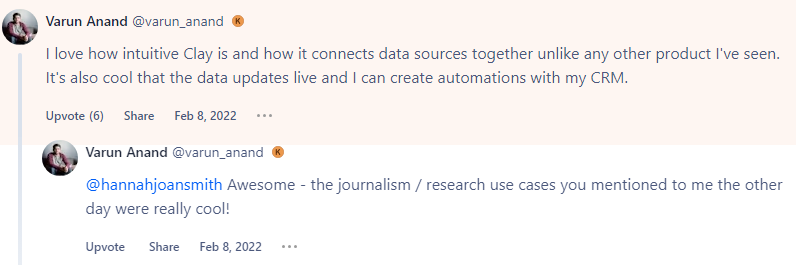
All of these robust features are tucked into a user-friendly interface. Here's what a user says about Clay's functionalities:
Все эти мощные функции собраны в удобном интерфейсе. Вот что говорит пользователь о возможностях Clay:
Begin your Clay journey
Начните свой путь с Clay
Now that you know the numerous ways in which Clay can help your campaigns, there's only one action to take: create your account:
Теперь, когда вы знаете о многочисленных способах, которыми Clay может помочь вашим кампаниям, осталось сделать одно: создать аккаунт:
Перейдите на страницу регистрации 👈Введите ваше имя, email и парольИзучите функции Clay
Clay offers a free forever plan with unlimited users, so you can explore all features free of charge. If you like what you see, you can opt for one of the four paid plans:
Clay предлагает бесплатный бессрочный план с неограниченным количеством пользователей, поэтому вы можете изучить все функции бесплатно. Если вам понравится, вы можете выбрать один из четырёх платных планов:
If you're interested in learning more about Clay, visit Clay University, where you can find tutorials and detailed explanations of its options. You should also join the Slack community and sign up for the platform's newsletter to stay up to date. 💌
Если вы хотите узнать больше о Clay, посетите Clay University, где вы найдёте обучающие материалы и подробные описания возможностей. Также присоединяйтесь к сообществу в Slack и подпишитесь на рассылку платформы, чтобы быть в курсе. 💌
Frequently Asked Questions
Часто задаваемые вопросы
Can Instant Data Scraper scrape any website?
Может ли Instant Data Scraper парсить любой сайт?
Instant Data Scraper is designed to work on any website, including popular platforms like Amazon and Twitter as well as smaller, lesser-known pages. It uses heuristic AI to analyze HTML content and detect data for extraction, so no website-specific scripts are required.
Instant Data Scraper предназначен для работы с любым сайтом, включая популярные платформы вроде Amazon и Twitter, а также небольшие, малоизвестные страницы. Он использует эвристический ИИ для анализа HTML-контента и обнаружения данных для извлечения, поэтому скрипты, специфичные для каждого сайта, не требуются.
Does Instant Data Scraper require coding knowledge?
Требует ли Instant Data Scraper навыков программирования?
No. Instant Data Scraper is a no-code Chrome extension. You install it from the Chrome Web Store, navigate to the page you want to scrape, and the extension handles detection and extraction automatically.
Нет. Instant Data Scraper — это no-code расширение для Chrome. Вы устанавливаете его из Chrome Web Store, переходите на страницу, которую хотите спарсить, и расширение автоматически выполняет обнаружение и извлечение данных.
What file formats does Instant Data Scraper export?
В каких форматах Instant Data Scraper экспортирует данные?
You can export scraped data as a CSV file, an XLSX (Excel) file, or copy all data directly to paste into an existing document or spreadsheet. All three options are accessible with one click from above the data preview table.
Вы можете экспортировать извлечённые данные в файл CSV, файл XLSX (Excel) или скопировать все данные для вставки в существующий документ или таблицу. Все три варианта доступны в один клик из панели над таблицей предпросмотра данных.
What are the main limitations of Instant Data Scraper?
Каковы основные ограничения Instant Data Scraper?
Users report inconsistent output: the extension sometimes works perfectly and sometimes scrapes data only partially or not at all. It is also limited to scraping only, so lead enrichment, outbound sequencing, and CRM sync all require separate tools.
Пользователи сообщают о нестабильности результатов: расширение иногда работает отлично, а иногда извлекает данные лишь частично или не работает вовсе. Также оно ограничено только скрейпингом, поэтому обогащение лидов, outbound-секвенсинг и синхронизация с CRM требуют отдельных инструментов.
💡 Bonus read: Interested in learning more about scraping and the best tools for extracting data? Check out our detailed guides:
💡 Бонус: Хотите узнать больше о скрейпинге и лучших инструментах для извлечения данных? Ознакомьтесь с нашими подробными руководствами:
Инструменты веб-скрейпинга с открытым исходным кодомИзвлечение данных с сайтовЗаконен ли веб-скрейпинг?Облачные веб-скрейперыВеб-скрейпинг с ChatGPT
Web scraping extensions are a popular way to extract data from different websites. They're typically affordable and easy to use and require no coding knowledge. Among popular solutions, Instant Data Scraper stands out as it offers advanced options and is suitable for various use cases.
Расширения для веб-скрейпинга — популярный способ извлечения данных с различных сайтов. Они, как правило, доступны по цене, просты в использовании и не требуют навыков программирования. Среди популярных решений Instant Data Scraper выделяется продвинутыми возможностями и подходит для различных сценариев использования.
In this guide, we'll offer a detailed review of Instant Data Scraper and explore its uses and features. We'll also zoom in on a potentially superior alternative that goes beyond data scraping and can help you effortlessly scale outbound campaigns. 📈
В этом руководстве мы предлагаем подробный обзор Instant Data Scraper и рассматриваем его возможности и функции. Мы также подробнее остановимся на потенциально более мощной альтернативе, выходящей за рамки извлечения данных, которая поможет вам легко масштабировать outbound-кампании. 📈
TL;DR
- Instant Data Scraper is a free Chrome extension that uses heuristic AI to detect and extract data from any website, with no coding required.
- Key features include pagination automation, adjustable crawling speed, data preview, column customization, and CSV/XLSX export.
- The extension has real limitations: inconsistent output and no support for lead management, enrichment, or outbound workflows beyond raw scraping.
- Clay goes further, combining a Chrome extension, Claygent (AI web scraper), waterfall enrichment across 150+ data providers, and outbound automation in one platform.
TL;DRInstant Data Scraper — бесплатное расширение для Chrome, которое использует эвристический ИИ для обнаружения и извлечения данных с любого сайта без необходимости программирования.Ключевые функции включают автоматизацию пагинации, настройку скорости обхода, предпросмотр данных, кастомизацию колонок и экспорт в CSV/XLSX.У расширения есть реальные ограничения: нестабильность результатов и отсутствие поддержки управления лидами, обогащения или outbound-процессов помимо базового скрейпинга.Clay идёт дальше, объединяя Chrome-расширение, Claygent (ИИ-скрейпер), каскадное обогащение через 150+ провайдеров данных и автоматизацию outbound на одной платформе.
What went into the making of this review?
Что легло в основу этого обзора?
To ensure objectivity in this review, our team crafted a unique approach:
Чтобы обеспечить объективность данного обзора, наша команда разработала уникальный подход:
Мы детально изучили платформу, чтобы получить чёткое представление о её функциях и о том, как с их помощью можно улучшить ваши рабочие процессы 🔍 Мы опросили нашу сеть отраслевых профессионалов и инфлюенсеров, чтобы узнать их честное мнение о расширении 🧑🤝🧑 Мы проанализировали отзывы о расширении в Chrome Web Store, чтобы понять его сильные стороны и потенциальные недостатки 📝
Instant Data Scraper at a glance
Instant Data Scraper: обзор
Instant Data Scraper is a Chrome extension designed to scrape data from websites and export it in CSV or Excel files. The extension is equally efficient for smaller, lesser-known web pages and popular websites like Amazon or Twitter. It's popular because, unlike many other web-scraping Chrome extensions, it offers advanced features at no cost.
Instant Data Scraper — это расширение для Chrome, предназначенное для извлечения данных с сайтов и экспорта их в файлы CSV или Excel. Расширение одинаково эффективно работает как с небольшими, малоизвестными веб-страницами, так и с популярными сайтами вроде Amazon или Twitter. Оно популярно потому, что, в отличие от многих других Chrome-расширений для веб-скрейпинга, предлагает продвинутые функции совершенно бесплатно.
See the table below for an overview of the main features of the Instant Data Scraper Chrome extension:
В таблице ниже представлен обзор основных функций расширения Instant Data Scraper для Chrome:
Let's review each feature in more detail! 👇
Давайте рассмотрим каждую функцию подробнее! 👇
AI Use
Использование ИИ
Instead of relying on website-specific scripts to scrape data, the Instant Data Scraper employs heuristic AI to solve problems and identify relevant information on a page. With AI, the extension performs a detailed analysis of the HTML content to detect data for extraction.
Вместо того чтобы полагаться на скрипты, специфичные для каждого сайта, Instant Data Scraper использует эвристический ИИ для решения задач и определения релевантной информации на странице. С помощью ИИ расширение выполняет детальный анализ HTML-контента для обнаружения данных, подлежащих извлечению.
This approach is convenient and efficient. Users won't end up with a bunch of outdated or irrelevant information. Instead, they only get what they need.
Этот подход удобен и эффективен. Пользователи не получат кучу устаревшей или нерелевантной информации — только то, что им нужно.
While Instant Data Scraper predicts which data is relevant, you can customize the selection if you consider the prediction is wrong and want to scrape additional data. This gives you control over the scraping process. ⛏️
Хотя Instant Data Scraper предсказывает, какие данные релевантны, вы можете настроить выборку, если считаете, что предсказание неверно и хотите извлечь дополнительные данные. Это даёт вам контроль над процессом скрейпинга. ⛏️
Pagination Automation
Автоматизация пагинации
Website pages overloaded with info can be slower to load and can drain memory from your browser. Websites solve this issue by breaking up data into pages. Users can press the next button to move to other pages and explore content.
Веб-страницы, перегруженные информацией, могут загружаться медленнее и потреблять больше памяти браузера. Сайты решают эту проблему, разбивая данные на страницы. Пользователи нажимают кнопку «далее», чтобы переходить на другие страницы и изучать контент.
While pagination can improve user experience and overall website organization, it can be an issue when you scrape data. Many scrapers require you to manually move to other pages.
Хотя пагинация может улучшить пользовательский опыт и общую организацию сайта, она может стать проблемой при скрейпинге данных. Многие скрейперы требуют ручного перехода на следующие страницы.
Instant Data Scraper offers a convenient feature called Locate the Next button to help you overcome this challenge. You can instruct the extension on where the Next button is and help it automatically jump to other pages without your assistance. 📌
Instant Data Scraper предлагает удобную функцию Locate the Next button (Найти кнопку «Далее»), помогающую преодолеть эту проблему. Вы можете указать расширению, где находится кнопка «Далее», и оно будет автоматически переходить на следующие страницы без вашего участия. 📌
Here's how to use this handy feature:
Вот как использовать эту удобную функцию:
Нажмите Locate "Next" buttonКликните на иконку, обозначающую следующую страницу (это может быть стрелка, цифра два или слово «next») → иконка станет зелёнойРасширение автоматически пролистает страницы и извлечёт доступные данные
Crawling Speed, Data Preview, and Column Customization
Скорость обхода, предпросмотр данных и настройка колонок
Instant Data Scraper lets you adjust the minimum and maximum crawling delay by entering the desired period (in seconds) in the designated fields. This feature lets you control the crawling speed to avoid burdening the servers and triggering interruptions.
Instant Data Scraper позволяет регулировать минимальную и максимальную задержку обхода, вводя желаемый период (в секундах) в соответствующие поля. Эта функция позволяет контролировать скорость обхода, чтобы не перегружать серверы и не вызывать прерывания.
All collected data is previewed within the extension. If you find any data points you don't need, you can remove them by deleting the column. 🚫
Все собранные данные доступны для предварительного просмотра прямо в расширении. Если вы обнаружите ненужные данные, вы можете удалить их, убрав колонку. 🚫
For easier organization, you can also rename columns before downloading the data.
Для удобства организации вы также можете переименовывать колонки перед скачиванием данных.
Data Export
Экспорт данных
Seamless data export is another convenient feature of the Instant Data Scraper Chrome extension. You have three exporting options:
Удобный экспорт данных — ещё одна практичная функция расширения Instant Data Scraper для Chrome. У вас есть три варианта экспорта:
Скачать данные в формате CSVСкачать данные в формате XLSX (Excel)Скопировать все данные (и вставить в существующий документ или таблицу)
💡 Note: These options are only one click away. You can find them above the table with the scraped data.
💡 Примечание: Эти опции доступны в один клик. Вы найдёте их над таблицей с извлечёнными данными.
What can you use Instant Data Scraper for?
Для чего можно использовать Instant Data Scraper?
As Instant Data Scraper offers extraction of data from any online source, you can use it for different purposes, including:
Поскольку Instant Data Scraper позволяет извлекать данные из любого онлайн-источника, вы можете использовать его для различных целей, включая:
How to use Instant Data Scraper: step-by-step
Как использовать Instant Data Scraper: пошаговая инструкция
Using the Instant Data Scraper is a breeze. You don't need a technical background, developing skills, or extensive training. Here are the steps:
Использовать Instant Data Scraper проще простого. Вам не нужна техническая подготовка, навыки разработки или длительное обучение. Вот шаги:
Перейдите в Chrome Web Store и скачайте и установите расширениеОткройте сайт, с которого хотите извлечь данные, и активируйте расширение, нажав на иконку с покеболомПодождите, пока расширение извлечёт данныеНастройте параметры расширения, задав минимальную и максимальную задержку и управляя пагинациейПросмотрите и экспортируйте извлечённые данные
Instant Data Scraper reviews and potential drawbacks
Отзывы об Instant Data Scraper и потенциальные недостатки
Many users agree that the Instant Data Scraper extension is useful and a massive time saver. Still, not all reviews are glowing.
Многие пользователи соглашаются, что расширение Instant Data Scraper полезно и значительно экономит время. Тем не менее не все отзывы восторженные.
Here are some of the most notable drawbacks:
Вот некоторые из наиболее заметных недостатков:
❌ Нестабильность результатов: иногда расширение работает отлично, а иногда не работает вовсе или извлекает данные лишь частично❌ Ограниченный функционал: расширение можно использовать только для скрейпинга, оно не помогает с другими процессами
Since the extension is designed solely for scraping, generating leads and managing outbound campaigns requires at least a few more tools. So, although this extension is free, you'll likely need to purchase a few subscriptions to cover the entire process. 💰
Поскольку расширение предназначено исключительно для скрейпинга, генерация лидов и управление outbound-кампаниями требуют как минимум нескольких дополнительных инструментов. Поэтому, хотя расширение бесплатно, вам, скорее всего, придётся приобрести несколько подписок для покрытия всего процесса. 💰
Instead of constantly jumping between apps to handle different phases of your processes and wasting money on subscriptions, try Clay, a multifunctional platform for streamlining your outbound efforts. 🌈
Вместо того чтобы постоянно переключаться между приложениями для выполнения разных этапов процессов и тратить деньги на подписки, попробуйте Clay, многофункциональную платформу для оптимизации ваших outbound-процессов. 🌈
How can Clay help you scrape data?
Как Clay может помочь с извлечением данных?
As a platform that combines data providing, enrichment, and sales automation features, Clay has advanced scraping capabilities.
Как платформа, объединяющая функции предоставления данных, обогащения и автоматизации продаж, Clay обладает продвинутыми возможностями скрейпинга.
The platform offers a Chrome extension that allows you to scrape data from any website. It's easy to use:
Платформа предлагает расширение для Chrome, которое позволяет извлекать данные с любого сайта. Им легко пользоваться:
Установите расширениеОткройте сайт, с которого хотите извлечь данныеЗапустите расширение и соберите данные в вашу таблицу Clay
You can use it to find company and people data and extract relevant data points in seconds. The internet is your data source, as you can use it to scrape any websites. ✨
Вы можете использовать его для поиска данных о компаниях и людях и извлечения нужных данных за секунды. Весь интернет — ваш источник данных, поскольку расширение позволяет парсить любые сайты. ✨
Another impressive scraping feature you'll get with Clay is Claygent, an AI web scraper. Tell Claygent what kind of data you need, and it will search every corner of the internet and deliver the info, automating the scraping process. You can get the desired data in seconds with zero manual research. 💪
Ещё одна впечатляющая функция скрейпинга, которую вы получите с Clay, — это Claygent, ИИ-скрейпер. Скажите Claygent, какие данные вам нужны, и он обыщет каждый уголок интернета и доставит информацию, автоматизируя процесс скрейпинга. Вы получите нужные данные за секунды без какого-либо ручного поиска. 💪
Wondering what you can ask Claygent to find out? Here are some examples:
Хотите узнать, что можно спросить у Claygent? Вот несколько примеров:
Какова тема последнего блога [компании]?Кто конкуренты [компании]?Как долго [человек] работает в [компании]?
If you're on the hunt for specific data points, you can easily get them from Clay. You don't even need to scrape. This is possible thanks to Clay's integrations with 50+ data providers, allowing you to tap into dozens of databases in search of the desired information. 📚
Если вы ищете конкретные данные, вы легко можете получить их из Clay. Вам даже не нужно парсить. Это возможно благодаря интеграции Clay с 50+ провайдерами данных, что позволяет обращаться к десяткам баз данных в поисках нужной информации. 📚
As the platform employs waterfall enrichment, it searches sequentially across data providers. It goes through them one by one until it finds the info you need, such as:
Поскольку платформа использует каскадное обогащение, она последовательно опрашивает провайдеров данных. Она перебирает их одного за другим, пока не найдёт нужную информацию, например:
Email и номера телефонов людейДомен компанииКоличество сотрудников
You only pay for the data Clay finds, so you don't waste money. 💸
Вы платите только за данные, которые Clay находит, поэтому вы не тратите деньги впустую. 💸
Clay's feature versatility beyond scraping
Универсальность функций Clay за пределами скрейпинга
Fantastic data scraping and enrichment options are merely the beginning. Here are other notable features you'll enjoy with Clay:
Отличные возможности скрейпинга и обогащения данных — это лишь начало. Вот другие примечательные функции, которые вы оцените в Clay:
All of these robust features are tucked into a user-friendly interface. Here's what a user says about Clay's functionalities:
Все эти мощные функции собраны в удобном интерфейсе. Вот что говорит пользователь о возможностях Clay:
Begin your Clay journey
Начните свой путь с Clay
Now that you know the numerous ways in which Clay can help your campaigns, there's only one action to take: create your account:
Теперь, когда вы знаете о многочисленных способах, которыми Clay может помочь вашим кампаниям, осталось сделать одно: создать аккаунт:
Перейдите на страницу регистрации 👈Введите ваше имя, email и парольИзучите функции Clay
Clay offers a free forever plan with unlimited users, so you can explore all features free of charge. If you like what you see, you can opt for one of the four paid plans:
Clay предлагает бесплатный бессрочный план с неограниченным количеством пользователей, поэтому вы можете изучить все функции бесплатно. Если вам понравится, вы можете выбрать один из четырёх платных планов:
If you're interested in learning more about Clay, visit Clay University, where you can find tutorials and detailed explanations of its options. You should also join the Slack community and sign up for the platform's newsletter to stay up to date. 💌
Если вы хотите узнать больше о Clay, посетите Clay University, где вы найдёте обучающие материалы и подробные описания возможностей. Также присоединяйтесь к сообществу в Slack и подпишитесь на рассылку платформы, чтобы быть в курсе. 💌
Frequently Asked Questions
Часто задаваемые вопросы
Can Instant Data Scraper scrape any website?
Может ли Instant Data Scraper парсить любой сайт?
Instant Data Scraper is designed to work on any website, including popular platforms like Amazon and Twitter as well as smaller, lesser-known pages. It uses heuristic AI to analyze HTML content and detect data for extraction, so no website-specific scripts are required.
Instant Data Scraper предназначен для работы с любым сайтом, включая популярные платформы вроде Amazon и Twitter, а также небольшие, малоизвестные страницы. Он использует эвристический ИИ для анализа HTML-контента и обнаружения данных для извлечения, поэтому скрипты, специфичные для каждого сайта, не требуются.
Does Instant Data Scraper require coding knowledge?
Требует ли Instant Data Scraper навыков программирования?
No. Instant Data Scraper is a no-code Chrome extension. You install it from the Chrome Web Store, navigate to the page you want to scrape, and the extension handles detection and extraction automatically.
Нет. Instant Data Scraper — это no-code расширение для Chrome. Вы устанавливаете его из Chrome Web Store, переходите на страницу, которую хотите спарсить, и расширение автоматически выполняет обнаружение и извлечение данных.
What file formats does Instant Data Scraper export?
В каких форматах Instant Data Scraper экспортирует данные?
You can export scraped data as a CSV file, an XLSX (Excel) file, or copy all data directly to paste into an existing document or spreadsheet. All three options are accessible with one click from above the data preview table.
Вы можете экспортировать извлечённые данные в файл CSV, файл XLSX (Excel) или скопировать все данные для вставки в существующий документ или таблицу. Все три варианта доступны в один клик из панели над таблицей предпросмотра данных.
What are the main limitations of Instant Data Scraper?
Каковы основные ограничения Instant Data Scraper?
Users report inconsistent output: the extension sometimes works perfectly and sometimes scrapes data only partially or not at all. It is also limited to scraping only, so lead enrichment, outbound sequencing, and CRM sync all require separate tools.
Пользователи сообщают о нестабильности результатов: расширение иногда работает отлично, а иногда извлекает данные лишь частично или не работает вовсе. Также оно ограничено только скрейпингом, поэтому обогащение лидов, outbound-секвенсинг и синхронизация с CRM требуют отдельных инструментов.
💡 Bonus read: Interested in learning more about scraping and the best tools for extracting data? Check out our detailed guides:
💡 Бонус: Хотите узнать больше о скрейпинге и лучших инструментах для извлечения данных? Ознакомьтесь с нашими подробными руководствами:
Инструменты веб-скрейпинга с открытым исходным кодомИзвлечение данных с сайтовЗаконен ли веб-скрейпинг?Облачные веб-скрейперыВеб-скрейпинг с ChatGPT
More Articles
Другие статьи

Claygent Builder: The easiest way to build, test, and deploy GTM Agents
Claygent Builder: самый простой способ создавать, тестировать и развёртывать GTM-агентов

How Clay Uses Clay Ads: From $250 to $25 CPL
Как Clay использует Clay Ads: с $250 до $25 за лид

HG Insights Corporate Hierarchy: GTM Precision in Clay
HG Insights Corporate Hierarchy: точность GTM в Clay

Sales GTM Engineering: How Clay Built the Role From Scratch
Sales GTM Engineering: как Clay создала эту роль с нуля

How to Automate Inbound Lead Outreach: The Clay Playbook
Как автоматизировать outbound-коммуникацию с входящими лидами: плейбук Clay
demandDrive Joins Clay’s Partner Ecosystem as an Official Clay Studio Partner
demandDrive присоединяется к партнёрской экосистеме Clay как официальный партнёр Clay Studio

B2B Sales Prospecting: 15 Strategies to Drive More Conversions
B2B-проспектинг в продажах: 15 стратегий для увеличения конверсий

AI Sales Assistants: 11 Ways to Accelerate Your Outbound
ИИ-ассистенты для продаж: 11 способов ускорить outbound

The Three Laws of GTM: How to Win in the AI Era
Три закона GTM: как побеждать в эпоху ИИ

Best Work Email Finders by Segment: SMB vs. Enterprise
Лучшие сервисы поиска рабочих email по сегментам: SMB vs. Enterprise

How Clay Converts Trial Users Into Customers With Automated Outreach
Как Clay конвертирует пробных пользователей в клиентов с помощью автоматизированного outreach

Best Mobile Phone Data Providers for B2B Sales Teams
Лучшие провайдеры данных мобильных номеров для B2B-команд продаж

How to Build a Complete AI Outbound Sales Funnel
Как построить полную воронку outbound-продаж на ИИ

How to Get More Customers Using Outbound Sales: A Complete Guide
Как привлечь больше клиентов с помощью outbound-продаж: полное руководство

How to Automate 6 Cold Email Campaigns in One Clay Workflow
Как автоматизировать 6 кампаний холодных писем в одном рабочем процессе Clay
How Clay Identifies Tier 1 Accounts: A Three-Score System
Как Clay определяет аккаунты Tier 1: система трёх оценок

Lead Scoring in Clay: A Step-by-Step Formula Guide
Скоринг лидов в Clay: пошаговое руководство по формулам

How to Validate Cold Outbound Offers and Find Message-Market Fit
Как валидировать офферы холодного outbound и найти message-market fit

Troubleshooting Outbound Sales and Prospecting: A Comprehensive Guide
Устранение проблем в outbound-продажах и проспектинге: исчерпывающее руководство
Bulk Enrichment: Enrich Millions of CRM Records in Clay
Массовое обогащение: обогатите миллионы записей CRM в Clay

Clay Templates: Automate, Customize, and Replicate Any GTM Workflow
Шаблоны Clay: автоматизируйте, настраивайте и тиражируйте любой GTM-процесс

How to Optimize Your Credit Usage in Clay
Как оптимизировать расход кредитов в Clay

AI for sales prospecting
ИИ для проспектинга в продажах

The Reverse Demo: How Clay Replaced Traditional B2B Sales Demos
Обратное демо: как Clay заменила традиционные B2B-демонстрации продаж

Data Waterfalls: How to Maximize Contact Coverage with Clay
Каскадное обогащение данных: как максимизировать покрытие контактов с Clay
How Clay Runs ABM Campaigns: A Step-by-Step Playbook
Как Clay проводит ABM-кампании: пошаговый плейбук

How We Built Clay's GTM Engineering Function
Как мы построили функцию GTM-инженерии в Clay

Best Personal Email Finder Tools: Tested and Ranked
Лучшие инструменты поиска личных email: протестировано и ранжировано

How to Use OpenAI to Write Cold Emails from Scratch with Clay
Как использовать OpenAI для написания холодных писем с нуля в Clay

How to Run a Personalized Demo Play at Scale with Clay
Как запустить персонализированное демо в масштабе с Clay

Automated Slide Deck Creation: How Clay Builds QBRs from Your Data
Автоматическое создание слайд-презентаций: как Clay собирает QBR из ваших данных

HG Insights + Clay: B2B Technographic and Firmographic Data
HG Insights + Clay: технографические и фирмографические данные для B2B

B2B Cold Email Deliverability: 21 Best Practices
Доставляемость холодных B2B-писем: 21 лучшая практика

Basics of Google Search Operators: A Practical Guide
Основы операторов поиска Google: практическое руководство

AI Lead Generation: The Complete B2B Guide
ИИ-генерация лидов: полное руководство для B2B
Clay MCP: Ops-built workflows, consumable by reps
Clay MCP: процессы, созданные операционными командами, доступные менеджерам
How to Manage and Enrich Inbound Leads Automatically
Как автоматически управлять и обогащать входящие лиды

GTM Alpha: How Winning Teams Build a Competitive Edge
GTM Alpha: как лучшие команды создают конкурентное преимущество

Why Good CRM Data Matters and How Clay Helps
Почему качественные данные в CRM важны и как Clay помогает

How to Use Formulas in Clay: AI Generator and Manual Entry
Как использовать формулы в Clay: ИИ-генератор и ручной ввод

GTM Engineering: What It Is, How It Works, and How to Hire
GTM-инженерия: что это, как работает и как нанимать

Formulas in Clay: A Beginner's Intro for Non-Engineers
Формулы в Clay: введение для нетехнических специалистов
How Clay Uses Clay for SEO and AEO: 3 Systems That Scale
Как Clay использует Clay для SEO и AEO: 3 масштабируемые системы

Turn Web Visitors into Leads: A Warm Outbound Play for B2B Sales
Превратите посетителей сайта в лидов: стратегия тёплого outbound для B2B-продаж

How to Use Web Scraping to Enrich Your Data with Clay
Как использовать веб-скрейпинг для обогащения данных с Clay

How to Create a Sales Prospect List in Minutes
Как создать список проспектов для продаж за считанные минуты

Best B2B Email List Providers: Tested and Ranked (2026)
Лучшие провайдеры B2B-списков email: протестировано и ранжировано (2026)

Outbound Sales Automation: How to 10x Pipeline Without More SDRs
Автоматизация outbound-продаж: как увеличить пайплайн в 10 раз без дополнительных SDR

The Wake the Dead Play: Reactivate Closed-Lost Deals with Clay
Стратегия «Воскреси мертвецов»: реактивация проигранных сделок с Clay

Three Tips to Guarantee Email Deliverability for Cold Outbound
Три совета для гарантии доставляемости email в холодном outbound
How Clay Uses Clay for Customer Support: 3 Real Workflows
Как Clay использует Clay для клиентской поддержки: 3 реальных рабочих процесса

B2B Cold Email Copywriting: The Complete Guide
Копирайтинг холодных B2B-писем: полное руководство

Introducing Clay Functions
Представляем Clay Functions

Clay and Apollo Integration: Enrichment, Sequencing, and More
Интеграция Clay и Apollo: обогащение, секвенсинг и другое

The Many Lives of Spreadsheets: A History and What Comes Next
Множество жизней электронных таблиц: история и что будет дальше

AI recruiting strategies
Стратегии ИИ-рекрутинга

How to Hire a GTM Engineer: The Complete Guide
Как нанять GTM-инженера: полное руководство

Inside Clay's GTM Engineering Lab: Plays, Principles, and Automation
Внутри GTM Engineering Lab от Clay: сценарии, принципы и автоматизация

How to Build the Most Targeted Account Lists Possible
Как составить максимально целевые списки аккаунтов

Personalized Direct Mail at Scale: The Gifting Play with Clay
Персонализированная директ-рассылка в масштабе: стратегия подарков с Clay

How to Set Up Your Full Inbound Sales Process on Clay
Как настроить полный процесс входящих продаж в Clay

AI-Enabled GTM for Private Equity: The Value Creation Playbook
GTM на базе ИИ для частного капитала: плейбук создания ценности

Do More With Your Data: Clay's Post-Data-Provider Approach
Делайте больше с вашими данными: пост-провайдерный подход Clay

Google Maps Lead Generation for Niche Local Businesses
Генерация лидов через Google Maps для нишевого локального бизнеса

24 AI Email Personalization Examples for Cold Outreach (With Prompts)
24 примера ИИ-персонализации email для холодного outreach (с промптами)

How to Ace Your Follow-Ups: A Practical Sales Guide
Как мастерски проводить follow-up: практическое руководство по продажам

How to Prioritize Your Waitlist with Lead Enrichment
Как приоритизировать список ожидания с помощью обогащения лидов

B2B Cold Email Templates: Frameworks That Get Replies
Шаблоны холодных B2B-писем: фреймворки, которые получают ответы

Audiences: now in Enterprise beta
Audiences: теперь в бета-версии Enterprise
The thinking behind our new pricing: our internal memo
Логика нашего нового ценообразования: наш внутренний меморандум

Introducing Clay’s new pricing
Представляем новое ценообразование Clay
Clay partners with Lusha and Beauhurst to expand European data coverage
Clay заключает партнёрство с Lusha и Beauhurst для расширения покрытия европейских данных
Source your precise TAM from lookalikes you can trust with Ocean.io and Clay
Найдите точный TAM по доверенным аналогам с Ocean.io и Clay

Clay doubles down on supporting European GTM teams
Clay удваивает поддержку европейских GTM-команд
In Nigeria, she built a life where money wouldn’t decide
В Нигерии она построила жизнь, в которой деньги не решают
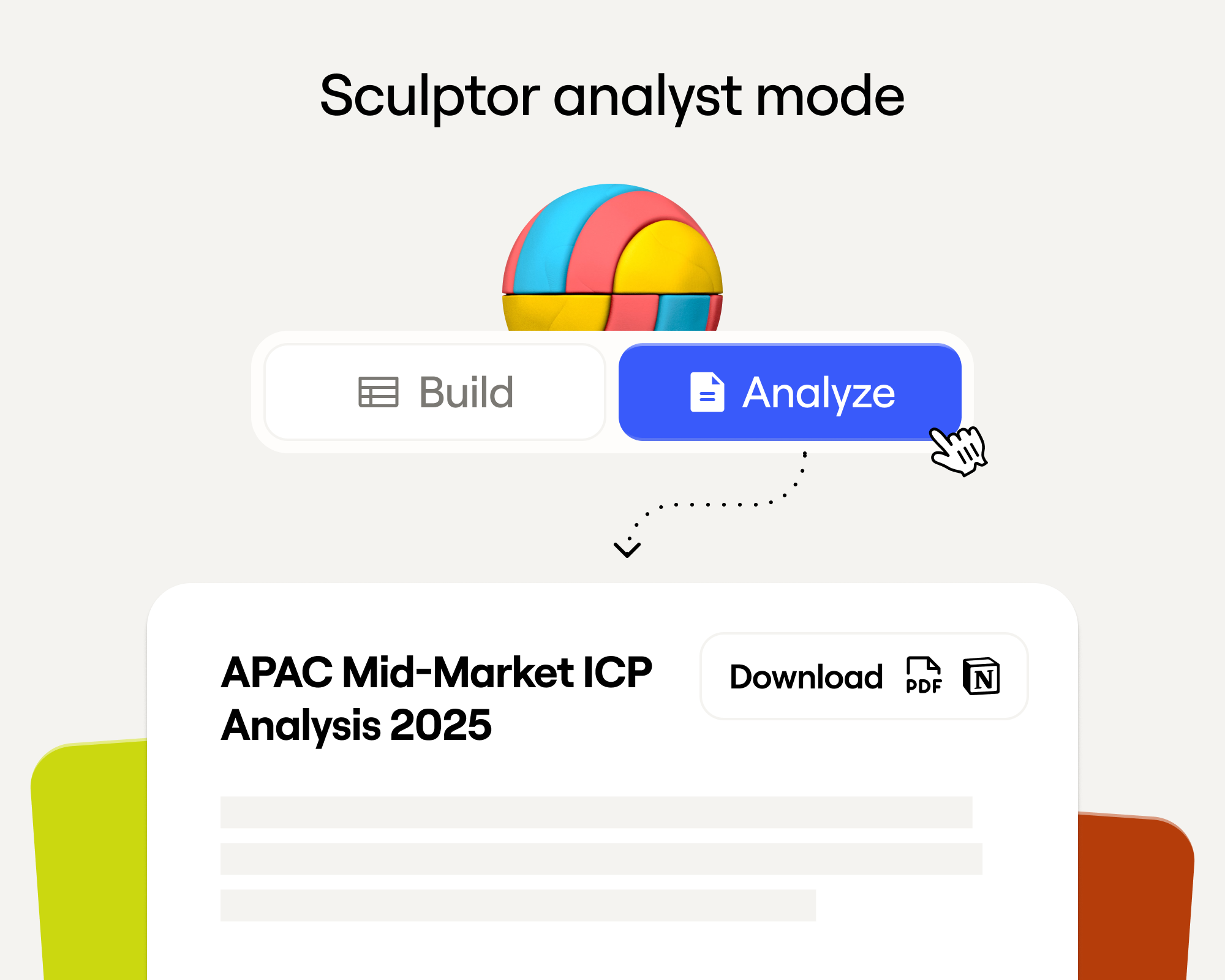
Sculptor Analyst Mode: Turning Context-Rich Data Into Actionable GTM Insights
Режим аналитика Sculptor: превращение контекстно-богатых данных в действенные GTM-инсайты

In a place where girls often choose between career or marriage, she carved her own path
Там, где девушки часто выбирают между карьерой и замужеством, она проложила свой собственный путь

How we designed Sculpt
Как мы разработали дизайн Sculpt

Clay announces second employee tender offer in nine months at a $5B valuation
Clay объявляет о второй программе продажи акций сотрудников за девять месяцев при оценке в $5 млрд

Clay is now available as a connector in Claude
Clay теперь доступен как коннектор в Claude

Sellers have a new AI edge: Clay in ChatGPT
У продавцов появилось новое ИИ-преимущество: Clay в ChatGPT

Clay reaches $100M ARR
Clay достигает $100M ARR

Clay Certifications: Turning mastery into credentials that matter
Сертификация Clay: превращаем мастерство в значимые квалификации
Mobile Phone Verification Methodology
Методология верификации мобильных номеров
Work Email Verification Methodology
Методология верификации рабочих email

Stop Guessing, Start Analyzing: How Sculptor Turns Your GTM Data Into Your Competitive Advantage
Хватит гадать — начните анализировать: как Sculptor превращает ваши GTM-данные в конкурентное преимущество

Find and outreach local businesses with Openmart and Clay Sequencer
Находите и связывайтесь с локальным бизнесом через Openmart и Clay Sequencer

Announcing Web Intent
Представляем Web Intent
How Clay Uses Clay: Conversational Data
Как Clay использует Clay: диалоговые данные

Sculpting GTM’s future with six major launches
Формируем будущее GTM с шестью крупными запусками

Introducing Claygent Navigator
Представляем Claygent Navigator

Announcing the Clay Partner Program
Объявляем партнёрскую программу Clay

Introducing GPT-5 in Claygent: sharper research, stronger formulas, better outbound
Представляем GPT-5 в Claygent: более точные исследования, сильные формулы, лучший outbound

Clay Series C announcement. The GTM engineering era begins now
Объявление о раунде Series C от Clay. Эра GTM-инженерии начинается сейчас

Claygent surpasses 1 billion runs
Claygent превысил 1 миллиард запусков

Announcing Sculpt: Clay’s first annual user conference
Объявляем Sculpt: первую ежегодную пользовательскую конференцию Clay

Announcing custom signals at Clay
Объявляем кастомные сигналы в Clay

Clay announces employee tender offer led by Sequoia at $1.5B valuation
Clay объявляет о программе продажи акций сотрудников под руководством Sequoia при оценке $1,5 млрд

Create personalized presentations at scale with Clay and Google Slides
Создавайте персонализированные презентации в масштабе с Clay и Google Slides