Introducing Claude Design by Anthropic Labs
Anthropic запускает Claude Design — продукт Anthropic Labs для совместной работы с Claude над визуальными материалами: дизайнами, прототипами, слайдами и одностраничниками. Продукт работает на Claude Opus 4.7 и доступен в режиме research preview для подписчиков Claude Pro, Max, Team и Enterprise. Claude Design умеет читать кодовую базу и дизайн-файлы команды, чтобы автоматически применять её дизайн-систему ко всем проектам, поддерживает импорт из DOCX, PPTX, XLSX и веб-захват, а также экспорт в Canva, PDF, PPTX и HTML. Среди сценариев — интерактивные прототипы, вайрфреймы продуктов, питч-деки, маркетинговые материалы и frontier-дизайн с голосом, видео и 3D. Готовый дизайн можно передать в Claude Code единым handoff-бандлом. Для Enterprise-организаций функция выключена по умолчанию и активируется администраторами.
Introducing Claude Design by Anthropic Labs
Представляем Claude Design от Anthropic Labs

Today, we’re launching Claude Design, a new Anthropic Labs product that lets you collaborate with Claude to create polished visual work like designs, prototypes, slides, one-pagers, and more.
Сегодня мы запускаем Claude Design — новый продукт Anthropic Labs, который позволяет совместно с Claude создавать отточенные визуальные работы: дизайны, прототипы, слайды, одностраничники и многое другое.
Claude Design is powered by our most capable vision model, Claude Opus 4.7, and is available in research preview for Claude Pro, Max, Team, and Enterprise subscribers. We’re rolling out to users gradually throughout the day.
Claude Design работает на нашей самой мощной vision-модели Claude Opus 4.7 и доступен в режиме research preview подписчикам Claude Pro, Max, Team и Enterprise. Мы постепенно открываем доступ пользователям в течение дня.
Design with Claude
Дизайн вместе с Claude
Even experienced designers have to ration exploration—there's rarely time to prototype a dozen directions, so you limit yourself to a few. And for founders, product managers, and marketers with an idea but not a design background, creating and sharing those ideas can be daunting.
Даже опытным дизайнерам приходится экономить на исследовании вариантов — редко находится время прототипировать десяток направлений, поэтому круг ограничивают несколькими. А для основателей, продакт-менеджеров и маркетологов, у которых есть идея, но нет дизайнерского бэкграунда, создание и презентация таких идей могут пугать.
Claude Design gives designers room to explore widely and everyone else a way to produce visual work. Describe what you need and Claude builds a first version. From there, you refine through conversation, inline comments, direct edits, or custom sliders (made by Claude) until it’s right. When given access, Claude can also apply your team’s design system to every project automatically, so the output is consistent with the rest of your company’s designs.
Claude Design даёт дизайнерам пространство для широкого исследования, а всем остальным — способ создавать визуальные работы. Опишите, что вам нужно, и Claude построит первую версию. Дальше вы дорабатываете её через диалог, инлайн-комментарии, прямое редактирование или кастомные слайдеры (созданные Claude), пока результат не окажется правильным. При наличии доступа Claude также может автоматически применять дизайн-систему вашей команды к каждому проекту, чтобы результат был согласован с остальными дизайнами вашей компании.
Teams have been using Claude Design for:
Команды используют Claude Design для:
Реалистичные прототипы: Дизайнеры могут превращать статичные макеты в легко расшариваемые интерактивные прототипы, чтобы собирать обратную связь и проводить пользовательские тесты — без code review и PR.Продуктовые вайрфреймы и макеты: Продакт-менеджеры могут набросать пользовательские флоу и передать их в Claude Code для реализации либо отправить дизайнерам для дальнейшей доработки.Дизайн-исследования: Дизайнеры могут быстро создавать широкий спектр направлений для изучения.Питч-деки и презентации: Основатели и AE могут превратить грубый план в законченную брендированную презентацию за минуты, а затем экспортировать её в PPTX или отправить в Canva.Маркетинговые материалы: Маркетологи могут создавать лендинги, ассеты для соцсетей и визуалы для кампаний, а затем привлекать дизайнеров для финальной полировки.Frontier-дизайн: Каждый может создавать прототипы на коде с голосом, видео, шейдерами, 3D и встроенным AI.
How it works
Как это работает
Claude Design follows a natural creative flow.
Claude Design следует естественному творческому потоку.
Your brand, built in. During onboarding, Claude builds a design system for your team by reading your codebase and design files. Every project after that uses your colors, typography, and components automatically. You can refine the system over time, and teams can maintain more than one.
Ваш бренд, встроенный внутри. Во время онбординга Claude строит дизайн-систему для вашей команды, читая вашу кодовую базу и дизайн-файлы. Каждый последующий проект автоматически использует ваши цвета, типографику и компоненты. Систему можно дорабатывать со временем, и команды могут поддерживать более одной.
Import from anywhere. Start from a text prompt, upload images and documents (DOCX, PPTX, XLSX), or point Claude at your codebase. You can also use the web capture tool to grab elements directly from your website so prototypes look like the real product.
Импорт откуда угодно. Начните с текстового промпта, загрузите изображения и документы (DOCX, PPTX, XLSX) или укажите Claude на вашу кодовую базу. Также можно использовать инструмент веб-захвата, чтобы вытаскивать элементы прямо с вашего сайта, и прототипы будут выглядеть как реальный продукт.
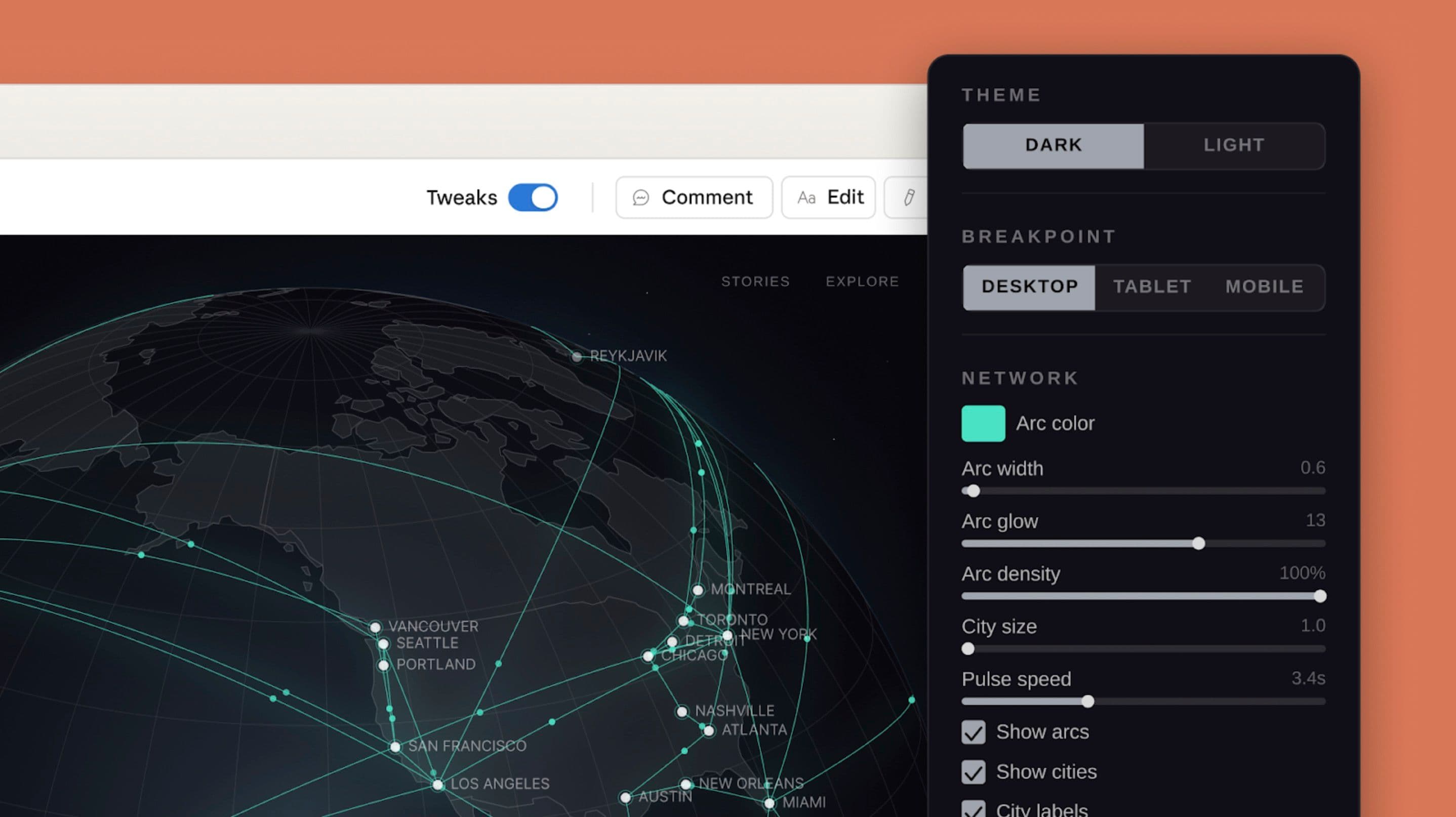
Refine with fine-grained controls. Comment inline on specific elements, edit text directly, or use adjustment knobs to tweak spacing, color, and layout live. Then ask Claude to apply your changes across the full design.
Дорабатывайте с тонким контролем. Оставляйте инлайн-комментарии к конкретным элементам, редактируйте текст напрямую или используйте регулировочные ручки, чтобы вживую подкручивать отступы, цвет и раскладку. Затем попросите Claude применить ваши изменения ко всему дизайну.
Collaborate. Designs have organization-scoped sharing. You can keep a document private, share it so anyone in your organization with the link can view it, or grant edit access so colleagues can modify the design and chat with Claude together in a group conversation.
Сотрудничайте. У дизайнов есть шеринг с областью видимости организации. Документ можно держать приватным, расшарить так, чтобы любой в вашей организации с ссылкой мог его посмотреть, или выдать права на редактирование, чтобы коллеги могли менять дизайн и общаться с Claude вместе в групповом разговоре.
Export anywhere. Share designs as an internal URL within your organization, save as a folder, or export to Canva, PDF, PPTX, or standalone HTML files.
Экспорт куда угодно. Делитесь дизайнами как внутренней ссылкой внутри вашей организации, сохраняйте в папку или экспортируйте в Canva, PDF, PPTX или отдельные HTML-файлы.
Handoff to Claude Code. When a design is ready to build, Claude packages everything into a handoff bundle that you can pass to Claude Code with a single instruction.
Передача в Claude Code. Когда дизайн готов к сборке, Claude упаковывает всё в handoff-бандл, который можно передать в Claude Code одной инструкцией.
Over the coming weeks, we'll make it easier to build integrations with Claude Design, so you can connect it to more of the tools your team already uses.
В ближайшие недели мы упростим создание интеграций с Claude Design, чтобы вы могли подключать его к большему числу инструментов, которые ваша команда уже использует.

Нам очень понравилось работать с Anthropic в последние пару лет, и мы разделяем глубокую сфокусированность на том, чтобы делать сложное простым. Миссия Canva всегда заключалась в том, чтобы дать миру возможность создавать дизайн, а это значит — приносить Canva туда, где рождаются идеи. Мы воодушевлены возможностью развивать наше сотрудничество с Claude, делая бесшовным перенос идей и черновиков из Claude Design в Canva, где они мгновенно становятся полностью редактируемыми и совместными дизайнами, готовыми к доработке, шерингу и публикации.

Сложная интерактивность и анимации Brilliant исторически были болезненны для прототипирования, но способность Claude Design превращать статичные дизайны в интерактивные прототипы стала для нас качественным скачком. Наши самые сложные страницы, на воссоздание которых в других инструментах уходило более 20 промптов, в Claude Design потребовали всего 2. Включение дизайн-замысла в передачу в Claude Code сделало переход от прототипа к продакшену бесшовным.

Claude Design сделал прототипирование для нашей команды драматически быстрее, позволяя проектировать вживую прямо во время обсуждений. Мы переходим от грубой идеи к рабочему прототипу ещё до того, как кто-либо выйдет из комнаты, и результат остаётся верен нашему бренду и дизайн-гайдлайнам. То, что раньше занимало неделю обмена брифами, макетами и раундами ревью, теперь происходит за один разговор.
Get started
Начало работы
Claude Design is available for Claude Pro, Max, Team, and Enterprise subscribers. Access is included with your plan and uses your subscription limits, with the option to continue beyond those limits by enabling extra usage.
Claude Design доступен подписчикам Claude Pro, Max, Team и Enterprise. Доступ включён в ваш план и расходует лимиты вашей подписки, с возможностью продолжить работу сверх этих лимитов, включив extra usage.
For Enterprise organizations, Claude Design is off by default. Admins can enable it in Organization settings.
Для Enterprise-организаций Claude Design выключен по умолчанию. Администраторы могут включить его в настройках организации.
Start designing at claude.ai/design.
Начните проектировать на claude.ai/design.
Related content
Связанные материалы
PwC is deploying Claude to build technology, execute deals, and reinvent enterprise functions for clients
PwC внедряет Claude для создания технологий, проведения сделок и переосмысления корпоративных функций для клиентов
PwC will roll out Claude Code and Cowork starting with U.S. teams and expanding toward a global workforce of hundreds of thousands of professionals, establish a joint Center of Excellence, and train and certify 30,000 PwC professionals on Claude.
PwC развернёт Claude Code и Cowork, начав с команд в США и расширяя охват до глобального штата в сотни тысяч специалистов, создаст совместный Центр компетенций и обучит и сертифицирует 30 000 специалистов PwC по Claude.
Anthropic forms $200 million partnership with the Gates Foundation
Anthropic заключает партнёрство с Gates Foundation на 200 миллионов долларов
Introducing Claude for Small Business
Представляем Claude for Small Business
We're launching Claude for Small Business, a package of connectors and ready-to-run workflows that put Claude inside the tools small businesses use every day.
Мы запускаем Claude for Small Business — пакет коннекторов и готовых к запуску воркфлоу, которые встраивают Claude в инструменты, которыми малый бизнес пользуется каждый день.