
How to Use AI to Write Emails in 2026 - The GTM with Clay Blog
Статья объясняет, как использовать AI для написания продающих email-писем в масштабе в 2026 году. Рассматриваются шесть ключевых техник: массовое написание, проверка грамматики, корректировка тона и стиля, оптимизация темы письма, персонализация и создание черновиков. Команда Clay отчитывается о результатах: в 2-3 раза более высокие response rate на более чем 800k cold-писем ежемесячно. В качестве рекомендуемого инструмента предлагается AI email drafter от Clay, использующий OpenAI и данные о лидах для гипер-персонализации сообщений со ссылками на подкасты, пресс-релизы и посты в соцсетях. Также описаны Claygent (AI-ассистент продаж), интеграции с 200+ инструментами и waterfall enrichment для обогащения данных.
Claygent Builder: The easiest way to build, test, and deploy GTM Agents
Claygent Builder: самый простой способ создавать, тестировать и развёртывать GTM-агентов
Build production-ready Claygents in natural language with Sculptor. Test on real data for free, track versions, and deploy once across every workflow. All inside Clay.
Создавайте production-ready Claygent на естественном языке с помощью Sculptor. Тестируйте на реальных данных бесплатно, отслеживайте версии и развёртывайте один раз для всех workflow. Всё внутри Clay.
How Clay Uses Clay Ads: From $250 to $25 CPL
Как Clay использует Clay Ads: с $250 до $25 CPL
See how Clay uses its own Ads feature to cut LinkedIn CPL from $250 to $25 and unlock Meta with enriched CRM audiences. No manual uploads needed.
Узнайте, как Clay использует собственную функцию Ads, чтобы снизить LinkedIn CPL с $250 до $25 и открыть Meta с обогащёнными CRM-аудиториями. Без ручных загрузок.
HG Insights Corporate Hierarchy: GTM Precision in Clay
HG Insights Corporate Hierarchy: точность GTM в Clay
Use HG Insights corporate hierarchy data in Clay to clean CRMs, map parent-child accounts, and trigger expansion plays. See how it works.
Используйте данные о корпоративной иерархии HG Insights в Clay, чтобы чистить CRM, строить карты parent-child аккаунтов и запускать expansion-плеи. Посмотрите, как это работает.
Sales GTM Engineering: How Clay Built the Role From Scratch
Sales GTM Engineering: как Clay создал эту роль с нуля
Learn what sales GTM engineering is, how it collapses SDR, AE, and SE roles into one, and how Clay built and hires for this high-leverage function. See how it works.
Узнайте, что такое sales GTM engineering, как эта роль объединяет SDR, AE и SE в одну позицию и как Clay построил и нанимает на эту высокорентабельную функцию. Посмотрите, как это работает.
How to Automate Inbound Lead Outreach: The Clay Playbook
Как автоматизировать outreach по inbound-лидам: плейбук Clay
Learn how to automate inbound lead outreach with enrichment, scoring, and personalized sequences. See the exact Clay workflow that runs without manual work.
Узнайте, как автоматизировать outreach по inbound-лидам с обогащением, скорингом и персонализированными последовательностями. Посмотрите точный workflow Clay, который работает без ручного труда.
demandDrive Joins Clay’s Partner Ecosystem as an Official Clay Studio Partner
demandDrive присоединяется к партнёрской экосистеме Clay в качестве официального Clay Studio Partner
demandDrive joins Clay’s partner ecosystem to help B2B teams turn account intelligence into pipeline and revenue with GTM engineering and automation.
demandDrive присоединяется к партнёрской экосистеме Clay, чтобы помогать B2B-командам превращать account intelligence в pipeline и выручку с помощью GTM-инжиниринга и автоматизации.
B2B Sales Prospecting: 15 Strategies to Drive More Conversions
B2B Sales Prospecting: 15 стратегий для роста конверсий
Master B2B sales prospecting with 15 proven strategies covering ICP building, multi-channel outreach, and list hygiene. Build a pipeline that converts.
Освойте B2B sales prospecting с 15 проверенными стратегиями: построение ICP, многоканальный outreach и гигиена списков. Постройте конверсионный pipeline.
AI Sales Assistants: 11 Ways to Accelerate Your Outbound
AI Sales Assistants: 11 способов ускорить ваш outbound
Discover 11 ways AI sales assistants automate lead research, enrichment, and email personalization. See how top B2B teams use them to accelerate outbound.
Откройте 11 способов, как AI sales assistants автоматизируют исследование лидов, обогащение и персонализацию email. Узнайте, как ведущие B2B-команды используют их для ускорения outbound.
The Three Laws of GTM: How to Win in the AI Era
Три закона GTM: как побеждать в эпоху AI
The three laws of GTM explain why uniqueness, saturation, and iteration speed determine who wins. Learn how AI changes the rules and what to do about it.
Три закона GTM объясняют, почему уникальность, насыщенность рынка и скорость итераций определяют победителей. Узнайте, как AI меняет правила и что с этим делать.
Best Work Email Finders by Segment: SMB vs. Enterprise
Лучшие work email finders по сегментам: SMB vs Enterprise
We tested 12 email finders across 4,700+ contacts to find the best work emails by segment. See accuracy, cost, and coverage winners for SMB and enterprise.
Мы протестировали 12 email finders на более чем 4 700 контактах, чтобы найти лучшие work email по сегментам. Смотрите победителей по точности, стоимости и охвату для SMB и enterprise.
How Clay Converts Trial Users Into Customers With Automated Outreach
Как Clay превращает trial-пользователей в клиентов с помощью автоматизированного outreach
See how Clay uses automated outreach to convert trial users into customers, with enrichment, lead scoring, and personalized HubSpot campaigns. Learn how.
Узнайте, как Clay использует автоматизированный outreach для конвертации trial-пользователей в клиентов: обогащение, lead scoring и персонализированные HubSpot-кампании. Узнайте как.
Best Mobile Phone Data Providers for B2B Sales Teams
Лучшие провайдеры данных по мобильным телефонам для B2B sales-команд
We tested 9,806 numbers across 10 B2B mobile phone data providers. See which wins on accuracy, coverage, and cost for NAMER, EMEA, and APAC.
Мы протестировали 9 806 номеров у 10 провайдеров данных по мобильным телефонам для B2B. Смотрите, кто побеждает по точности, охвату и стоимости в NAMER, EMEA и APAC.
How to Build a Complete AI Outbound Sales Funnel
Как построить полную AI outbound sales-воронку
Learn how to build a complete AI outbound sales funnel—from account scoring to personalized outreach—using Clay waterfalls and automation. See how it works.
Узнайте, как построить полную AI outbound sales-воронку — от скоринга аккаунтов до персонализированного outreach — с использованием waterfall'ов и автоматизации Clay. Посмотрите, как это работает.
How to Get More Customers Using Outbound Sales: A Complete Guide
Как получать больше клиентов с помощью outbound sales: полный гайд
Learn how outbound sales works, who it's right for, and how to build a strategy from prospecting to closing. Covers cold calling, email, and more.
Узнайте, как работает outbound sales, кому он подходит и как построить стратегию от prospecting до закрытия. Покрывает cold calling, email и многое другое.
How to Automate 6 Cold Email Campaigns in One Clay Workflow
Как автоматизировать 6 cold email кампаний в одном workflow Clay
Learn how to automate 6 cold email campaigns from a single Clay table — with enrichment, AI classification, and deduplication built in. See how it works.
Узнайте, как автоматизировать 6 cold email кампаний из одной таблицы Clay — с обогащением, AI-классификацией и дедупликацией. Посмотрите, как это работает.
How Clay Identifies Tier 1 Accounts: A Three-Score System
Как Clay определяет Tier 1 аккаунты: система трёх скоров
See how Clay identifies tier 1 accounts using a three-score system: fit, engagement, and contract value. Learn how sales and marketing align on the same priorities.
Узнайте, как Clay определяет tier 1 аккаунты с помощью системы трёх скоров: соответствие (fit), вовлечённость и стоимость контракта. Узнайте, как sales и marketing выравниваются по одним и тем же приоритетам.
Lead Scoring in Clay: A Step-by-Step Formula Guide
Lead Scoring в Clay: пошаговый гайд по формулам
Learn how to build lead scoring formulas in Clay to prioritize your ICP leads by employee count, job postings, and more. See how it works.
Узнайте, как строить формулы lead scoring в Clay, чтобы приоритизировать ICP-лиды по количеству сотрудников, открытым вакансиям и другим параметрам. Посмотрите, как это работает.
How to Validate Cold Outbound Offers and Find Message-Market Fit
Как валидировать cold outbound офферы и найти message-market fit
Learn how to validate cold outbound offers by finding message-market fit — from breaking down your value prop to testing with a phased email approach. See how it works.
Узнайте, как валидировать cold outbound офферы через поиск message-market fit — от разбора value prop до тестирования фазовым подходом к email. Посмотрите, как это работает.
Troubleshooting Outbound Sales and Prospecting: A Comprehensive Guide
Устранение неполадок в outbound sales и prospecting: исчерпывающий гайд
Fix broken outbound sales campaigns with this guide. Diagnose open and reply rates, reduce no-shows, qualify prospects with MEDDIC, and optimize what's working.
Чините сломанные outbound sales кампании с помощью этого гайда. Диагностируйте open и reply rate, снижайте no-show, квалифицируйте проспектов по MEDDIC и оптимизируйте то, что работает.
Bulk Enrichment: Enrich Millions of CRM Records in Clay
Bulk Enrichment: обогащайте миллионы CRM-записей в Clay
Bulk enrichment lets Enterprise teams enrich millions of Salesforce records with firmographics, tech stack, and AI research — then write results back automatically.
Bulk enrichment позволяет Enterprise-командам обогащать миллионы записей Salesforce фирмографикой, tech stack и AI-исследованиями — а затем автоматически записывать результаты обратно.
Clay Templates: Automate, Customize, and Replicate Any GTM Workflow
Шаблоны Clay: автоматизируйте, кастомизируйте и реплицируйте любой GTM workflow
Clay Templates let you replicate full GTM workflows in hours, not days. Automate prospecting from data scraping to AI messaging, free and fully customizable.
Шаблоны Clay позволяют реплицировать полные GTM workflow за часы, а не дни. Автоматизируйте prospecting от скрапинга данных до AI-сообщений, бесплатно и с полной кастомизацией.
How to Optimize Your Credit Usage in Clay
Как оптимизировать расход кредитов в Clay
Learn how to optimize your credit usage in Clay with conditional formulas, Clearbit waterfall lookups, and smarter enrichment workflows. Save credits fast.
Узнайте, как оптимизировать расход кредитов в Clay с помощью условных формул, waterfall lookup через Clearbit и более умных workflow обогащения. Экономьте кредиты быстро.
AI for sales prospecting
AI для sales prospecting
Learn about how to use AI for sales prospecting in this comprehensive guide, including framework for creating AI prompts and examples of cold email templates using AI that real sales teams have used successfully to land clients. AI sales prospecting can save your team thousands of hours—and double or triple your positive response rates.
Узнайте, как использовать AI для sales prospecting в этом подробном гайде, включая фреймворк для создания AI-промптов и примеры cold email шаблонов с использованием AI, которые реальные sales-команды успешно применили, чтобы получить клиентов. AI sales prospecting может сэкономить вашей команде тысячи часов и удвоить или утроить ваши positive response rate.
The Reverse Demo: How Clay Replaced Traditional B2B Sales Demos
The Reverse Demo: как Clay заменил традиционные B2B sales-демо
A reverse demo lets prospects solve real problems live, guided by your rep. Learn how Clay used 100+ sessions to boost conversion, retention, and product quality.
Reverse demo позволяет проспектам решать реальные проблемы в режиме реального времени под руководством вашего реп. Узнайте, как Clay использовал 100+ сессий для роста конверсии, retention и качества продукта.
Data Waterfalls: How to Maximize Contact Coverage with Clay
Data Waterfalls: как максимизировать покрытие контактов с Clay
Data waterfalls query multiple providers in sequence so you only pay for matches. See how Clay pushes coverage from 30% to 80%+ without annual contracts.
Data waterfalls последовательно опрашивают нескольких провайдеров, так что вы платите только за совпадения. Узнайте, как Clay поднимает покрытие с 30% до 80%+ без годовых контрактов.
How Clay Runs ABM Campaigns: A Step-by-Step Playbook
Как Clay проводит ABM-кампании: пошаговый плейбук
See how Clay runs ABM campaigns — scoring 300 accounts, personalizing mailers and landing pages, and automating SDR follow-up. Learn how.
Узнайте, как Clay проводит ABM-кампании — скоринг 300 аккаунтов, персонализация мейлеров и landing-страниц, автоматизация SDR follow-up. Узнайте как.
How We Built Clay's GTM Engineering Function
Как мы построили функцию GTM Engineering в Clay
See how Clay built its GTM engineering function with sprint-based delivery, founder-level reporting, and full sales automation. A practical inside look.
Узнайте, как Clay построил функцию GTM engineering со спринтовой доставкой, founder-уровнем отчётности и полной автоматизацией продаж. Практический взгляд изнутри.
Best Personal Email Finder Tools: Tested and Ranked
Лучшие инструменты поиска персональных email: протестировано и проранжировано
We tested 5 personal email finder tools across 2,354 prospects. See accuracy, coverage, and pricing data — plus the waterfall order that hit 79% coverage.
Мы протестировали 5 инструментов поиска персональных email на 2 354 проспектах. Смотрите данные по точности, охвату и ценам — плюс waterfall-порядок, который дал 79% покрытия.
How to Use OpenAI to Write Cold Emails from Scratch with Clay
Как использовать OpenAI для написания cold email с нуля в Clay
Learn how to use OpenAI to write personalized cold emails at scale with Clay. Set up the integration, craft better prompts, and boost deliverability.
Узнайте, как использовать OpenAI для написания персонализированных cold email в масштабе с Clay. Настройте интеграцию, создавайте лучшие промпты и повышайте deliverability.
How to Run a Personalized Demo Play at Scale with Clay
Как запустить персонализированный demo play в масштабе с Clay
Learn how to automate a personalized demo play using Clay, Claygent, and AI enrichment to build custom mockups at scale. See how it works.
Узнайте, как автоматизировать персонализированный demo play с помощью Clay, Claygent и AI-обогащения для создания кастомных мокапов в масштабе. Посмотрите, как это работает.
Automated Slide Deck Creation: How Clay Builds QBRs from Your Data
Автоматизированное создание презентаций: как Clay строит QBR из ваших данных
Clay's automated slide deck creation pulls from Snowflake, Salesforce, and Gong to build QBRs in minutes. Save 90+ hours per quarter. See how it works.
Автоматизированное создание презентаций в Clay тянет данные из Snowflake, Salesforce и Gong для создания QBR за минуты. Экономия 90+ часов в квартал. Посмотрите, как это работает.
HG Insights + Clay: B2B Technographic and Firmographic Data
HG Insights + Clay: B2B технографические и фирмографические данные
HG Insights surfaces deep technographic and firmographic data from billions of documents. Use it in Clay workflows to enrich accounts and power GTM. See how it works.
HG Insights раскрывает глубокие технографические и фирмографические данные из миллиардов документов. Используйте их в workflow Clay, чтобы обогащать аккаунты и усиливать GTM. Посмотрите, как это работает.
B2B Cold Email Deliverability: 21 Best Practices
Deliverability B2B cold email: 21 лучшая практика
Master B2B cold email deliverability with 21 proven best practices: domain setup, inbox warmup, authentication, and copy tips that keep you out of spam. Learn how.
Освойте deliverability B2B cold email с 21 проверенной практикой: настройка домена, прогрев инбокса, аутентификация и советы по копирайтингу, которые держат вас вне спама. Узнайте как.
Basics of Google Search Operators: A Practical Guide
Основы Google Search Operators: практический гайд
Learn the basics of Google Search Operators and how to use them in Clay for prospecting, list building, and company research. See how it works.
Изучите основы Google Search Operators и узнайте, как использовать их в Clay для prospecting, построения списков и исследования компаний. Посмотрите, как это работает.
AI Lead Generation: The Complete B2B Guide
AI Lead Generation: полный B2B-гайд
Learn how AI lead generation automates list building, enrichment, and personalized outreach for B2B teams. Scale your pipeline without scaling headcount. See how it works.
Узнайте, как AI lead generation автоматизирует построение списков, обогащение и персонализированный outreach для B2B-команд. Масштабируйте pipeline без увеличения штата. Посмотрите, как это работает.
Clay MCP: Ops-built workflows, consumable by reps
Clay MCP: workflow от ops-команды, удобные для реп
Clay MCP: Ops-built workflows, consumable by reps
Clay MCP: workflow от ops-команды, удобные для реп
How to Manage and Enrich Inbound Leads Automatically
Как автоматически управлять и обогащать inbound-лиды
Learn how to manage and enrich inbound leads automatically using a four-phase workflow that scores, segments, and triggers outreach from one email. See how it works.
Узнайте, как автоматически управлять и обогащать inbound-лиды с помощью четырёхфазного workflow, который скорит, сегментирует и запускает outreach с одного email. Посмотрите, как это работает.
GTM Alpha: How Winning Teams Build a Competitive Edge
GTM Alpha: как побеждающие команды строят конкурентное преимущество
GTM alpha is the edge winning teams build with unique data and signal-based plays. Learn how to find hidden signals, run better plays, and outpace competitors.
GTM alpha — это преимущество, которое побеждающие команды строят с уникальными данными и signal-based плеями. Узнайте, как находить скрытые сигналы, проводить лучшие плеи и опережать конкурентов.
Why Good CRM Data Matters and How Clay Helps
Почему хорошие CRM-данные важны и как Clay помогает
Poor CRM data kills outreach. Learn why CRM data coverage fails and how Clay's waterfall enrichment lifts coverage rates from 20% to 80%. See how it works.
Плохие CRM-данные убивают outreach. Узнайте, почему покрытие CRM-данных проваливается и как waterfall enrichment в Clay поднимает покрытие с 20% до 80%. Посмотрите, как это работает.
How to Use Formulas in Clay: AI Generator and Manual Entry
Как использовать формулы в Clay: AI-генератор и ручной ввод
Learn how to use formulas in Clay with the AI Formula Generator or manual entry. Transform and clean your data faster. See how it works.
Узнайте, как использовать формулы в Clay с помощью AI Formula Generator или ручного ввода. Трансформируйте и очищайте данные быстрее. Посмотрите, как это работает.
GTM Engineering: What It Is, How It Works, and How to Hire
GTM Engineering: что это, как работает и как нанимать
GTM engineering turns ops teams into revenue builders using AI and automation. Learn what GTM engineers do, how to structure the role, and how to hire one.
GTM engineering превращает ops-команды в строителей выручки с помощью AI и автоматизации. Узнайте, чем занимаются GTM-инженеры, как структурировать роль и как нанять такого специалиста.
Formulas in Clay: A Beginner's Intro for Non-Engineers
Формулы в Clay: введение для не-инженеров
Learn how to use formulas in Clay without coding. This intro covers conditional statements, combining columns, and auto-qualifying leads. Start in 30 minutes.
Узнайте, как использовать формулы в Clay без кода. Это введение покрывает условные конструкции, объединение колонок и автоквалификацию лидов. Начните за 30 минут.
How Clay Uses Clay for SEO and AEO: 3 Systems That Scale
Как Clay использует Clay для SEO и AEO: 3 системы, которые масштабируются
See how Clay uses Clay for SEO and AEO: automated content refresh, video-to-page conversion, and a custom AI visibility dashboard. Learn how.
Узнайте, как Clay использует Clay для SEO и AEO: автоматическое обновление контента, конвертация видео в страницы и кастомный дашборд AI-видимости. Узнайте как.
Turn Web Visitors into Leads: A Warm Outbound Play for B2B Sales
Превращайте посетителей сайта в лидов: warm outbound play для B2B sales
Learn how to turn web visitors into leads using a warm outbound play for B2B sales — with RB2B, Clay, and Lemlist. See how it works.
Узнайте, как превращать посетителей сайта в лидов с помощью warm outbound play для B2B sales — с RB2B, Clay и Lemlist. Посмотрите, как это работает.
How to Use Web Scraping to Enrich Your Data with Clay
Как использовать web scraping для обогащения данных в Clay
Learn how to use web scraping to enrich your data without code. Clay's Claygent answers deep GTM research questions at scale. See how it works.
Узнайте, как использовать web scraping для обогащения данных без кода. Claygent от Clay отвечает на глубокие GTM-исследовательские вопросы в масштабе. Посмотрите, как это работает.
How to Create a Sales Prospect List in Minutes
Как создать список sales-проспектов за минуты
Learn how to create your own sales prospect list in minutes using Clay. Pull from 40+ sources, enrich with ICP data, and export to your CRM. See how it works.
Узнайте, как создать собственный список sales-проспектов за минуты с помощью Clay. Тяните данные из 40+ источников, обогащайте ICP-данными и экспортируйте в CRM. Посмотрите, как это работает.
Best B2B Email List Providers: Tested and Ranked (2026)
Лучшие провайдеры B2B email-списков: протестировано и проранжировано (2026)
We tested 8 B2B email list providers head-to-head. See accuracy results, per-email pricing, and how to waterfall providers for maximum coverage.
Мы протестировали 8 провайдеров B2B email-списков head-to-head. Смотрите результаты точности, цену за email и как использовать waterfall провайдеров для максимального покрытия.
Outbound Sales Automation: How to 10x Pipeline Without More SDRs
Outbound Sales Automation: как 10x pipeline без дополнительных SDR
Learn how outbound sales automation replaces manual SDR work, cuts cost per email by 100x, and scales pipeline without growing headcount. See how it works.
Узнайте, как outbound sales automation заменяет ручную работу SDR, снижает стоимость одного email в 100 раз и масштабирует pipeline без роста штата. Посмотрите, как это работает.
The Wake the Dead Play: Reactivate Closed-Lost Deals with Clay
The Wake the Dead Play: реактивация closed-lost сделок с Clay
The wake the dead play uses Clay + ChatGPT to send automated, personalized emails to closed-lost prospects. Restart stalled deals in a few steps. Learn how.
Wake the dead play использует Clay + ChatGPT для отправки автоматизированных персонализированных email closed-lost проспектам. Перезапустите застопорившиеся сделки за несколько шагов. Узнайте как.
Three Tips to Guarantee Email Deliverability for Cold Outbound
Три совета, гарантирующих email deliverability для cold outbound
Split volume, verify contacts, and personalize copy to guarantee email deliverability for cold outbound. Three actionable tips that keep you out of spam.
Разделяйте объёмы, верифицируйте контакты и персонализируйте копирайт, чтобы гарантировать email deliverability для cold outbound. Три практических совета, которые держат вас вне спама.
How Clay Uses Clay for Customer Support: 3 Real Workflows
Как Clay использует Clay для клиентской поддержки: 3 реальных workflow
See how Clay's customer support team uses Clay to enrich Intercom tickets, automate QA, and draft help articles. Real workflows, real results.
Узнайте, как команда клиентской поддержки Clay использует Clay для обогащения тикетов Intercom, автоматизации QA и подготовки help-статей. Реальные workflow, реальные результаты.
B2B Cold Email Copywriting: The Complete Guide
Копирайтинг B2B cold email: полный гайд
Master B2B cold email copywriting with proven templates, a research framework, and a checklist used to send 800k+ emails a month. Start writing emails that get replies.
Освойте копирайтинг B2B cold email с проверенными шаблонами, фреймворком для исследования и чеклистом, использованным для отправки 800k+ email в месяц. Начните писать email, которые получают ответы.
Introducing Clay Functions
Представляем Clay Functions
Build Your GTM Logic Once, Apply It Everywhere
Создайте свою GTM-логику один раз — применяйте её везде
Clay and Apollo Integration: Enrichment, Sequencing, and More
Интеграция Clay и Apollo: обогащение, sequencing и многое другое
The Clay and Apollo integration unlocks 5X faster enrichment and direct sequencer API access. See how joint customers go from data to booked meetings.
Интеграция Clay и Apollo даёт обогащение в 5 раз быстрее и прямой доступ к API секвенсера. Узнайте, как совместные клиенты идут от данных к назначенным встречам.
The Many Lives of Spreadsheets: A History and What Comes Next
Многие жизни электронных таблиц: история и что дальше
Explore the many lives of spreadsheets — from VisiCalc in 1979 to self-filling automation tools today. See how the no-code vision keeps evolving.
Исследуйте многие жизни электронных таблиц — от VisiCalc в 1979 году до сегодняшних инструментов self-filling автоматизации. Узнайте, как продолжает развиваться no-code видение.
AI recruiting strategies
AI-стратегии рекрутинга
Learn our top AI recruiting workflows to help you identify, research, and reach out to qualified candidates for open roles. AI can eliminate manual work and help you reach out to—and land—better employees for your clients.
Узнайте наши лучшие AI workflow для рекрутинга, которые помогут вам идентифицировать, исследовать и связываться с квалифицированными кандидатами на открытые позиции. AI может устранить ручную работу и помочь связаться — и нанять — лучших сотрудников для ваших клиентов.
How to Hire a GTM Engineer: The Complete Guide
Как нанять GTM-инженера: полный гайд
Learn how to hire a GTM engineer: when to make the hire, what skills to screen for, red flags to avoid, and where to find the best candidates. See how it works.
Узнайте, как нанять GTM-инженера: когда делать найм, какие навыки проверять, каких красных флагов избегать и где искать лучших кандидатов. Посмотрите, как это работает.
Inside Clay's GTM Engineering Lab: Plays, Principles, and Automation
Внутри лаборатории GTM Engineering Clay: плеи, принципы и автоматизация
See how Clay's GTM engineering lab turns internal problems into revenue plays using AI, automation, and data-driven principles. Learn how it works.
Узнайте, как лаборатория GTM engineering Clay превращает внутренние проблемы в плеи для выручки с помощью AI, автоматизации и data-driven принципов. Узнайте, как это работает.
How to Build the Most Targeted Account Lists Possible
Как построить максимально таргетированные списки аккаунтов
Generic tools leave bad-fit companies in your account list. Learn how to build targeted account lists using AI enrichment and real workflow examples in Clay.
Универсальные инструменты оставляют компании с плохим fit в вашем списке аккаунтов. Узнайте, как строить таргетированные списки аккаунтов с использованием AI-обогащения и реальных примеров workflow в Clay.
Personalized Direct Mail at Scale: The Gifting Play with Clay
Персонализированный direct mail в масштабе: gifting play с Clay
Learn how to run personalized direct mail campaigns using Clay — validate contacts, generate AI gift copy, and export to email. See how it works.
Узнайте, как проводить персонализированные direct mail кампании с помощью Clay — валидируйте контакты, генерируйте AI-копирайт для подарков и экспортируйте в email. Посмотрите, как это работает.
How to Set Up Your Full Inbound Sales Process on Clay
Как настроить полный inbound sales процесс в Clay
Learn how to set up your full inbound sales process on Clay — enrich leads, tag MQLs, and automate email campaigns from form to demo. See how it works.
Узнайте, как настроить полный inbound sales процесс в Clay — обогащайте лиды, тегайте MQL и автоматизируйте email-кампании от формы до демо. Посмотрите, как это работает.
AI-Enabled GTM for Private Equity: The Value Creation Playbook
AI-enabled GTM для private equity: плейбук создания стоимости
Learn how AI-enabled GTM for private equity drives value creation across portfolios—from data quality to agentic workflows. See how it works.
Узнайте, как AI-enabled GTM для private equity создаёт стоимость в портфелях — от качества данных до агентских workflow. Посмотрите, как это работает.
Do More With Your Data: Clay's Post-Data-Provider Approach
Делайте больше с вашими данными: post-data-provider подход Clay
Clay's post-data-provider approach combines 150+ providers, waterfall enrichment, and AI scraping to maximize data coverage. See how it works.
Post-data-provider подход Clay сочетает 150+ провайдеров, waterfall enrichment и AI-скрапинг для максимизации покрытия данных. Посмотрите, как это работает.
Google Maps Lead Generation for Niche Local Businesses
Google Maps Lead Generation для нишевых локальных бизнесов
Learn how to use Google Maps lead generation to find niche local businesses, enrich owner contacts, and send personalized outreach at scale with Clay.
Узнайте, как использовать Google Maps lead generation для поиска нишевых локальных бизнесов, обогащения контактов владельцев и отправки персонализированного outreach в масштабе с помощью Clay.
24 AI Email Personalization Examples for Cold Outreach (With Prompts)
24 примера AI email-персонализации для cold outreach (с промптами)
Get 24 AI email personalization examples for cold outreach, with ChatGPT prompts you can run at scale in Clay. Learn how to write emails that actually convert.
Получите 24 примера AI email-персонализации для cold outreach с ChatGPT-промптами, которые можно запускать в масштабе в Clay. Узнайте, как писать email, которые реально конвертят.
How to Ace Your Follow-Ups: A Practical Sales Guide
Как мастерски делать follow-up: практический sales-гайд
Learn how to ace your follow-ups with value-driven outreach, personalization tips, multi-channel tactics, and automation tools that keep deals moving. See how it works.
Узнайте, как мастерски делать follow-up с value-driven outreach, советами по персонализации, многоканальной тактикой и инструментами автоматизации, которые двигают сделки. Посмотрите, как это работает.
How to Prioritize Your Waitlist with Lead Enrichment
Как приоритизировать ваш waitlist с помощью lead enrichment
Learn how to prioritize your waitlist using lead enrichment. Turn raw signups into qualified leads by company, title, and role — no long forms needed. See how.
Узнайте, как приоритизировать ваш waitlist с помощью lead enrichment. Превратите сырые регистрации в квалифицированные лиды по компании, должности и роли — без длинных форм. Узнайте как.
B2B Cold Email Templates: Frameworks That Get Replies
Шаблоны B2B cold email: фреймворки, которые получают ответы
Learn how to write B2B cold email templates that convert with a proven 5-part framework, follow-up strategy, and real examples. See how it works.
Узнайте, как писать шаблоны B2B cold email, которые конвертят — с проверенным 5-частным фреймворком, стратегией follow-up и реальными примерами. Посмотрите, как это работает.
Audiences: now in Enterprise beta
Audiences: теперь в Enterprise beta
Clay Audiences unifies your CRM, product data, and intent signals into one layer — so reps and agents can run precise, personalized GTM plays at scale.
Clay Audiences объединяет вашу CRM, продуктовые данные и intent-сигналы в один слой — чтобы реп и агенты могли запускать точные персонализированные GTM-плеи в масштабе.
The thinking behind our new pricing: our internal memo
Мышление за нашим новым прайсингом: наша внутренняя памятка
Clay pricing memo: INTERNAL
Памятка о ценах Clay: INTERNAL
Introducing Clay’s new pricing
Представляем новый прайсинг Clay
Today, we’re launching a pricing update that reduces data costs, and simplifies and improves the value of our plans. Our goal is to have Clay be your default tool for GTM Engineering.
Сегодня мы запускаем обновление прайсинга, которое снижает стоимость данных, упрощает и улучшает ценность наших планов. Наша цель — сделать Clay вашим default-инструментом для GTM Engineering.
Clay partners with Lusha and Beauhurst to expand European data coverage
Clay объединяется с Lusha и Beauhurst для расширения покрытия европейских данных
Lusha adds lookalike prospecting, contact enrichment, and signals in EMEA. Beauhurst adds private funding and corporate structure data in the UK and Germany.
Lusha добавляет lookalike prospecting, обогащение контактов и сигналы в EMEA. Beauhurst добавляет данные о приватном финансировании и корпоративной структуре в Великобритании и Германии.
Source your precise TAM from lookalikes you can trust with Ocean.io and Clay
Найдите свой точный TAM от lookalikes, которым можно доверять, с Ocean.io и Clay
Clay + Ocean now enable preview-based B2B lookalike discovery. Preview leads before committing credits and expand your TAM with greater precision.
Clay + Ocean теперь предлагают preview-based discovery B2B-lookalike. Просматривайте лиды до фиксации кредитов и расширяйте свой TAM с большей точностью.
Clay doubles down on supporting European GTM teams
Clay удваивает поддержку европейских GTM-команд
Clay's waterfall enrichment delivers 2–3x more mobile phone coverage than leading solo providers across Europe. Plus new data partnerships, a London office, and timezone-aligned support.
Waterfall enrichment от Clay даёт в 2-3 раза больше покрытия мобильных телефонов, чем ведущие одиночные провайдеры по Европе. Плюс новые data-партнёрства, офис в Лондоне и поддержка с учётом часовых поясов.
In Nigeria, she built a life where money wouldn’t decide
В Нигерии она построила жизнь, где деньги не будут решать
Clay blog | In Nigeria, she built a life where money wouldn’t decide
Блог Clay | В Нигерии она построила жизнь, где деньги не будут решать
Sculptor Analyst Mode: Turning Context-Rich Data Into Actionable GTM Insights
Sculptor Analyst Mode: превращение контекстно-богатых данных в actionable GTM-инсайты
Gather business intelligence and share documents of this analysis directly from Sculptor
Собирайте бизнес-аналитику и делитесь документами с этим анализом прямо из Sculptor
In a place where girls often choose between career or marriage, she carved her own path
В месте, где девушки часто выбирают между карьерой и замужеством, она проложила свой путь
Javeria Shah won the Clay Cup 2025 despite being denied a US visa and competing remotely from Pakistan. Learn how she transitioned from electronics engineering into GTM engineering and built her own business.
Javeria Shah выиграла Clay Cup 2025, несмотря на отказ в визе США и удалённое участие из Пакистана. Узнайте, как она перешла из electronics engineering в GTM engineering и построила собственный бизнес.
How we designed Sculpt
Как мы спроектировали Sculpt
Our first conference, Sculpt, is where the analog soul of Clay met the digital mind of Clay.
Наша первая конференция Sculpt — место, где аналоговая душа Clay встретилась с цифровым умом Clay.
Clay announces second employee tender offer in nine months at a $5B valuation
Clay объявляет второй employee tender offer за девять месяцев при оценке $5B
A rare repeat employee liquidity event, designed to give builders flexibility as Clay accelerates
Редкое повторное мероприятие по ликвидности для сотрудников, призванное дать строителям гибкость, пока Clay ускоряется
Clay is now available as a connector in Claude
Clay теперь доступен как коннектор в Claude
Bring Clay's contact databases, enrichment providers, and AI agents into your Claude workflow.
Привнесите контактные базы данных Clay, провайдеров обогащения и AI-агентов в свой workflow Claude.
Sellers have a new AI edge: Clay in ChatGPT
У продавцов новое AI-преимущество: Clay в ChatGPT
Use Clay directly in ChatGPT to find the right buyers, research people and companies, and draft personalized outbound. One conversation, powered by live GTM data.
Используйте Clay прямо в ChatGPT, чтобы находить правильных покупателей, исследовать людей и компании и составлять персонализированный outbound. Один разговор, движимый живыми GTM-данными.
Clay reaches $100M ARR
Clay достигает $100M ARR
Clay has crossed $100M ARR, growing from $1M to $100M in two years after six years of foundational product work. The milestone reflects durable customer adoption, efficient growth, and an ecosystem of GTM builders using Clay to power their business.
Clay перешагнул $100M ARR, выросший с $1M до $100M за два года после шести лет фундаментальной работы над продуктом. Этот рубеж отражает долгосрочное принятие клиентами, эффективный рост и экосистему GTM-строителей, использующих Clay для своего бизнеса.
Clay Certifications: Turning mastery into credentials that matter
Clay Certifications: превращение мастерства в значимые сертификаты
The Clay education team has built a certification program that runs entirely on Clay and gives users credentials that actually matter
Команда образования Clay построила программу сертификации, которая полностью работает на Clay и даёт пользователям сертификаты, которые действительно важны
Mobile Phone Verification Methodology
Методология верификации мобильных телефонов
Clay has partnered with The Kiln to setup a series of large-scale data test across mobile phone, work email, personal email, email verification, and more. Below, we explain the approach to these tests.
Clay объединился с The Kiln для проведения серии масштабных тестов данных по мобильным телефонам, work email, персональному email, верификации email и др. Ниже мы объясняем подход к этим тестам.
Work Email Verification Methodology
Методология верификации work email
Clay has partnered with The Kiln to setup a series of large-scale data test across mobile phone, work email, personal email, email verification, and more. Below, we explain the approach to these tests.
Clay объединился с The Kiln для проведения серии масштабных тестов данных по мобильным телефонам, work email, персональному email, верификации email и др. Ниже мы объясняем подход к этим тестам.
Stop Guessing, Start Analyzing: How Sculptor Turns Your GTM Data Into Your Competitive Advantage
Хватит угадывать, начинайте анализировать: как Sculptor превращает ваши GTM-данные в конкурентное преимущество
Analyze your GTM data with Sculptor to turn fragmented information into actionable insight.
Анализируйте ваши GTM-данные с Sculptor, чтобы превратить фрагментированную информацию в actionable инсайты.
Find and outreach local businesses with Openmart and Clay Sequencer
Найдите и проведите outreach к локальным бизнесам с Openmart и Clay Sequencer
Get the right contacts for local businesses without stitching together multiple tools or wasting valuable time on setup instead of selling.
Получите правильные контакты для локальных бизнесов без склеивания нескольких инструментов или траты ценного времени на настройку вместо продаж.
Announcing Web Intent
Анонсируем Web Intent
Use Website Intent in Clay to see which companies visit your site, track engagement, and trigger personalized GTM plays. Turn website traffic into real buyer intent data.
Используйте Website Intent в Clay, чтобы видеть, какие компании посещают ваш сайт, отслеживать вовлечённость и запускать персонализированные GTM-плеи. Превратите трафик сайта в реальные данные о намерениях покупателей.
How Clay Uses Clay: Conversational Data
Как Clay использует Clay: разговорные данные
How we use Clay to mine millions of pages of call transcripts to generate revenue, and how you can use it too.
Как мы используем Clay, чтобы извлекать выручку из миллионов страниц транскриптов звонков, и как вы можете использовать это тоже.
Sculpting GTM’s future with six major launches
Лепим будущее GTM с шестью крупными запусками
Today at Sculpt, we're launching six major features that will help teams turn any growth idea into reality faster.
Сегодня на Sculpt мы запускаем шесть крупных функций, которые помогут командам быстрее превращать любую идею роста в реальность.
Introducing Claygent Navigator
Представляем Claygent Navigator
A new Claygent model that can use a browser to take actions and extract information from webpages.
Новая модель Claygent, которая может использовать браузер для выполнения действий и извлечения информации с веб-страниц.
Announcing the Clay Partner Program
Анонсируем Clay Partner Program
The Clay Partner Program is to a partner, what a toolbox is to an artist. It keeps essential resources within reach and grows more sophisticated as your expertise develops. We've designed everything around one simple principle: helping you grow your business as Clay grows.
Clay Partner Program для партнёра — то же, что ящик с инструментами для художника. Она держит важные ресурсы под рукой и становится более продвинутой по мере развития вашей экспертизы. Мы построили всё вокруг одного простого принципа: помогать вам растить ваш бизнес по мере роста Clay.
Introducing GPT-5 in Claygent: sharper research, stronger formulas, better outbound
Представляем GPT-5 в Claygent: более острый ресёрч, более сильные формулы, более лучший outbound
GPT-5 is now a model option across Clay, bringing the best research and conversational writing we've ever shipped to your GTM workflows.
GPT-5 теперь доступен как опция модели по всему Clay, привнося лучший ресёрч и разговорное письмо, которое мы когда-либо выпускали, в ваши GTM workflow.
Clay Series C announcement. The GTM engineering era begins now
Анонс Series C от Clay. Эра GTM engineering начинается сейчас
We raised a $100M Series C at a $3.1B valuation to power GTM engineering!
Мы привлекли $100M Series C при оценке $3.1B для развития GTM engineering!
Claygent surpasses 1 billion runs
Claygent превышает 1 миллиард запусков
The world's most loved AI research agent in GTM has passes a huge milestone at 1 billion runs.
Самый любимый в мире AI-исследовательский агент в GTM прошёл огромный рубеж в 1 миллиард запусков.
Announcing Sculpt: Clay’s first annual user conference
Анонсируем Sculpt: первую ежегодную пользовательскую конференцию Clay
Join us for Sculpt, Clay’s first annual user conference on Sept 17 in San Francisco where GTM leaders build AI workflows, share creative tactics, and get early access to new features.
Присоединяйтесь к нам на Sculpt, первой ежегодной пользовательской конференции Clay 17 сентября в Сан-Франциско, где GTM-лидеры строят AI workflow, делятся креативной тактикой и получают ранний доступ к новым функциям.
Announcing custom signals at Clay
Анонсируем custom signals в Clay
Clay's new custom signals platform helps sales teams track unique data changes that indicate buying opportunities. Turn any data point into a sales signal, enrich with context, and automate personalized outreach to find GTM alpha your competitors miss.
Новая платформа custom signals в Clay помогает sales-командам отслеживать уникальные изменения данных, указывающие на возможности покупки. Превратите любую точку данных в sales-сигнал, обогащайте контекстом и автоматизируйте персонализированный outreach, чтобы находить GTM alpha, который пропускают ваши конкуренты.
Clay announces employee tender offer led by Sequoia at $1.5B valuation
Clay объявляет employee tender offer во главе с Sequoia при оценке $1.5B
Clay allows employees to sell vested shares for immediate liquidity through a $20M tender offer at a $1.5B valuation. With 10x revenue growth in 2022-2023 and serving 8,000+ customers including OpenAI and Hubspot, Clay continues to change how businesses approach go-to-market strategies with their AI agent Claygent.
Clay позволяет сотрудникам продать вестированные акции для немедленной ликвидности через $20M tender offer при оценке $1.5B. С ростом выручки в 10 раз в 2022-2023 и обслуживанием 8 000+ клиентов, включая OpenAI и Hubspot, Clay продолжает менять подход бизнесов к go-to-market стратегиям со своим AI-агентом Claygent.
Create personalized presentations at scale with Clay and Google Slides
Создавайте персонализированные презентации в масштабе с Clay и Google Slides
Automate personalized sales decks with Clay’s Google Slides integration. Instantly generate tailored presentations for leads, customers, QBRs, and internal updates. Use one template to create hundreds of presentations at scale.
Автоматизируйте персонализированные sales-колоды с интеграцией Clay и Google Slides. Мгновенно генерируйте кастомизированные презентации для лидов, клиентов, QBR и внутренних обновлений. Используйте один шаблон для создания сотен презентаций в масштабе.
Turn Gong conversations into automated GTM workflows
Превращайте разговоры из Gong в автоматизированные GTM workflow
Clay now integrates with Gong—turn messy call transcripts into powerful automations in Salesforce, HubSpot, Notion, Slack, Google Sheets, and 100+ other integrations.
Clay теперь интегрируется с Gong — превращайте messy транскрипты звонков в мощную автоматизацию в Salesforce, HubSpot, Notion, Slack, Google Sheets и 100+ других интеграциях.

Product
Продукт
Use Cases
Сценарии использования
Solutions
Решения
Resources
Ресурсы
Company
Компания
Pricing
Цены
Features
Возможности


ClaygentsИсследуйте целевые компании и людей с помощью AIWaterfallКомбинируйте нескольких провайдеров данных для лучшего покрытияSignals and IntentОтслеживайте смену работы, повышения и другие сигналыМаркетплейс данныхПокупайте данные у 150+ провайдеров в одном месте



AdsСинхронизируйте таргетированные рекламные аудитории в LinkedIn, Meta и GoogleAudiencesЦентрализуйте свои first- и third-party источники данных в ClaySequencerИспользуйте нативный секвенсер Clay или автоматизируйте сообщенияSculptorСтройте GTM workflow на естественном языке
Additional
Дополнительно
FunctionsДлинное описание ссылки будет здесь.AI formattingДлинное описание ссылки будет здесь.Clay MCPДлинное описание ссылки будет здесь.Clay for SalesforceДлинное описание ссылки будет здесь.ChangelogДлинное описание ссылки будет здесь.Безопасность ClayДлинное описание ссылки будет здесь.
How Clay uses Clay
Как Clay использует Clay
LinkedIn + Meta Ads on Autopilot
LinkedIn + Meta Ads на автопилоте




CRM-обогащениеДлинное описание ссылки будет здесь.Prospecting для репДлинное описание ссылки будет здесь.Автоматический inboundСтройте рекламные аудитории и синхронизируйте их с основными рекламными платформамиABMДлинное описание ссылки будет здесь.



Reverse ETLДлинное описание ссылки будет здесь.OutboundДлинное описание ссылки будет здесь.PLG-помощникДлинное описание ссылки будет здесь.Поиск TAMДлинное описание ссылки будет здесь.



Исследование аккаунтовДлинное описание ссылки будет здесь.Помощник репуДлинное описание ссылки будет здесь.Планирование территорийДлинное описание ссылки будет здесь.
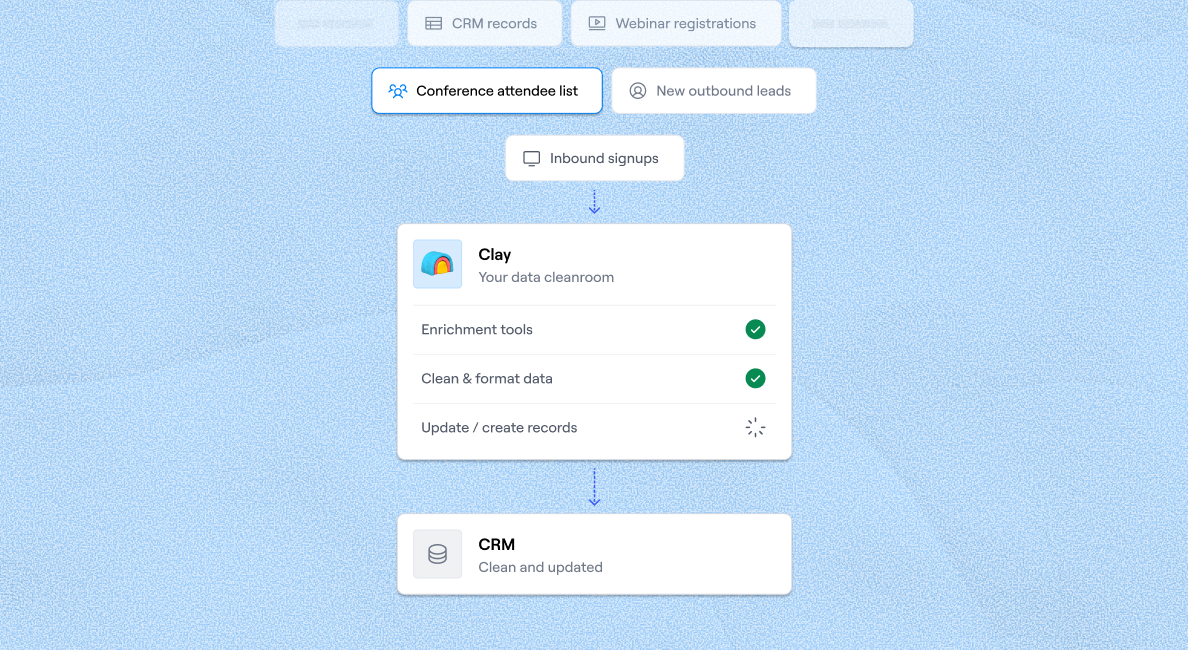
CRM enrichment
CRM-обогащение
Keep your CRM clean with the highest quality data
Содержите CRM в чистоте с данными высочайшего качества
BY TEAM
ПО КОМАНДЕ



GTM OpsДлинное описание ссылки будет здесь.MarketingДлинное описание ссылки будет здесь.SalesДлинное описание ссылки будет здесь.
BY STAGE
ПО СТАДИИ


BY CUSTOMERS
ПО КЛИЕНТАМ


AlertMedia
AlertMedia
Link long form description will go in this slot here.
Длинное описание ссылки будет здесь.

Legora
Legora
Link long form description will go in this slot here.
Длинное описание ссылки будет здесь.

Mistral AI
Mistral AI
Link long form description will go in this slot here.
Длинное описание ссылки будет здесь.

Pump
Pump
Link long form description will go in this slot here.
Длинное описание ссылки будет здесь.

Terrapinn
Terrapinn
Link long form description will go in this slot here.
Длинное описание ссылки будет здесь.
Intercom
Intercom
Grew their outbound-sourced pipeline by +140%
Вырастили outbound-sourced pipeline на +140%

START GROWING
НАЧНИТЕ РАСТИ




LivestreamsДлинное описание ссылки будет здесь.Cohort live-занятияДлинное описание ссылки будет здесь.Найти Clay-экспертовДлинное описание ссылки будет здесь.Нанять GTM-талантыДлинное описание ссылки будет здесь.GTME Job boardДлинное описание ссылки будет здесь.
DISCOVER
ОТКРЫТЬ
UniversityДлинное описание ссылки будет здесь.ШаблоныДлинное описание ссылки будет здесь.GTME BlogДлинное описание ссылки будет здесь.Документация поддержкиДлинное описание ссылки будет здесь.
Community
Сообщество
Live-событияДлинное описание ссылки будет здесь.Clay cupДлинное описание ссылки будет здесь.Сообщество ClayДлинное описание ссылки будет здесь.SlackДлинное описание ссылки будет здесь.
PARTNER WITH US
СТАТЬ ПАРТНЁРОМ
Стать партнёромДлинное описание ссылки будет здесь.Solution-партнёрыДлинное описание ссылки будет здесь.Integration-партнёрыДлинное описание ссылки будет здесь.Программа для создателейДлинное описание ссылки будет здесь.Программа для стартаповДлинное описание ссылки будет здесь.Private EquityДлинное описание ссылки будет здесь.
Clay Commnity
Сообщество Clay
In Nigeria, she built a life where money wouldn’t decide
В Нигерии она построила жизнь, где деньги не будут решать

OUR COMPANY
НАША КОМПАНИЯ



О насДлинное описание ссылки будет здесь.КарьераДлинное описание ссылки будет здесь.Открытые позицииДлинное описание ссылки будет здесь.
GET IN TOUCH
СВЯЗАТЬСЯ


SOCIALS
СОЦСЕТИ



LinkedInДлинное описание ссылки будет здесь.YouTubeДлинное описание ссылки будет здесь.XДлинное описание ссылки будет здесь.
Article – NY Times
Статья – NY Times
Clay allows employees to sell shares at a $5b valuation.
Clay позволяет сотрудникам продавать акции при оценке $5b.

How to Use AI to Write Emails: Top Techniques and Tools
Как использовать AI для написания email: лучшие техники и инструменты


You've done your research and gathered data on your leads. Now, it's time to use this data to craft messages that will win them over and result in conversions. This critical activity can make or break your sales campaign. Without effective outreach, all your preparation was in vain.
Вы провели ресёрч и собрали данные о своих лидах. Теперь время использовать эти данные для создания сообщений, которые их завоюют и приведут к конверсиям. Эта критически важная активность может сделать или сломать вашу sales-кампанию. Без эффективного outreach вся ваша подготовка была напрасной.
Considering the importance and time it takes to craft emails at scale, turning to AI is a smart move. The technology can help you reach out to leads with precise messaging without stretching your resources or sacrificing quality.
Учитывая важность и время, которое требуется для создания email в масштабе, обращение к AI — это умный ход. Технология может помочь вам связываться с лидами с точными сообщениями, не растягивая ресурсы и не жертвуя качеством.
Our team has used AI for writing emails for years and managed to:
Наша команда использует AI для написания email уже годы, и нам удалось:
Получить в 2-3 раза лучшие response rate в более чем 800k cold email, которые мы отправляем ежемесячноСэкономить несколько часов в день, потому что не тратим столько времени на ресёрч и ручное написание
To help you get similar results, we've put together this guide to show you how to use AI to write emails.
Чтобы помочь вам получить похожие результаты, мы собрали этот гайд, чтобы показать, как использовать AI для написания email.
TL;DR
- AI can help you write emails in bulk, correct grammar, adjust tone and style, optimize subject lines, personalize outreach, and create drafts.
- The best results come from tools that combine AI email writing with lead data, enrichment, and integrations in one place.
- Clay's AI email drafter uses your lead data and custom prompts to generate hyper-personalized emails at scale, going well beyond basic name or title insertion.
- Clay's waterfall enrichment and 200+ integrations give you the data foundation that makes personalized AI-written emails actually land.
TL;DRAI может помочь вам писать email в массовом порядке, исправлять грамматику, корректировать тон и стиль, оптимизировать темы писем, персонализировать outreach и создавать черновики.Лучшие результаты дают инструменты, которые объединяют AI email writing с данными о лидах, обогащением и интеграциями в одном месте.AI email drafter от Clay использует ваши данные о лидах и кастомные промпты, чтобы генерировать гипер-персонализированные email в масштабе, выходя далеко за рамки базовой вставки имени или должности.Waterfall enrichment от Clay и 200+ интеграций дают вам фундамент данных, который делает персонализированные AI-написанные email действительно работающими.
How to Use AI to Write an Email: Top Techniques
Как использовать AI для написания email: лучшие техники

AI can be used in various email writing scenarios. To help you maximize the technology's potential and improve your sales campaigns, we'll go over the most popular and creative ones:
AI может использоваться в различных сценариях написания email. Чтобы помочь вам максимизировать потенциал технологии и улучшить ваши sales-кампании, мы рассмотрим самые популярные и креативные из них:
Написание в массовом порядкеИсправление грамматики и орфографииКорректировка стиля и тонаОптимизация тем писемПерсонализация emailСоздание черновиков
Writing in Bulk
Написание в массовом порядке
Manual email writing makes sense when you want to reach out to only a few leads. As your business grows, their numbers will increase, and at some point, you won't be able to handle writing effective emails to everyone.
Ручное написание email имеет смысл, когда вы хотите связаться лишь с несколькими лидами. По мере роста вашего бизнеса их число будет увеличиваться, и в какой-то момент вы не сможете справляться с написанием эффективных email каждому.
This is where AI comes in. With its help, you can write hundreds of emails with just a few prompts or clicks. Here are some appealing benefits you'll get if you decide to use AI for bulk email writing:
Здесь приходит на помощь AI. С его помощью вы можете писать сотни email всего за несколько промптов или кликов. Вот несколько привлекательных преимуществ, которые вы получите, если решите использовать AI для массового написания email:
Сэкономленное время: AI email writing намного быстрее ручного написания, что позволяет ежедневно экономить много времени. Это дополнительное время можно использовать для фокуса на high-value задачахБыстрый outreach: Быстрое написание email помогает добраться до high-potential лидов раньше, чем кто-то другой, или до того, как они остынутМаксимальный контроль: Правильный инструмент даёт вам полный контроль над содержимым email. Вы выбираете, что упомянуть в email, а AI это реализует
💡 Bonus read: AI can help with more than email writing. Read our extensive guides on AI in marketing and sales and how to use AI in sales to learn different ways to leverage it in your workflows. For specific use cases, read about AI sales enablement and AI SDRs.
💡 Бонусное чтение: AI может помогать не только с написанием email. Прочитайте наши обширные гайды о AI в маркетинге и продажах и как использовать AI в продажах, чтобы узнать разные способы использовать его в ваших workflow. Для конкретных use case прочитайте об AI sales enablement и AI SDR.
Correcting Grammar
Исправление грамматики
With email writing, every detail matters, and proper grammar is at the top of the list. Bad grammar can cost you business. If your emails are full of mistakes, your leads could see you as lazy or incompetent, making it harder to hit your targets.
В написании email каждая деталь важна, и правильная грамматика возглавляет список. Плохая грамматика может стоить вам бизнеса. Если ваши email полны ошибок, лиды могут увидеть вас ленивым или некомпетентным, что усложнит достижение ваших целей.
You don't need to hire a professional proofreader and editor to ensure your emails are grammatically perfect. Instead, you can leverage AI tools with grammar-checking options. These tools analyze elements such as:
Вам не нужно нанимать профессионального проофридера и редактора, чтобы гарантировать, что ваши email грамматически безупречны. Вместо этого вы можете использовать AI-инструменты с опциями проверки грамматики. Эти инструменты анализируют такие элементы, как:
AI grammar-checking tools highlight mistakes and offer suggestions to help you polish your emails. Although they don't help you write emails per se, they ensure the content is free of mistakes so that you can leave an excellent first impression. ✨
AI-инструменты проверки грамматики выделяют ошибки и предлагают подсказки, чтобы помочь вам отполировать email. Хотя они не помогают писать email как таковые, они гарантируют, что контент свободен от ошибок, чтобы вы могли произвести отличное первое впечатление. ✨
Adjusting Style and Tone
Корректировка стиля и тона

Even if your emails are grammatically flawless, they can still leave the wrong impression on your leads due to style or tone issues, such as:
Даже если ваши email грамматически безупречны, они всё равно могут оставить неправильное впечатление на ваших лидов из-за проблем со стилем или тоном, таких как:
Неподходящий тон: Некоторые люди предпочитают формальный подход, другие — более casual. Вам следует корректировать тон в зависимости от целевой аудитории и ситуацииНепоследовательность: Постоянная смена тона и стиля может усложнить чтение emailПлохой выбор слов: Некоторые слова могут быть слишком неформальными, неподходящими или неправильными для контекста и заставлять вас казаться слишком требовательным, непрофессиональным или даже агрессивным
Some AI tools can ensure your style and tone are on point. Like grammar-checking platforms, these tools can analyze any text (including emails) to highlight potential mistakes and offer suggestions for improvement.
Некоторые AI-инструменты могут гарантировать, что ваш стиль и тон в порядке. Как и платформы проверки грамматики, эти инструменты могут анализировать любой текст (включая email), чтобы выделить потенциальные ошибки и предложить улучшения.
Optimizing Subject Lines
Оптимизация тем писем
The subject line is the first thing people see when they receive your email. Based on its wording, they will determine if your email is worth opening and if they should prioritize it.
Тема письма — это первое, что люди видят, получая ваш email. На основе её формулировки они определят, стоит ли открывать ваш email и нужно ли его приоритизировать.
Every subject line should be:
Каждая тема должна быть:
Ясной и краткойОписательнойРелевантнойПривлекающей внимание
Instead of investing precious time in optimizing email subject lines for each lead, you can rely on an AI tool. A quality tool can offer suggestions on incorporating keywords and adjusting the language to catch your recipients' attention and boost email open rates. ⬆️
Вместо того чтобы тратить драгоценное время на оптимизацию темы письма для каждого лида, вы можете положиться на AI-инструмент. Качественный инструмент может предложить подсказки по включению ключевых слов и корректировке языка, чтобы привлечь внимание получателей и поднять email open rate. ⬆️
Personalizing Emails
Персонализация email

Generic emails may be easier to write, but they won't resonate with your leads. You need to focus on personalization to capture their attention, offer an excellent experience, and create a foundation for building strong business relationships.
Универсальные email писать проще, но они не зацепят ваших лидов. Вам нужно сфокусироваться на персонализации, чтобы захватить их внимание, обеспечить отличный опыт и создать фундамент для построения сильных бизнес-отношений.
For example, you could:
Например, вы могли бы:
Создавать персонализированные темы писемУпоминать имя лида в открывающей строкеИспользовать их данные для персонализации содержимого email
The problem is that personalizing every email takes time and effort. Luckily, AI tools offer a shortcut. They can create hyper-personalized emails within seconds. Using prompts, you tell the tool what data to use to write messages that will resonate with your leads and drive engagement.
Проблема в том, что персонализация каждого email требует времени и усилий. К счастью, AI-инструменты предлагают шорткат. Они могут создавать гипер-персонализированные email за секунды. С помощью промптов вы говорите инструменту, какие данные использовать, чтобы писать сообщения, которые зацепят ваших лидов и вызовут вовлечённость.
Some AI solutions offer basic personalization options, like mentioning a lead's name, job title, or company. Others are more advanced, allowing you to cite research or mention specific info like podcast appearances, and this is what you should aim for. Bringing up such details shows your lead that you've done your research and are determined. 🕶️
Некоторые AI-решения предлагают базовые опции персонализации, такие как упоминание имени лида, должности или компании. Другие более продвинуты, позволяя цитировать ресёрч или упоминать конкретную информацию вроде участия в подкастах, и это то, к чему вам нужно стремиться. Упоминание таких деталей показывает лиду, что вы сделали ресёрч и настроены серьёзно. 🕶️
Creating Drafts
Создание черновиков
If you need to write an email manually (for a particularly high-value lead, to re-engage a cold one, or as a follow-up after a conversation), AI tools can help you with that, too. Based on your input, they can create email drafts you can later refine and adjust to your style, preferences, and goals. Your AI tool can lend a hand by:
Если вам нужно написать email вручную (для особо ценного лида, чтобы реактивировать остывшего, или как follow-up после разговора), AI-инструменты также могут помочь. На основе вашего ввода они могут создавать черновики email, которые вы потом можете доработать и подстроить под свой стиль, предпочтения и цели. Ваш AI-инструмент может помочь:
Суммируя ваши предыдущие взаимодействияСоздавая структуру для вашего emailГарантируя, что вы охватите все важные пункты обсуждения
💡 Bonus read: ChatGPT can be a solid tool for creating email drafts. Read our guide on how to use ChatGPT to write emails to learn more. To discover ChatGPT's other uses in sales, take a look at our articles covering ChatGPT prompts for sales and ChatGPT lead generation.
💡 Бонусное чтение: ChatGPT может быть надёжным инструментом для создания черновиков email. Прочитайте наш гайд о том, как использовать ChatGPT для написания email, чтобы узнать больше. Чтобы открыть другие применения ChatGPT в продажах, посмотрите наши статьи о ChatGPT-промптах для продаж и генерации лидов через ChatGPT.
How to Choose an AI Tool for Writing Emails
Как выбрать AI-инструмент для написания email
There are plenty of AI tools that can help you write emails, from chatbots to specialized writing software. ✍️
Есть множество AI-инструментов, которые могут помочь писать email — от чатботов до специализированного writing-софта. ✍️
While these can be excellent options, they aren't sales-oriented and don't offer functionalities that help you manage multiple processes. So, if you have a specialized writing tool, you'll still need platforms for lead generation, data enrichment, and outreach.
Хотя это могут быть отличные варианты, они не ориентированы на продажи и не предлагают функциональности, которая помогает управлять множеством процессов. Так что если у вас есть специализированный writing-инструмент, вам всё равно понадобятся платформы для lead generation, обогащения данных и outreach.
To keep work under one roof, look for a sales tool with a dedicated AI email writing option. If you're unsure which platform to choose, focus on the following criteria:
Чтобы держать работу под одной крышей, ищите sales-инструмент с выделенной опцией AI email writing. Если вы не уверены, какую платформу выбрать, сфокусируйтесь на следующих критериях:
Based on these criteria, one platform stands out as the best: Clay. This sales automation solution offers options covering the entire sales process, from generating leads to AI email writing. 💯
На основе этих критериев одна платформа выделяется как лучшая: Clay. Это решение для sales-автоматизации предлагает опции, покрывающие весь sales-процесс — от генерации лидов до AI email writing. 💯
Clay: Your Go-To AI Email Writing Tool
Clay: ваш go-to инструмент для AI email writing
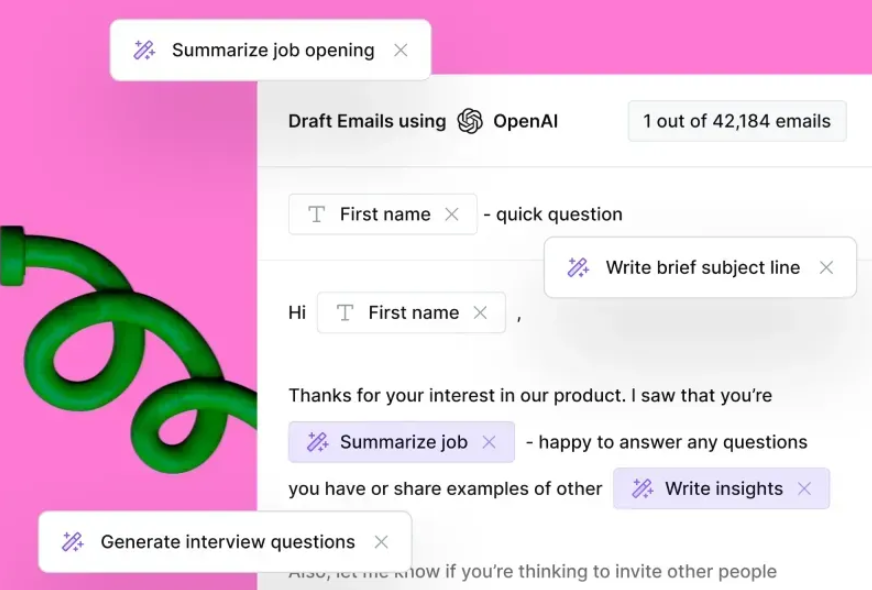
Clay is an AI-powered sales automation platform with options focusing on effortless lead generation and outreach. In terms of email writing, Clay offers an AI email drafter that prioritizes personalization while ensuring you're in control of the content. 💪
Clay — это AI-powered платформа для sales-автоматизации с опциями, фокусирующимися на легкой генерации лидов и outreach. С точки зрения написания email, Clay предлагает AI email drafter, который приоритизирует персонализацию, сохраняя за вами контроль над контентом. 💪
The drafter relies on OpenAI and the data you've collected on your leads to craft messages that stand out. With the drafter, you can do much more than basic personalization and have it:
Drafter полагается на OpenAI и данные, которые вы собрали о своих лидах, чтобы создавать выделяющиеся сообщения. С drafter вы можете делать гораздо больше, чем базовая персонализация, и заставить его:
Упомянуть событие, которое посетил получательЦитировать ресёрч о миссии компанииИспользовать актуальные релевантные новости как ледоколУпоминать посты в соцсетях
Clay gives you absolute control over your emails. You can write custom prompts to get the desired results. To save time, leverage some of Clay's powerful AI email writing templates, such as:
Clay даёт вам абсолютный контроль над вашими email. Вы можете писать кастомные промпты, чтобы получать желаемые результаты. Чтобы сэкономить время, используйте некоторые мощные шаблоны AI email writing от Clay, такие как:
Найти SMB-инфо и написать комплиментНаписать персонализированные email, используя пресс-релизы, текущих клиентов и открытые вакансииНаписать персонализированные email с использованием недавних личных или профессиональных постовУпомянуть обновления продукта в emailНаписать персонализированные email с использованием нескольких типов ресёрчаНаписать персонализированные email на основе данных сайта
Once you've created your emails, send them to a preferred email sequencer or CRM platform and set your campaigns in motion. You can also download the email as a CSV file and upload it to any tool. 📤
Создав email, отправьте их в предпочитаемый email-секвенсер или CRM-платформу и запустите кампании. Также можно скачать email в виде CSV-файла и загрузить в любой инструмент. 📤
More Clay Features: Enrichment, Integrations, and Automation
Больше возможностей Clay: обогащение, интеграции и автоматизация
What sets Clay apart from many other AI email writing tools is its feature versatility. Writing personalized emails is only one part of high-performing sales campaigns and requires comprehensive lead data as the basis. Without it, your emails can come off as generic and bland.
Что отличает Clay от многих других AI email writing инструментов — это его универсальность функций. Написание персонализированных email — лишь одна часть высокоэффективных sales-кампаний, и она требует исчерпывающих данных о лидах как основы. Без этого ваши email могут получиться универсальными и пресными.
Clay ensures this doesn't happen with its rich feature set focusing on lead generation and data enrichment, such as:
Clay гарантирует, что этого не случится, благодаря богатому набору функций, фокусирующемуся на lead generation и обогащении данных, таких как:
ClaygentДесятки интеграцийWaterfall enrichment
Claygent
Claygent
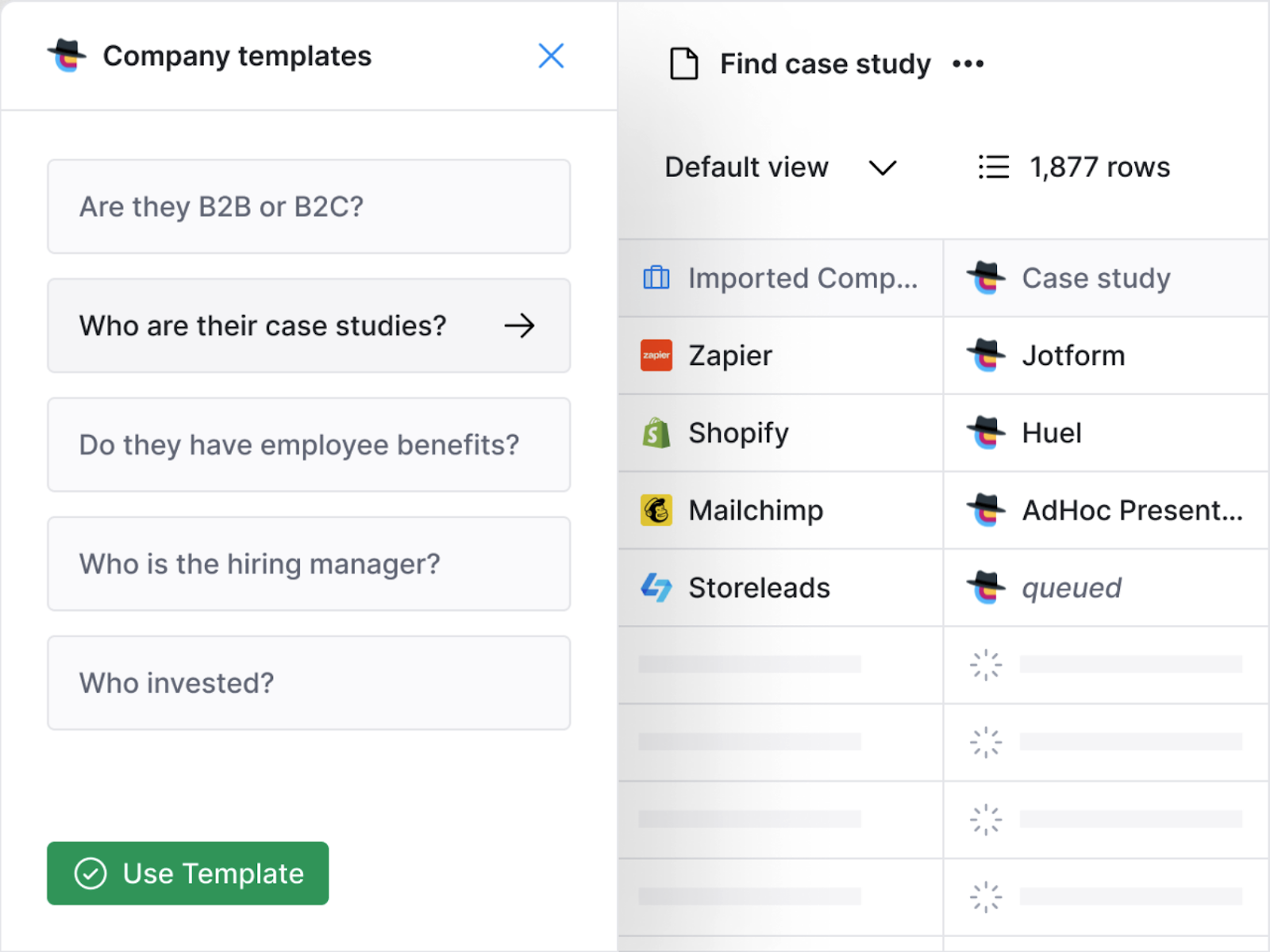
The email drafter isn't the only AI-powered option you'll get with Clay. Another valuable one is Claygent, your new sales assistant that can automate virtually any aspect of a sales campaign, allowing you to put your work on auto-pilot.
Email drafter — не единственная AI-powered опция, которую вы получите с Clay. Ещё одна ценная — Claygent, ваш новый sales-ассистент, который может автоматизировать практически любой аспект sales-кампании, позволяя поставить работу на автопилот.
Claygent works similarly to ChatGPT. You enter prompts, and it delivers results. Its use cases are versatile and include:
Claygent работает похоже на ChatGPT. Вы вводите промпты, и он выдаёт результаты. Его use case разнообразны и включают:
Поиск лидов и обогащение существующих данныхСегментацию лидовПоиск конкретных ключевых слов на сайтах компанийАвтоматизацию trigger-based таргетингаОчистку messy данныхГенерацию полезных идей для outbound-кампаний
Claygent can also answer questions about companies and people by searching every corner of the internet. Here are some questions that Clay users ask Claygent to answer:
Claygent также может отвечать на вопросы о компаниях и людях, обыскивая каждый уголок интернета. Вот некоторые вопросы, которые пользователи Clay просят Claygent ответить:
Есть ли у этой компании подкаст?Какие средние цены указаны на сайте этой компании?Какая тема была у последнего поста в блоге этой компании?
Clay's Valuable Integrations
Ценные интеграции Clay
Another reason Clay is a must-have sales automation platform is its integrations with 200+ tools that help you centralize work and boost your campaign's performance.
Ещё одна причина, по которой Clay — must-have платформа для sales-автоматизации, — это её интеграции с 200+ инструментами, которые помогают вам централизовать работу и поднять производительность кампании.
You'll appreciate Clay's OpenAI integration, which can help you write efficiently. Here are some examples of what you can do with the integration:
Вы оцените интеграцию Clay с OpenAI, которая может помочь вам писать эффективно. Вот примеры того, что можно делать с этой интеграцией:
Besides the OpenAI integration, Clay offers integrations with over 75+ data providers. This is one of Clay's main advantages. It can tap into dozens of databases to get you the data you need to personalize emails and ensure the info in them is accurate, reliable, and up-to-date.
Помимо интеграции с OpenAI, Clay предлагает интеграции с более чем 75+ провайдерами данных. Это одно из главных преимуществ Clay. Он может подключаться к десяткам баз данных, чтобы получить нужные данные для персонализации email и убедиться, что информация в них точна, надёжна и актуальна.
But wait, there's more! Here are some other valuable integrations you'll get with Clay:
Но и это ещё не всё! Вот несколько других ценных интеграций, которые вы получите с Clay:
DeBounce: используйте для верификации email-адресовSmartlead.ai: используйте платформу для прогрева emailSalesloft: храните email в одном месте и легко обновляйте информацию о проспектахSemrush: получайте месячную аналитику трафика
Waterfall Enrichment
Waterfall Enrichment
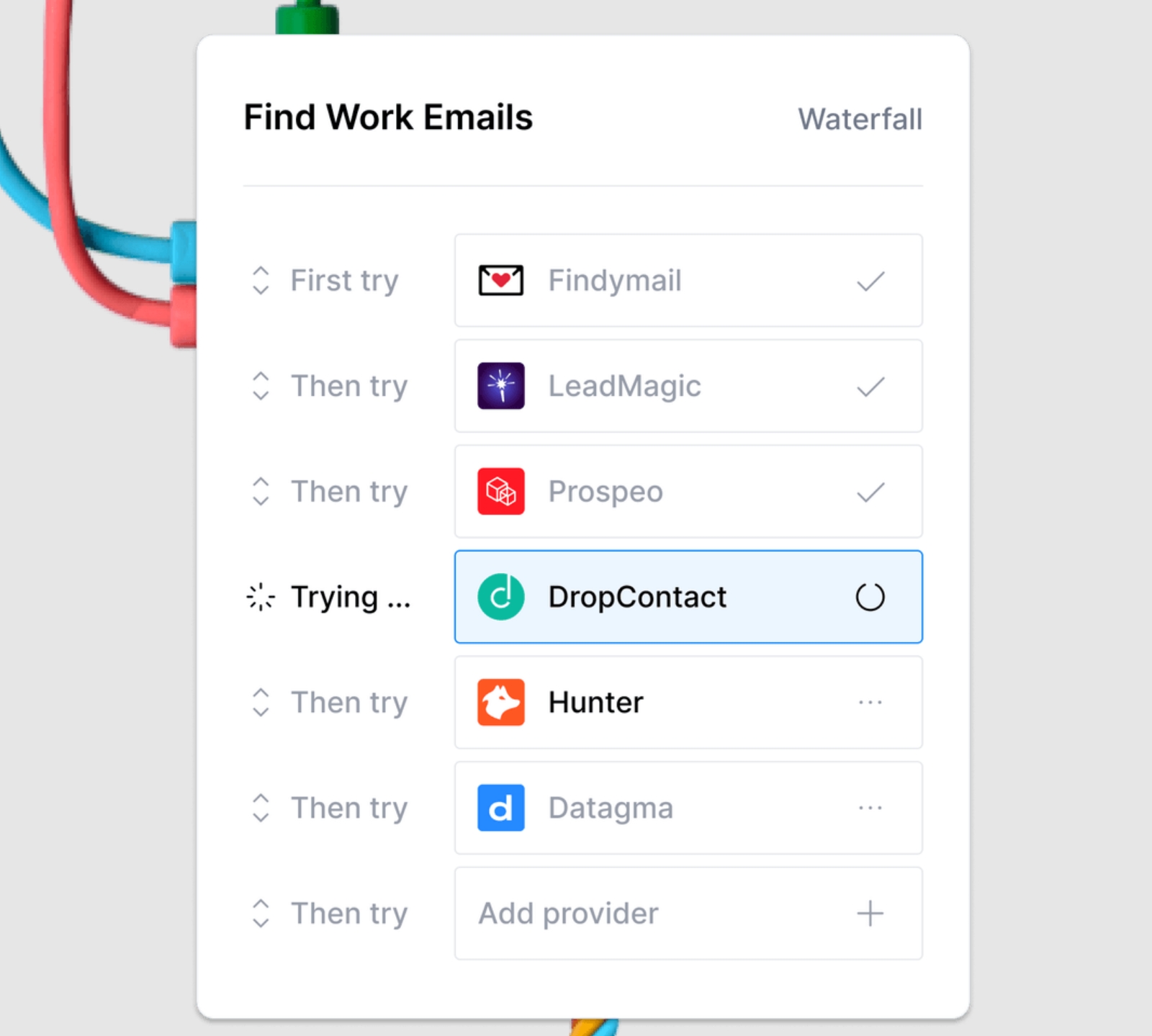
We've mentioned that Clay integrates with dozens of data providers. The platform gives you two options for taking advantage of these integrations:
Мы упоминали, что Clay интегрируется с десятками провайдеров данных. Платформа даёт вам два варианта использования этих интеграций:
Получать доступ к каждой базе данных по отдельностиПолучать доступ к нескольким базам данных последовательно
The second option is possible thanks to Clay's waterfall enrichment feature. It automates the enrichment process by going through databases one by one to dig up the info you need. For maximum control, you're in the driver's seat. In only a few clicks, choose the data you want to retrieve and the providers Clay should search.
Второй вариант возможен благодаря функции waterfall enrichment в Clay. Она автоматизирует процесс обогащения, проходя по базам данных одну за другой, чтобы откопать нужную информацию. Для максимального контроля вы за рулём. В несколько кликов выберите данные, которые хотите получить, и провайдеров, у которых Clay должен искать.
Clay's Flexible Pricing Plans
Гибкие тарифные планы Clay
Clay comes with a free forever plan, so you can try out its options without spending a dime. If you'd like to fully take advantage of the platform's functionalities, choose one of the paid options:
Clay поставляется с бесплатным навсегда планом, так что вы можете попробовать его опции, не потратив ни копейки. Если хотите полностью использовать функциональность платформы, выберите один из платных вариантов:
All plans include unlimited users, so you can expand your team without worrying your subscription will skyrocket. 🚀
Все планы включают неограниченное число пользователей, так что можно расширять команду, не беспокоясь о росте подписки. 🚀
Thousands of users enjoy Clay's multifunctionality and ease of use. Here's what one user has to say about the platform:
Тысячи пользователей ценят многофункциональность Clay и простоту использования. Вот что говорит один пользователь о платформе:

Get Started With Clay and Ace Email Writing
Начните с Clay и освойте email writing
You're only minutes away from giving your sales campaigns a boost with Clay's fantastic functionalities. Set up your account in a few simple steps:
Вы в нескольких минутах от того, чтобы дать вашим sales-кампаниям буст с фантастической функциональностью Clay. Настройте свою учётную запись в несколько простых шагов:
Перейдите на страницу регистрацииВведите своё имя, email и парольНаслаждайтесь платформой
If you'd like to know more details about all of Clay's options before signing up, check out Clay University and see every feature in action.
Если хотите узнать подробнее обо всех опциях Clay перед регистрацией, посмотрите Clay University и увидите каждую функцию в действии.
To find out how others use Clay and get inspired, join the Slack community. You should also subscribe to the Sales Prospecting Newsletter, which provides ongoing tips on creating high-performing sales campaigns that will help you make the most of the platform.
Чтобы узнать, как другие используют Clay, и вдохновиться, присоединяйтесь к Slack-сообществу. Также стоит подписаться на Sales Prospecting Newsletter, который предоставляет постоянные советы по созданию высокоэффективных sales-кампаний, чтобы помочь вам максимально использовать платформу.
Frequently Asked Questions
Часто задаваемые вопросы
What is an AI email writer?
Что такое AI email writer?
An AI email writer is a tool that uses artificial intelligence to generate, draft, or improve email content based on your inputs and prompts. Depending on the tool, it can handle everything from grammar correction and tone adjustment to full hyper-personalized email generation at scale.
AI email writer — это инструмент, использующий искусственный интеллект для генерации, составления черновиков или улучшения содержимого email на основе ваших вводных данных и промптов. В зависимости от инструмента, он может справляться со всем — от исправления грамматики и корректировки тона до полной гипер-персонализированной генерации email в масштабе.
How does AI generate a personalized email?
Как AI генерирует персонализированный email?
You provide the AI tool with data about your lead (name, company, job title, recent news, social posts, etc.) and a prompt describing what you want the email to say. The tool uses that context to produce a message tailored to that specific recipient. More advanced tools, like Clay's AI email drafter, can reference podcast appearances, press clips, or company mission statements to go well beyond basic personalization.
Вы предоставляете AI-инструменту данные о вашем лиде (имя, компания, должность, недавние новости, посты в соцсетях и т.д.) и промпт, описывающий, что вы хотите сказать в email. Инструмент использует этот контекст, чтобы создать сообщение, подогнанное под конкретного получателя. Более продвинутые инструменты, такие как AI email drafter от Clay, могут ссылаться на участие в подкастах, пресс-релизы или формулировки миссии компании, выходя далеко за рамки базовой персонализации.
How do you get the best results from an AI email writing tool?
Как получить лучшие результаты от AI email writing инструмента?
The quality of your output depends heavily on the quality of your input. Give the tool specific, accurate data about your lead and write clear prompts that describe the goal, tone, and key points you want covered. The richer your lead data, the more relevant and personalized the resulting email will be.
Качество вашего вывода сильно зависит от качества вашего ввода. Дайте инструменту конкретные, точные данные о вашем лиде и напишите ясные промпты, описывающие цель, тон и ключевые пункты, которые вы хотите покрыть. Чем богаче ваши данные о лидах, тем более релевантным и персонализированным будет итоговый email.
Which AI email writer works best for cold outreach?
Какой AI email writer лучше всего работает для cold outreach?
For cold outreach at scale, you need a tool that combines AI email writing with lead data and enrichment in one place. Standalone writing tools require you to manually supply context for every email. A platform like Clay connects your lead data directly to the AI drafter, so personalization happens automatically across hundreds or thousands of records.
Для cold outreach в масштабе вам нужен инструмент, объединяющий AI email writing с данными о лидах и обогащением в одном месте. Отдельные writing-инструменты требуют, чтобы вы вручную предоставляли контекст для каждого email. Платформа вроде Clay соединяет ваши данные о лидах напрямую с AI drafter, так что персонализация происходит автоматически по сотням или тысячам записей.
💡 Keep reading: Want to know more about the role of AI in sales? Read our in-depth guides:
💡 Продолжайте чтение: Хотите узнать больше о роли AI в продажах? Прочитайте наши подробные гайды:
AI lead scoringAI-guided sellingAI в B2B salesAI sales training
You've done your research and gathered data on your leads. Now, it's time to use this data to craft messages that will win them over and result in conversions. This critical activity can make or break your sales campaign. Without effective outreach, all your preparation was in vain.
Вы провели ресёрч и собрали данные о своих лидах. Теперь время использовать эти данные для создания сообщений, которые их завоюют и приведут к конверсиям. Эта критически важная активность может сделать или сломать вашу sales-кампанию. Без эффективного outreach вся ваша подготовка была напрасной.
Considering the importance and time it takes to craft emails at scale, turning to AI is a smart move. The technology can help you reach out to leads with precise messaging without stretching your resources or sacrificing quality.
Учитывая важность и время, которое требуется для создания email в масштабе, обращение к AI — это умный ход. Технология может помочь вам связываться с лидами с точными сообщениями, не растягивая ресурсы и не жертвуя качеством.
Our team has used AI for writing emails for years and managed to:
Наша команда использует AI для написания email уже годы, и нам удалось:
Получить в 2-3 раза лучшие response rate в более чем 800k cold email, которые мы отправляем ежемесячноСэкономить несколько часов в день, потому что не тратим столько времени на ресёрч и ручное написание
To help you get similar results, we've put together this guide to show you how to use AI to write emails.
Чтобы помочь вам получить похожие результаты, мы собрали этот гайд, чтобы показать, как использовать AI для написания email.
TL;DR
- AI can help you write emails in bulk, correct grammar, adjust tone and style, optimize subject lines, personalize outreach, and create drafts.
- The best results come from tools that combine AI email writing with lead data, enrichment, and integrations in one place.
- Clay's AI email drafter uses your lead data and custom prompts to generate hyper-personalized emails at scale, going well beyond basic name or title insertion.
- Clay's waterfall enrichment and 200+ integrations give you the data foundation that makes personalized AI-written emails actually land.
TL;DRAI может помочь вам писать email в массовом порядке, исправлять грамматику, корректировать тон и стиль, оптимизировать темы писем, персонализировать outreach и создавать черновики.Лучшие результаты дают инструменты, которые объединяют AI email writing с данными о лидах, обогащением и интеграциями в одном месте.AI email drafter от Clay использует ваши данные о лидах и кастомные промпты, чтобы генерировать гипер-персонализированные email в масштабе, выходя далеко за рамки базовой вставки имени или должности.Waterfall enrichment от Clay и 200+ интеграций дают вам фундамент данных, который делает персонализированные AI-написанные email действительно работающими.
How to Use AI to Write an Email: Top Techniques
Как использовать AI для написания email: лучшие техники
AI can be used in various email writing scenarios. To help you maximize the technology's potential and improve your sales campaigns, we'll go over the most popular and creative ones:
AI может использоваться в различных сценариях написания email. Чтобы помочь вам максимизировать потенциал технологии и улучшить ваши sales-кампании, мы рассмотрим самые популярные и креативные из них:
Написание в массовом порядкеИсправление грамматики и орфографииКорректировка стиля и тонаОптимизация тем писемПерсонализация emailСоздание черновиков
Writing in Bulk
Написание в массовом порядке
Manual email writing makes sense when you want to reach out to only a few leads. As your business grows, their numbers will increase, and at some point, you won't be able to handle writing effective emails to everyone.
Ручное написание email имеет смысл, когда вы хотите связаться лишь с несколькими лидами. По мере роста вашего бизнеса их число будет увеличиваться, и в какой-то момент вы не сможете справляться с написанием эффективных email каждому.
This is where AI comes in. With its help, you can write hundreds of emails with just a few prompts or clicks. Here are some appealing benefits you'll get if you decide to use AI for bulk email writing:
Здесь приходит на помощь AI. С его помощью вы можете писать сотни email всего за несколько промптов или кликов. Вот несколько привлекательных преимуществ, которые вы получите, если решите использовать AI для массового написания email:
Сэкономленное время: AI email writing намного быстрее ручного написания, что позволяет ежедневно экономить много времени. Это дополнительное время можно использовать для фокуса на high-value задачахБыстрый outreach: Быстрое написание email помогает добраться до high-potential лидов раньше, чем кто-то другой, или до того, как они остынутМаксимальный контроль: Правильный инструмент даёт вам полный контроль над содержимым email. Вы выбираете, что упомянуть в email, а AI это реализует
💡 Bonus read: AI can help with more than email writing. Read our extensive guides on AI in marketing and sales and how to use AI in sales to learn different ways to leverage it in your workflows. For specific use cases, read about AI sales enablement and AI SDRs.
💡 Бонусное чтение: AI может помогать не только с написанием email. Прочитайте наши обширные гайды о AI в маркетинге и продажах и как использовать AI в продажах, чтобы узнать разные способы использовать его в ваших workflow. Для конкретных use case прочитайте об AI sales enablement и AI SDR.
Correcting Grammar
Исправление грамматики
With email writing, every detail matters, and proper grammar is at the top of the list. Bad grammar can cost you business. If your emails are full of mistakes, your leads could see you as lazy or incompetent, making it harder to hit your targets.
В написании email каждая деталь важна, и правильная грамматика возглавляет список. Плохая грамматика может стоить вам бизнеса. Если ваши email полны ошибок, лиды могут увидеть вас ленивым или некомпетентным, что усложнит достижение ваших целей.
You don't need to hire a professional proofreader and editor to ensure your emails are grammatically perfect. Instead, you can leverage AI tools with grammar-checking options. These tools analyze elements such as:
Вам не нужно нанимать профессионального проофридера и редактора, чтобы гарантировать, что ваши email грамматически безупречны. Вместо этого вы можете использовать AI-инструменты с опциями проверки грамматики. Эти инструменты анализируют такие элементы, как:
AI grammar-checking tools highlight mistakes and offer suggestions to help you polish your emails. Although they don't help you write emails per se, they ensure the content is free of mistakes so that you can leave an excellent first impression. ✨
AI-инструменты проверки грамматики выделяют ошибки и предлагают подсказки, чтобы помочь вам отполировать email. Хотя они не помогают писать email как таковые, они гарантируют, что контент свободен от ошибок, чтобы вы могли произвести отличное первое впечатление. ✨
Adjusting Style and Tone
Корректировка стиля и тона
Even if your emails are grammatically flawless, they can still leave the wrong impression on your leads due to style or tone issues, such as:
Даже если ваши email грамматически безупречны, они всё равно могут оставить неправильное впечатление на ваших лидов из-за проблем со стилем или тоном, таких как:
Неподходящий тон: Некоторые люди предпочитают формальный подход, другие — более casual. Вам следует корректировать тон в зависимости от целевой аудитории и ситуацииНепоследовательность: Постоянная смена тона и стиля может усложнить чтение emailПлохой выбор слов: Некоторые слова могут быть слишком неформальными, неподходящими или неправильными для контекста и заставлять вас казаться слишком требовательным, непрофессиональным или даже агрессивным
Some AI tools can ensure your style and tone are on point. Like grammar-checking platforms, these tools can analyze any text (including emails) to highlight potential mistakes and offer suggestions for improvement.
Некоторые AI-инструменты могут гарантировать, что ваш стиль и тон в порядке. Как и платформы проверки грамматики, эти инструменты могут анализировать любой текст (включая email), чтобы выделить потенциальные ошибки и предложить улучшения.
Optimizing Subject Lines
Оптимизация тем писем
The subject line is the first thing people see when they receive your email. Based on its wording, they will determine if your email is worth opening and if they should prioritize it.
Тема письма — это первое, что люди видят, получая ваш email. На основе её формулировки они определят, стоит ли открывать ваш email и нужно ли его приоритизировать.
Every subject line should be:
Каждая тема должна быть:
Ясной и краткойОписательнойРелевантнойПривлекающей внимание
Instead of investing precious time in optimizing email subject lines for each lead, you can rely on an AI tool. A quality tool can offer suggestions on incorporating keywords and adjusting the language to catch your recipients' attention and boost email open rates. ⬆️
Вместо того чтобы тратить драгоценное время на оптимизацию темы письма для каждого лида, вы можете положиться на AI-инструмент. Качественный инструмент может предложить подсказки по включению ключевых слов и корректировке языка, чтобы привлечь внимание получателей и поднять email open rate. ⬆️
Personalizing Emails
Персонализация email
Generic emails may be easier to write, but they won't resonate with your leads. You need to focus on personalization to capture their attention, offer an excellent experience, and create a foundation for building strong business relationships.
Универсальные email писать проще, но они не зацепят ваших лидов. Вам нужно сфокусироваться на персонализации, чтобы захватить их внимание, обеспечить отличный опыт и создать фундамент для построения сильных бизнес-отношений.
For example, you could:
Например, вы могли бы:
Создавать персонализированные темы писемУпоминать имя лида в открывающей строкеИспользовать их данные для персонализации содержимого email
The problem is that personalizing every email takes time and effort. Luckily, AI tools offer a shortcut. They can create hyper-personalized emails within seconds. Using prompts, you tell the tool what data to use to write messages that will resonate with your leads and drive engagement.
Проблема в том, что персонализация каждого email требует времени и усилий. К счастью, AI-инструменты предлагают шорткат. Они могут создавать гипер-персонализированные email за секунды. С помощью промптов вы говорите инструменту, какие данные использовать, чтобы писать сообщения, которые зацепят ваших лидов и вызовут вовлечённость.
Some AI solutions offer basic personalization options, like mentioning a lead's name, job title, or company. Others are more advanced, allowing you to cite research or mention specific info like podcast appearances, and this is what you should aim for. Bringing up such details shows your lead that you've done your research and are determined. 🕶️
Некоторые AI-решения предлагают базовые опции персонализации, такие как упоминание имени лида, должности или компании. Другие более продвинуты, позволяя цитировать ресёрч или упоминать конкретную информацию вроде участия в подкастах, и это то, к чему вам нужно стремиться. Упоминание таких деталей показывает лиду, что вы сделали ресёрч и настроены серьёзно. 🕶️
Creating Drafts
Создание черновиков
If you need to write an email manually (for a particularly high-value lead, to re-engage a cold one, or as a follow-up after a conversation), AI tools can help you with that, too. Based on your input, they can create email drafts you can later refine and adjust to your style, preferences, and goals. Your AI tool can lend a hand by:
Если вам нужно написать email вручную (для особо ценного лида, чтобы реактивировать остывшего, или как follow-up после разговора), AI-инструменты также могут помочь. На основе вашего ввода они могут создавать черновики email, которые вы потом можете доработать и подстроить под свой стиль, предпочтения и цели. Ваш AI-инструмент может помочь:
Суммируя ваши предыдущие взаимодействияСоздавая структуру для вашего emailГарантируя, что вы охватите все важные пункты обсуждения
💡 Bonus read: ChatGPT can be a solid tool for creating email drafts. Read our guide on how to use ChatGPT to write emails to learn more. To discover ChatGPT's other uses in sales, take a look at our articles covering ChatGPT prompts for sales and ChatGPT lead generation.
💡 Бонусное чтение: ChatGPT может быть надёжным инструментом для создания черновиков email. Прочитайте наш гайд о том, как использовать ChatGPT для написания email, чтобы узнать больше. Чтобы открыть другие применения ChatGPT в продажах, посмотрите наши статьи о ChatGPT-промптах для продаж и генерации лидов через ChatGPT.
How to Choose an AI Tool for Writing Emails
Как выбрать AI-инструмент для написания email
There are plenty of AI tools that can help you write emails, from chatbots to specialized writing software. ✍️
Есть множество AI-инструментов, которые могут помочь писать email — от чатботов до специализированного writing-софта. ✍️
While these can be excellent options, they aren't sales-oriented and don't offer functionalities that help you manage multiple processes. So, if you have a specialized writing tool, you'll still need platforms for lead generation, data enrichment, and outreach.
Хотя это могут быть отличные варианты, они не ориентированы на продажи и не предлагают функциональности, которая помогает управлять множеством процессов. Так что если у вас есть специализированный writing-инструмент, вам всё равно понадобятся платформы для lead generation, обогащения данных и outreach.
To keep work under one roof, look for a sales tool with a dedicated AI email writing option. If you're unsure which platform to choose, focus on the following criteria:
Чтобы держать работу под одной крышей, ищите sales-инструмент с выделенной опцией AI email writing. Если вы не уверены, какую платформу выбрать, сфокусируйтесь на следующих критериях:
Based on these criteria, one platform stands out as the best: Clay. This sales automation solution offers options covering the entire sales process, from generating leads to AI email writing. 💯
На основе этих критериев одна платформа выделяется как лучшая: Clay. Это решение для sales-автоматизации предлагает опции, покрывающие весь sales-процесс — от генерации лидов до AI email writing. 💯
Clay: Your Go-To AI Email Writing Tool
Clay: ваш go-to инструмент для AI email writing
Clay is an AI-powered sales automation platform with options focusing on effortless lead generation and outreach. In terms of email writing, Clay offers an AI email drafter that prioritizes personalization while ensuring you're in control of the content. 💪
Clay — это AI-powered платформа для sales-автоматизации с опциями, фокусирующимися на легкой генерации лидов и outreach. С точки зрения написания email, Clay предлагает AI email drafter, который приоритизирует персонализацию, сохраняя за вами контроль над контентом. 💪
The drafter relies on OpenAI and the data you've collected on your leads to craft messages that stand out. With the drafter, you can do much more than basic personalization and have it:
Drafter полагается на OpenAI и данные, которые вы собрали о своих лидах, чтобы создавать выделяющиеся сообщения. С drafter вы можете делать гораздо больше, чем базовая персонализация, и заставить его:
Упомянуть событие, которое посетил получательЦитировать ресёрч о миссии компанииИспользовать актуальные релевантные новости как ледоколУпоминать посты в соцсетях
Clay gives you absolute control over your emails. You can write custom prompts to get the desired results. To save time, leverage some of Clay's powerful AI email writing templates, such as:
Clay даёт вам абсолютный контроль над вашими email. Вы можете писать кастомные промпты, чтобы получать желаемые результаты. Чтобы сэкономить время, используйте некоторые мощные шаблоны AI email writing от Clay, такие как:
Найти SMB-инфо и написать комплиментНаписать персонализированные email, используя пресс-релизы, текущих клиентов и открытые вакансииНаписать персонализированные email с использованием недавних личных или профессиональных постовУпомянуть обновления продукта в emailНаписать персонализированные email с использованием нескольких типов ресёрчаНаписать персонализированные email на основе данных сайта
Once you've created your emails, send them to a preferred email sequencer or CRM platform and set your campaigns in motion. You can also download the email as a CSV file and upload it to any tool. 📤
Создав email, отправьте их в предпочитаемый email-секвенсер или CRM-платформу и запустите кампании. Также можно скачать email в виде CSV-файла и загрузить в любой инструмент. 📤
More Clay Features: Enrichment, Integrations, and Automation
Больше возможностей Clay: обогащение, интеграции и автоматизация
What sets Clay apart from many other AI email writing tools is its feature versatility. Writing personalized emails is only one part of high-performing sales campaigns and requires comprehensive lead data as the basis. Without it, your emails can come off as generic and bland.
Что отличает Clay от многих других AI email writing инструментов — это его универсальность функций. Написание персонализированных email — лишь одна часть высокоэффективных sales-кампаний, и она требует исчерпывающих данных о лидах как основы. Без этого ваши email могут получиться универсальными и пресными.
Clay ensures this doesn't happen with its rich feature set focusing on lead generation and data enrichment, such as:
Clay гарантирует, что этого не случится, благодаря богатому набору функций, фокусирующемуся на lead generation и обогащении данных, таких как:
ClaygentДесятки интеграцийWaterfall enrichment
Claygent
Claygent
The email drafter isn't the only AI-powered option you'll get with Clay. Another valuable one is Claygent, your new sales assistant that can automate virtually any aspect of a sales campaign, allowing you to put your work on auto-pilot.
Email drafter — не единственная AI-powered опция, которую вы получите с Clay. Ещё одна ценная — Claygent, ваш новый sales-ассистент, который может автоматизировать практически любой аспект sales-кампании, позволяя поставить работу на автопилот.
Claygent works similarly to ChatGPT. You enter prompts, and it delivers results. Its use cases are versatile and include:
Claygent работает похоже на ChatGPT. Вы вводите промпты, и он выдаёт результаты. Его use case разнообразны и включают:
Поиск лидов и обогащение существующих данныхСегментацию лидовПоиск конкретных ключевых слов на сайтах компанийАвтоматизацию trigger-based таргетингаОчистку messy данныхГенерацию полезных идей для outbound-кампаний
Claygent can also answer questions about companies and people by searching every corner of the internet. Here are some questions that Clay users ask Claygent to answer:
Claygent также может отвечать на вопросы о компаниях и людях, обыскивая каждый уголок интернета. Вот некоторые вопросы, которые пользователи Clay просят Claygent ответить:
Есть ли у этой компании подкаст?Какие средние цены указаны на сайте этой компании?Какая тема была у последнего поста в блоге этой компании?
Clay's Valuable Integrations
Ценные интеграции Clay
Another reason Clay is a must-have sales automation platform is its integrations with 200+ tools that help you centralize work and boost your campaign's performance.
Ещё одна причина, по которой Clay — must-have платформа для sales-автоматизации, — это её интеграции с 200+ инструментами, которые помогают вам централизовать работу и поднять производительность кампании.
You'll appreciate Clay's OpenAI integration, which can help you write efficiently. Here are some examples of what you can do with the integration:
Вы оцените интеграцию Clay с OpenAI, которая может помочь вам писать эффективно. Вот примеры того, что можно делать с этой интеграцией:
Besides the OpenAI integration, Clay offers integrations with over 75+ data providers. This is one of Clay's main advantages. It can tap into dozens of databases to get you the data you need to personalize emails and ensure the info in them is accurate, reliable, and up-to-date.
Помимо интеграции с OpenAI, Clay предлагает интеграции с более чем 75+ провайдерами данных. Это одно из главных преимуществ Clay. Он может подключаться к десяткам баз данных, чтобы получить нужные данные для персонализации email и убедиться, что информация в них точна, надёжна и актуальна.
But wait, there's more! Here are some other valuable integrations you'll get with Clay:
Но и это ещё не всё! Вот несколько других ценных интеграций, которые вы получите с Clay:
DeBounce: используйте для верификации email-адресовSmartlead.ai: используйте платформу для прогрева emailSalesloft: храните email в одном месте и легко обновляйте информацию о проспектахSemrush: получайте месячную аналитику трафика
Waterfall Enrichment
Waterfall Enrichment
We've mentioned that Clay integrates with dozens of data providers. The platform gives you two options for taking advantage of these integrations:
Мы упоминали, что Clay интегрируется с десятками провайдеров данных. Платформа даёт вам два варианта использования этих интеграций:
Получать доступ к каждой базе данных по отдельностиПолучать доступ к нескольким базам данных последовательно
The second option is possible thanks to Clay's waterfall enrichment feature. It automates the enrichment process by going through databases one by one to dig up the info you need. For maximum control, you're in the driver's seat. In only a few clicks, choose the data you want to retrieve and the providers Clay should search.
Второй вариант возможен благодаря функции waterfall enrichment в Clay. Она автоматизирует процесс обогащения, проходя по базам данных одну за другой, чтобы откопать нужную информацию. Для максимального контроля вы за рулём. В несколько кликов выберите данные, которые хотите получить, и провайдеров, у которых Clay должен искать.
Clay's Flexible Pricing Plans
Гибкие тарифные планы Clay
Clay comes with a free forever plan, so you can try out its options without spending a dime. If you'd like to fully take advantage of the platform's functionalities, choose one of the paid options:
Clay поставляется с бесплатным навсегда планом, так что вы можете попробовать его опции, не потратив ни копейки. Если хотите полностью использовать функциональность платформы, выберите один из платных вариантов:
All plans include unlimited users, so you can expand your team without worrying your subscription will skyrocket. 🚀
Все планы включают неограниченное число пользователей, так что можно расширять команду, не беспокоясь о росте подписки. 🚀
Thousands of users enjoy Clay's multifunctionality and ease of use. Here's what one user has to say about the platform:
Тысячи пользователей ценят многофункциональность Clay и простоту использования. Вот что говорит один пользователь о платформе:
Get Started With Clay and Ace Email Writing
Начните с Clay и освойте email writing
You're only minutes away from giving your sales campaigns a boost with Clay's fantastic functionalities. Set up your account in a few simple steps:
Вы в нескольких минутах от того, чтобы дать вашим sales-кампаниям буст с фантастической функциональностью Clay. Настройте свою учётную запись в несколько простых шагов:
Перейдите на страницу регистрацииВведите своё имя, email и парольНаслаждайтесь платформой
If you'd like to know more details about all of Clay's options before signing up, check out Clay University and see every feature in action.
Если хотите узнать подробнее обо всех опциях Clay перед регистрацией, посмотрите Clay University и увидите каждую функцию в действии.
To find out how others use Clay and get inspired, join the Slack community. You should also subscribe to the Sales Prospecting Newsletter, which provides ongoing tips on creating high-performing sales campaigns that will help you make the most of the platform.
Чтобы узнать, как другие используют Clay, и вдохновиться, присоединяйтесь к Slack-сообществу. Также стоит подписаться на Sales Prospecting Newsletter, который предоставляет постоянные советы по созданию высокоэффективных sales-кампаний, чтобы помочь вам максимально использовать платформу.
Frequently Asked Questions
Часто задаваемые вопросы
What is an AI email writer?
Что такое AI email writer?
An AI email writer is a tool that uses artificial intelligence to generate, draft, or improve email content based on your inputs and prompts. Depending on the tool, it can handle everything from grammar correction and tone adjustment to full hyper-personalized email generation at scale.
AI email writer — это инструмент, использующий искусственный интеллект для генерации, составления черновиков или улучшения содержимого email на основе ваших вводных данных и промптов. В зависимости от инструмента, он может справляться со всем — от исправления грамматики и корректировки тона до полной гипер-персонализированной генерации email в масштабе.
How does AI generate a personalized email?
Как AI генерирует персонализированный email?
You provide the AI tool with data about your lead (name, company, job title, recent news, social posts, etc.) and a prompt describing what you want the email to say. The tool uses that context to produce a message tailored to that specific recipient. More advanced tools, like Clay's AI email drafter, can reference podcast appearances, press clips, or company mission statements to go well beyond basic personalization.
Вы предоставляете AI-инструменту данные о вашем лиде (имя, компания, должность, недавние новости, посты в соцсетях и т.д.) и промпт, описывающий, что вы хотите сказать в email. Инструмент использует этот контекст, чтобы создать сообщение, подогнанное под конкретного получателя. Более продвинутые инструменты, такие как AI email drafter от Clay, могут ссылаться на участие в подкастах, пресс-релизы или формулировки миссии компании, выходя далеко за рамки базовой персонализации.
How do you get the best results from an AI email writing tool?
Как получить лучшие результаты от AI email writing инструмента?
The quality of your output depends heavily on the quality of your input. Give the tool specific, accurate data about your lead and write clear prompts that describe the goal, tone, and key points you want covered. The richer your lead data, the more relevant and personalized the resulting email will be.
Качество вашего вывода сильно зависит от качества вашего ввода. Дайте инструменту конкретные, точные данные о вашем лиде и напишите ясные промпты, описывающие цель, тон и ключевые пункты, которые вы хотите покрыть. Чем богаче ваши данные о лидах, тем более релевантным и персонализированным будет итоговый email.
Which AI email writer works best for cold outreach?
Какой AI email writer лучше всего работает для cold outreach?
For cold outreach at scale, you need a tool that combines AI email writing with lead data and enrichment in one place. Standalone writing tools require you to manually supply context for every email. A platform like Clay connects your lead data directly to the AI drafter, so personalization happens automatically across hundreds or thousands of records.
Для cold outreach в масштабе вам нужен инструмент, объединяющий AI email writing с данными о лидах и обогащением в одном месте. Отдельные writing-инструменты требуют, чтобы вы вручную предоставляли контекст для каждого email. Платформа вроде Clay соединяет ваши данные о лидах напрямую с AI drafter, так что персонализация происходит автоматически по сотням или тысячам записей.
💡 Keep reading: Want to know more about the role of AI in sales? Read our in-depth guides:
💡 Продолжайте чтение: Хотите узнать больше о роли AI в продажах? Прочитайте наши подробные гайды:
AI lead scoringAI-guided sellingAI в B2B salesAI sales training
More Articles
Больше статей
Claygent Builder: The easiest way to build, test, and deploy GTM Agents
Claygent Builder: самый простой способ создавать, тестировать и развёртывать GTM-агентов

How Clay Uses Clay Ads: From $250 to $25 CPL
Как Clay использует Clay Ads: с $250 до $25 CPL

HG Insights Corporate Hierarchy: GTM Precision in Clay
HG Insights Corporate Hierarchy: точность GTM в Clay

Sales GTM Engineering: How Clay Built the Role From Scratch
Sales GTM Engineering: как Clay создал эту роль с нуля

How to Automate Inbound Lead Outreach: The Clay Playbook
Как автоматизировать outreach по inbound-лидам: плейбук Clay
demandDrive Joins Clay’s Partner Ecosystem as an Official Clay Studio Partner
demandDrive присоединяется к партнёрской экосистеме Clay в качестве официального Clay Studio Partner

B2B Sales Prospecting: 15 Strategies to Drive More Conversions
B2B Sales Prospecting: 15 стратегий для роста конверсий

AI Sales Assistants: 11 Ways to Accelerate Your Outbound
AI Sales Assistants: 11 способов ускорить ваш outbound

The Three Laws of GTM: How to Win in the AI Era
Три закона GTM: как побеждать в эпоху AI

Best Work Email Finders by Segment: SMB vs. Enterprise
Лучшие work email finders по сегментам: SMB vs Enterprise

How Clay Converts Trial Users Into Customers With Automated Outreach
Как Clay превращает trial-пользователей в клиентов с помощью автоматизированного outreach

Best Mobile Phone Data Providers for B2B Sales Teams
Лучшие провайдеры данных по мобильным телефонам для B2B sales-команд

How to Build a Complete AI Outbound Sales Funnel
Как построить полную AI outbound sales-воронку

How to Get More Customers Using Outbound Sales: A Complete Guide
Как получать больше клиентов с помощью outbound sales: полный гайд

How to Automate 6 Cold Email Campaigns in One Clay Workflow
Как автоматизировать 6 cold email кампаний в одном workflow Clay
How Clay Identifies Tier 1 Accounts: A Three-Score System
Как Clay определяет Tier 1 аккаунты: система трёх скоров

Lead Scoring in Clay: A Step-by-Step Formula Guide
Lead Scoring в Clay: пошаговый гайд по формулам

How to Validate Cold Outbound Offers and Find Message-Market Fit
Как валидировать cold outbound офферы и найти message-market fit

Troubleshooting Outbound Sales and Prospecting: A Comprehensive Guide
Устранение неполадок в outbound sales и prospecting: исчерпывающий гайд
Bulk Enrichment: Enrich Millions of CRM Records in Clay
Bulk Enrichment: обогащайте миллионы CRM-записей в Clay

Clay Templates: Automate, Customize, and Replicate Any GTM Workflow
Шаблоны Clay: автоматизируйте, кастомизируйте и реплицируйте любой GTM workflow

How to Optimize Your Credit Usage in Clay
Как оптимизировать расход кредитов в Clay

AI for sales prospecting
AI для sales prospecting

The Reverse Demo: How Clay Replaced Traditional B2B Sales Demos
The Reverse Demo: как Clay заменил традиционные B2B sales-демо

Data Waterfalls: How to Maximize Contact Coverage with Clay
Data Waterfalls: как максимизировать покрытие контактов с Clay
How Clay Runs ABM Campaigns: A Step-by-Step Playbook
Как Clay проводит ABM-кампании: пошаговый плейбук

How We Built Clay's GTM Engineering Function
Как мы построили функцию GTM Engineering в Clay

Best Personal Email Finder Tools: Tested and Ranked
Лучшие инструменты поиска персональных email: протестировано и проранжировано

How to Use OpenAI to Write Cold Emails from Scratch with Clay
Как использовать OpenAI для написания cold email с нуля в Clay

How to Run a Personalized Demo Play at Scale with Clay
Как запустить персонализированный demo play в масштабе с Clay

Automated Slide Deck Creation: How Clay Builds QBRs from Your Data
Автоматизированное создание презентаций: как Clay строит QBR из ваших данных

HG Insights + Clay: B2B Technographic and Firmographic Data
HG Insights + Clay: B2B технографические и фирмографические данные

B2B Cold Email Deliverability: 21 Best Practices
Deliverability B2B cold email: 21 лучшая практика

Basics of Google Search Operators: A Practical Guide
Основы Google Search Operators: практический гайд

AI Lead Generation: The Complete B2B Guide
AI Lead Generation: полный B2B-гайд
Clay MCP: Ops-built workflows, consumable by reps
Clay MCP: workflow от ops-команды, удобные для реп
How to Manage and Enrich Inbound Leads Automatically
Как автоматически управлять и обогащать inbound-лиды

GTM Alpha: How Winning Teams Build a Competitive Edge
GTM Alpha: как побеждающие команды строят конкурентное преимущество

Why Good CRM Data Matters and How Clay Helps
Почему хорошие CRM-данные важны и как Clay помогает

How to Use Formulas in Clay: AI Generator and Manual Entry
Как использовать формулы в Clay: AI-генератор и ручной ввод

GTM Engineering: What It Is, How It Works, and How to Hire
GTM Engineering: что это, как работает и как нанимать

Formulas in Clay: A Beginner's Intro for Non-Engineers
Формулы в Clay: введение для не-инженеров
How Clay Uses Clay for SEO and AEO: 3 Systems That Scale
Как Clay использует Clay для SEO и AEO: 3 системы, которые масштабируются

Turn Web Visitors into Leads: A Warm Outbound Play for B2B Sales
Превращайте посетителей сайта в лидов: warm outbound play для B2B sales

How to Use Web Scraping to Enrich Your Data with Clay
Как использовать web scraping для обогащения данных в Clay

How to Create a Sales Prospect List in Minutes
Как создать список sales-проспектов за минуты

Best B2B Email List Providers: Tested and Ranked (2026)
Лучшие провайдеры B2B email-списков: протестировано и проранжировано (2026)

Outbound Sales Automation: How to 10x Pipeline Without More SDRs
Outbound Sales Automation: как 10x pipeline без дополнительных SDR

The Wake the Dead Play: Reactivate Closed-Lost Deals with Clay
The Wake the Dead Play: реактивация closed-lost сделок с Clay

Three Tips to Guarantee Email Deliverability for Cold Outbound
Три совета, гарантирующих email deliverability для cold outbound
How Clay Uses Clay for Customer Support: 3 Real Workflows
Как Clay использует Clay для клиентской поддержки: 3 реальных workflow

B2B Cold Email Copywriting: The Complete Guide
Копирайтинг B2B cold email: полный гайд

Introducing Clay Functions
Представляем Clay Functions
Clay and Apollo Integration: Enrichment, Sequencing, and More
Интеграция Clay и Apollo: обогащение, sequencing и многое другое

The Many Lives of Spreadsheets: A History and What Comes Next
Многие жизни электронных таблиц: история и что дальше

AI recruiting strategies
AI-стратегии рекрутинга

How to Hire a GTM Engineer: The Complete Guide
Как нанять GTM-инженера: полный гайд

Inside Clay's GTM Engineering Lab: Plays, Principles, and Automation
Внутри лаборатории GTM Engineering Clay: плеи, принципы и автоматизация

How to Build the Most Targeted Account Lists Possible
Как построить максимально таргетированные списки аккаунтов

Personalized Direct Mail at Scale: The Gifting Play with Clay
Персонализированный direct mail в масштабе: gifting play с Clay

How to Set Up Your Full Inbound Sales Process on Clay
Как настроить полный inbound sales процесс в Clay

AI-Enabled GTM for Private Equity: The Value Creation Playbook
AI-enabled GTM для private equity: плейбук создания стоимости

Do More With Your Data: Clay's Post-Data-Provider Approach
Делайте больше с вашими данными: post-data-provider подход Clay

Google Maps Lead Generation for Niche Local Businesses
Google Maps Lead Generation для нишевых локальных бизнесов

24 AI Email Personalization Examples for Cold Outreach (With Prompts)
24 примера AI email-персонализации для cold outreach (с промптами)

How to Ace Your Follow-Ups: A Practical Sales Guide
Как мастерски делать follow-up: практический sales-гайд

How to Prioritize Your Waitlist with Lead Enrichment
Как приоритизировать ваш waitlist с помощью lead enrichment

B2B Cold Email Templates: Frameworks That Get Replies
Шаблоны B2B cold email: фреймворки, которые получают ответы

Audiences: now in Enterprise beta
Audiences: теперь в Enterprise beta
The thinking behind our new pricing: our internal memo
Мышление за нашим новым прайсингом: наша внутренняя памятка
Introducing Clay’s new pricing
Представляем новый прайсинг Clay
Clay partners with Lusha and Beauhurst to expand European data coverage
Clay объединяется с Lusha и Beauhurst для расширения покрытия европейских данных
Source your precise TAM from lookalikes you can trust with Ocean.io and Clay
Найдите свой точный TAM от lookalikes, которым можно доверять, с Ocean.io и Clay
Clay doubles down on supporting European GTM teams
Clay удваивает поддержку европейских GTM-команд
In Nigeria, she built a life where money wouldn’t decide
В Нигерии она построила жизнь, где деньги не будут решать
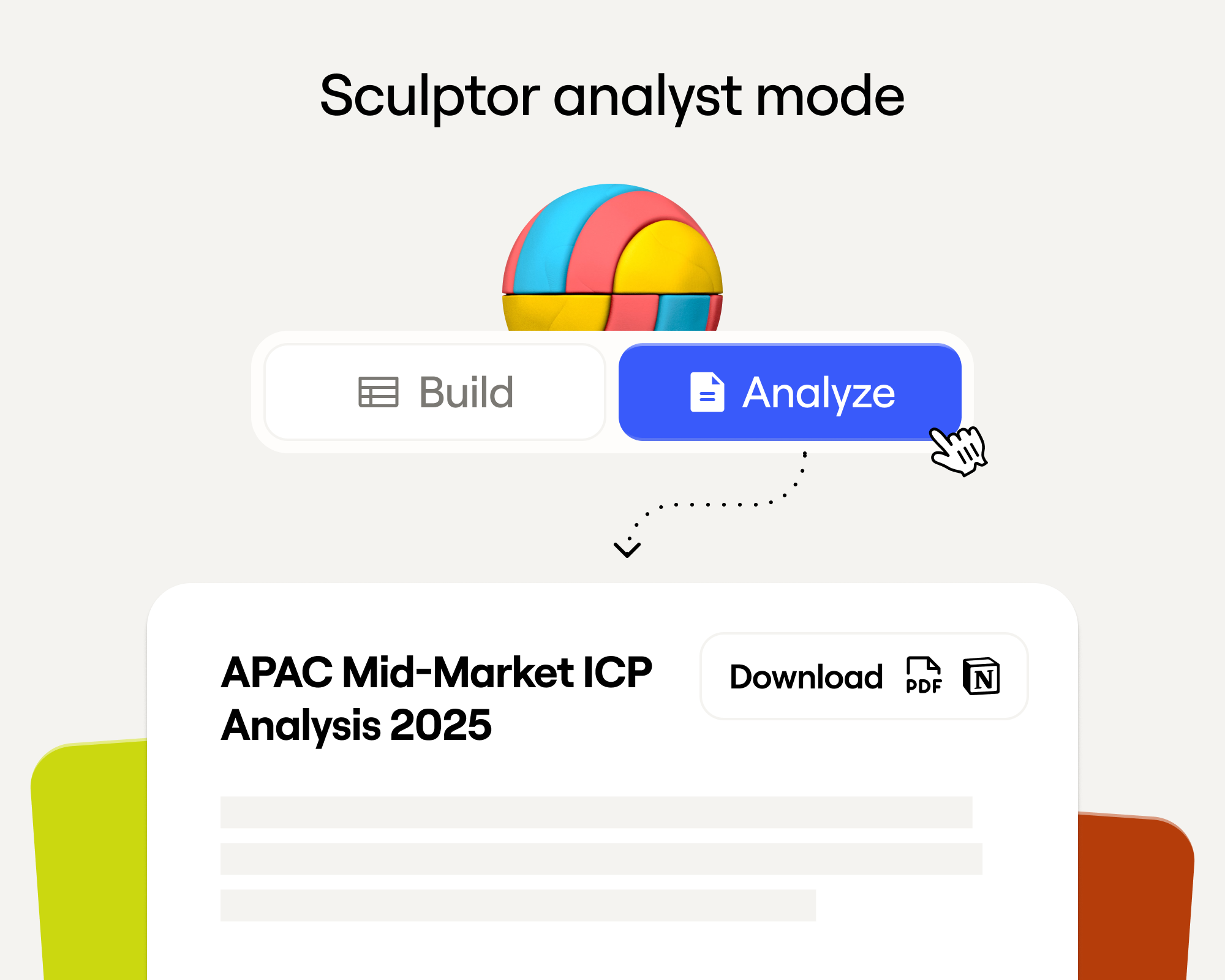
Sculptor Analyst Mode: Turning Context-Rich Data Into Actionable GTM Insights
Sculptor Analyst Mode: превращение контекстно-богатых данных в actionable GTM-инсайты

In a place where girls often choose between career or marriage, she carved her own path
В месте, где девушки часто выбирают между карьерой и замужеством, она проложила свой путь

How we designed Sculpt
Как мы спроектировали Sculpt
Clay announces second employee tender offer in nine months at a $5B valuation
Clay объявляет второй employee tender offer за девять месяцев при оценке $5B
Clay is now available as a connector in Claude
Clay теперь доступен как коннектор в Claude

Sellers have a new AI edge: Clay in ChatGPT
У продавцов новое AI-преимущество: Clay в ChatGPT

Clay reaches $100M ARR
Clay достигает $100M ARR

Clay Certifications: Turning mastery into credentials that matter
Clay Certifications: превращение мастерства в значимые сертификаты
Mobile Phone Verification Methodology
Методология верификации мобильных телефонов
Work Email Verification Methodology
Методология верификации work email
Stop Guessing, Start Analyzing: How Sculptor Turns Your GTM Data Into Your Competitive Advantage
Хватит угадывать, начинайте анализировать: как Sculptor превращает ваши GTM-данные в конкурентное преимущество

Find and outreach local businesses with Openmart and Clay Sequencer
Найдите и проведите outreach к локальным бизнесам с Openmart и Clay Sequencer

Announcing Web Intent
Анонсируем Web Intent
How Clay Uses Clay: Conversational Data
Как Clay использует Clay: разговорные данные

Sculpting GTM’s future with six major launches
Лепим будущее GTM с шестью крупными запусками

Introducing Claygent Navigator
Представляем Claygent Navigator

Announcing the Clay Partner Program
Анонсируем Clay Partner Program

Introducing GPT-5 in Claygent: sharper research, stronger formulas, better outbound
Представляем GPT-5 в Claygent: более острый ресёрч, более сильные формулы, более лучший outbound

Clay Series C announcement. The GTM engineering era begins now
Анонс Series C от Clay. Эра GTM engineering начинается сейчас

Claygent surpasses 1 billion runs
Claygent превышает 1 миллиард запусков

Announcing Sculpt: Clay’s first annual user conference
Анонсируем Sculpt: первую ежегодную пользовательскую конференцию Clay

Announcing custom signals at Clay
Анонсируем custom signals в Clay

Clay announces employee tender offer led by Sequoia at $1.5B valuation
Clay объявляет employee tender offer во главе с Sequoia при оценке $1.5B

Create personalized presentations at scale with Clay and Google Slides
Создавайте персонализированные презентации в масштабе с Clay и Google Slides