Browser requests to code – Hamel’s Blog - Hamel Husain
Заметка Hamel Husain описывает приём веб-скрапинга: вместо парсинга HTML можно превратить сетевые запросы браузера в готовый код. Автор узнал этот трюк из доклада Zachary Blackwood на NormConf 2022. На примере поиска ресторанов Subway показано, как через DevTools Chrome найти нужный сетевой запрос (GetLocations.ashx), скопировать его как cURL и вставить на curlconverter.com, чтобы получить Python-код, обращающийся к недокументированному API. Дополнительно показан хакерский способ распарсить ответ через json.loads и извлечь данные о магазинах. Подход хорош для разовых задач, но для повторяемого скрапинга лучше использовать headless-браузер.
I learned this from Zachary Blackwood’s 2022 NormConf Talk.
Example: Get A List of Subway Restaurants With Python
Open developer tools using Option + CMD + I
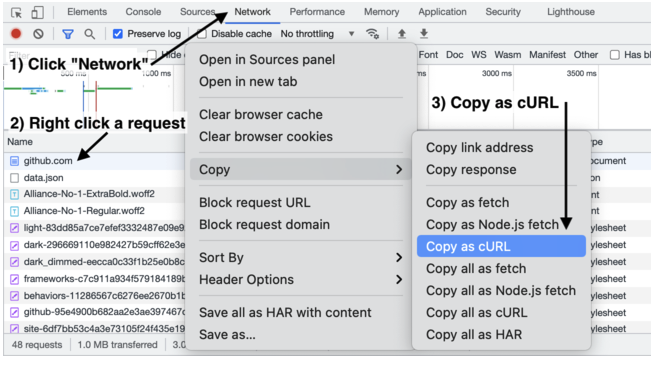
Go the the network tab, and hit the clear button
GetLocations.ashx... looks super promising.Copy -> Copy as CurlEnjoy your python code that uses this otherwise undocumented API :)
Bonus: Parse The Response
You can parse the response data in a hacky way.
# run the code from curlconverter.com, which will give you a `response` object. >>> import json ... response_string = response.text ... json_string = response_string[response_string.index("(") +1:response_string.index('"AdditionalData":')-1]+'}' ... parsed_string = json.loads(json_string) ... stores = parsed_string['ResultData'] >>> stores [{'LocationId': {'StoreNumber': 21809, 'SatelliteNumber': 0}, 'Address': {'Address1': '4888 NW Bethany Blvd', 'Address2': 'Suite K-1', 'Address3': 'Bethany Village Centre', 'City': 'Portland', 'StateProvCode': 'OR', 'PostalCode': '97229', 'CountryCode': 'US', 'CountryCode3': 'USA'}, 'Geo': {'Latitude': 45.5548, 'Longitude': -122.8358, 'TimeZoneId': 'America/Los_Angeles', 'CurrentUtcOffset': 0}, 'ListingNumber': 1, 'OrderingUrl': 'http://order.subway.com/Stores/Redirect.aspx?s=21809&sa=0&f=r&scc=US&spc=OR', 'CateringUrl': 'https://www.ezcater.com/catering/pvt/subway-portland-nw-bethany-blvd', 'ExtendedProperties': None}, ...
When to use this approach
This is great for adhoc things, but you probably want to use a headless browser and actually scrape the HTML if you want to do this in a repeatable way. But many times you want to do a one-off scrape, this isn’t so bad!