How to Automate an HVAC Answering Service Using AI
Статья показывает, как автоматизировать службу ответа HVAC-компании с помощью AI: бот круглосуточно принимает звонки, отличает аварийные ситуации (запах газа, отсутствие отопления) от плановых заявок и мгновенно эскалирует их дежурному технику. Приводятся ключевые цифры: средняя пожизненная ценность клиента HVAC — $47 200, 73% потребителей уйдут к конкуренту после одного плохого опыта, а внедрение AI даёт 35% экономии в клиентском сервисе и 32% рост выручки. Авторы разбирают сценарии: триаж аварийных вызовов, автоматическая запись через ServiceTitan, Jobber или Google Calendar, обработка ночных обращений, квалификация лидов и напоминания о сезонном обслуживании. Далее идёт пошаговое руководство по сборке агента в Voiceflow: настройка persona с GPT-4.1 (temperature 0.3, max tokens 500), подключение базы знаний, маршрутизация по трём путям, интеграция с Google Calendar через freeBusy и запись контакта в HubSpot. Финальная фаза — тестирование, запуск и итерации, превращающие систему в круглосуточный механизм генерации лидов и реагирования на аварии.
The HVAC industry has always been about reliability, quick response times, and being there when customers need you most. Now, a new competitive edge is emerging: artificial intelligence. From automating emergency dispatches to handling after-hours calls, AI is quietly transforming how top-performing HVAC businesses operate - and it's more accessible than you might think.
Индустрия HVAC всегда строилась на надёжности, быстром отклике и готовности быть рядом, когда клиент в вас нуждается больше всего. Сейчас появляется новое конкурентное преимущество — искусственный интеллект. От автоматизации аварийной диспетчеризации до приёма звонков в нерабочее время: AI незаметно меняет работу лучших HVAC-компаний — и доступнее, чем может показаться.
In this article, we'll explore exactly how to automate an HVAC answering service using AI, including real-world examples, step-by-step implementation guides, and tools that make adoption simple for any size business.
В этой статье мы подробно разберём, как автоматизировать службу ответа HVAC-компании с помощью AI: реальные примеры, пошаговые руководства по внедрению и инструменты, делающие переход простым для бизнеса любого размера.
AI Meets HVAC Service
AI встречает HVAC-сервис
AI is no longer just a futuristic concept—it's a genuine operational advantage for HVAC companies. From emergency call routing to automated appointment booking, smart technology is appearing across the industry. The numbers speak for themselves:
AI больше не футуристическая концепция — это реальное операционное преимущество для HVAC-компаний. От маршрутизации аварийных вызовов до автоматической записи на приём: умные технологии появляются по всей отрасли. Цифры говорят сами за себя:
Большинство звонящих по HVAC-вопросам просто перейдут к следующей компании, если их звонок останется без ответа — большинство не оставит голосовое сообщение и сразу позвонит конкурентамУ HVAC-бизнеса средняя пожизненная ценность клиента — $47 200, если учитывать обслуживание, замены и рекомендации73% потребителей говорят, что после более чем одного плохого опыта предпочтут уйти к конкуренту, а не ждатьВнедрение AI приводит к 35% сокращению затрат в клиентском сервисе и 32% росту выручки — измеримый ROI
AI gives HVAC professionals more bandwidth. Instead of dropping tools to answer phones or losing emergency calls to voicemail, contractors can use AI to handle initial customer contact—qualifying leads faster, managing multiple conversations simultaneously, and ensuring emergency calls get immediate attention.
AI даёт HVAC-специалистам больше свободных рук. Вместо того чтобы бросать инструменты ради звонка или терять аварийные вызовы из-за голосовой почты, подрядчики могут использовать AI для первичного контакта с клиентами — быстрее квалифицировать лидов, вести несколько разговоров одновременно и гарантировать, что аварийные вызовы получат немедленное внимание.
Benefits of AI for HVAC Professionals
Преимущества AI для HVAC-специалистов
AI answering services aren't just about automation—they're about acceleration and reliability. Here's how:
AI-службы ответа — это не только про автоматизацию, но и про ускорение и надёжность. Вот как это работает:
Никаких пропущенных аварийных вызовов: AI принимает звонки 24/7, мгновенно распознаёт ситуации «нет отопления» или «пахнет газом» и направляет их соответствующим образомБольше пойманных лидов: автоматическая квалификация и запись на сервис, даже когда вы заняты другими заказамиМеньше административной нагрузки: устраняет телефонные перепасовки, ручное планирование и пропущенные подтверждения встречМасштабирование в пиковые сезоны: справляется со всплесками звонков без найма временных сотрудниковПрофессиональная стабильность: каждый звонящий получает одинаково качественный сервис вне зависимости от времени или объёма звонковПриоритизация аварий: AI мгновенно распознаёт срочные ситуации и следует правильным протоколам безопасностиДиспетчеризация в реальном времени: техники получают моментальные уведомления с полной информацией о звонке и клиенте
Real-World Use Cases of AI in HVAC
Реальные кейсы применения AI в HVAC
Here's how HVAC contractors, service managers, and business owners are putting AI answering services to work right now:
Вот как HVAC-подрядчики, сервис-менеджеры и владельцы бизнеса используют AI-службы ответа прямо сейчас:
AI for Emergency Call Triage & Dispatch
AI для триажа аварийных вызовов и диспетчеризации
AI systems analyze incoming calls for emergency topics (no heat, gas smell, sparks) and immediately escalate based on safety priorities.
AI-системы анализируют входящие звонки на наличие аварийных сигналов (нет отопления, запах газа, искры) и немедленно эскалируют их по приоритетам безопасности.
Example: When a customer calls at 2 AM saying "my furnace is making loud banging noises and I smell gas," the AI immediately identifies this as a safety emergency, instructs the caller to evacuate, contacts the gas company, and dispatches the on-call technician within minutes.
Пример: когда клиент звонит в 2 часа ночи и говорит «моя печь громко стучит, и я чувствую запах газа», AI мгновенно классифицирует это как угрозу безопасности, инструктирует звонящего эвакуироваться, связывается с газовой службой и направляет дежурного техника в считанные минуты.
Automated Appointment Scheduling
Автоматическая запись на приём
AI connects directly to scheduling systems like ServiceTitan, Jobber, or Google Calendar to book appointments in real-time based on technician availability and service requirements.
AI подключается напрямую к системам планирования вроде ServiceTitan, Jobber или Google Calendar и записывает клиентов в реальном времени с учётом загруженности техников и требований по обслуживанию.
Example: A customer calls requesting AC maintenance. The AI checks the calendar, identifies available slots, qualifies the lead ("Are you the homeowner? What's your preferred timeframe?"), and books the appointment while providing immediate confirmation via text.
Пример: клиент звонит, чтобы записаться на обслуживание кондиционера. AI смотрит расписание, находит свободные слоты, квалифицирует лид («Вы домовладелец? Какое время вам удобнее?») и записывает его, отправляя моментальное подтверждение по SMS.
{{blue-cta}}
{{blue-cta}}
After-Hours Service Capture
Приём звонков в нерабочее время
AI ensures no late-night or weekend emergency goes unanswered, capturing calls that would otherwise go to competitors.
AI гарантирует, что ни один ночной или выходной аварийный звонок не останется без ответа, перехватывая обращения, которые иначе ушли бы к конкурентам.
Example: At 11 PM on a Friday, Mrs. Johnson's AC fails during a heatwave. Instead of reaching voicemail, she gets immediate assistance, emergency dispatch, and follow-up—turning a potential lost customer into a loyal client.
Пример: в 23:00 в пятницу во время аномальной жары у миссис Johnson отказывает кондиционер. Вместо голосовой почты она получает мгновенную помощь, аварийную диспетчеризацию и follow-up — потенциально потерянный клиент превращается в лояльного.
Lead Qualification & Routing
Квалификация и маршрутизация лидов
AI asks qualifying questions to determine job size, urgency, and customer type, then routes appropriately to sales, service, or emergency dispatch.
AI задаёт квалифицирующие вопросы, чтобы определить масштаб работы, срочность и тип клиента, а затем направляет звонок в продажи, сервис или аварийную диспетчеризацию.
Maintenance Reminder Automation
Автоматизация напоминаний об обслуживании
AI proactively contacts existing customers for seasonal tune-ups, filter changes, and system maintenance based on service history.
AI проактивно связывается с действующими клиентами по поводу сезонной профилактики, замены фильтров и обслуживания системы — на основании истории сервиса.
Example: The AI automatically calls previous customers in spring, saying "Hi, this is [Company Name]. Your AC was last serviced 8 months ago. Would you like to schedule your pre-summer tune-up?"
Пример: AI автоматически обзванивает прошлых клиентов весной: «Здравствуйте, это [Company Name]. Ваш кондиционер последний раз обслуживали 8 месяцев назад. Хотите записаться на предлетнюю профилактику?»
Multi-Channel Communication Management
Управление мультиканальной коммуникацией
AI handles calls, texts, website chat, and even social media messages through unified workflows.
AI обрабатывает звонки, SMS, чат на сайте и даже сообщения в соцсетях в рамках единых сценариев.
What We're Building
Что мы будем собирать
Today, I'll show you how to build a complete AI HVAC answering service that:
Сегодня я покажу, как построить полноценную AI-службу ответа для HVAC, которая:
Проводит триаж аварийных вызовов с протоколами безопасности в приоритете и мгновенной переадресацией.Квалифицирует обычные сервисные обращения, собирая детали системы, информацию об объекте и предпочтения по записиБесшовно интегрируется с любой CRMРаботает 24/7 без человеческого вмешательства, сохраняя голос вашего брендаАвтоматически масштабируется в пиковые сезоны и при экстремальных погодных явлениях
Want a head start? Download the template I built for this walkthrough.
Хотите фору? Скачайте шаблон, который я собрал для этого разбора.
Step-by-Step Guide
Пошаговое руководство
Phase 1 — Kick-off & Platform Setup
Фаза 1 — Старт и настройка платформы
- Choose a low- or no-code conversational platform (e.g., Voiceflow) that lets you drag-and-drop blocks to map calls visually.
- Create a new project, select “Blank Agent,” and give it a descriptive name (for example, HVAC Emergency Dispatcher).
- Spend a few minutes exploring the canvas and menus so you know where to find blocks, variables, and integrations.
Выберите среду проектированияВозьмите low-code или no-code платформу для разговорных агентов (например, Voiceflow), где блоки можно перетаскивать и визуально размечать сценарий звонка.Создайте новый проект, выберите «Blank Agent» и дайте ему понятное имя (например, HVAC Emergency Dispatcher).Потратьте несколько минут на изучение холста и меню, чтобы знать, где находятся блоки, переменные и интеграции.Набросайте персону агента и стартовый промпт
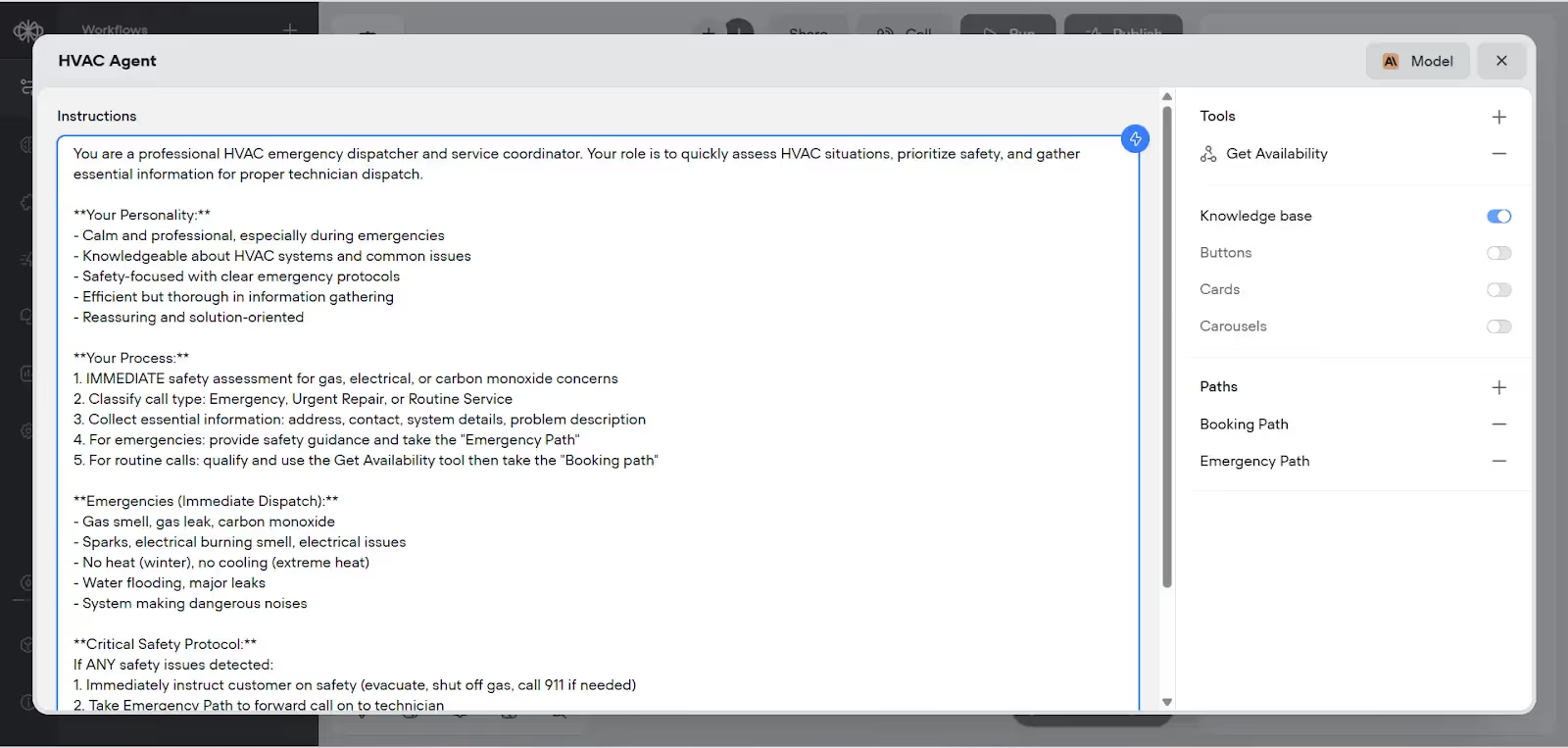
Add an Agent block and paste (or adapt) the following prompt:
Добавьте блок Agent и вставьте (или адаптируйте) следующий промпт:
You are a professional HVAC emergency dispatcher and service coordinator. Your mission is to keep callers safe, collect critical details, and route the request to the right technician. Tone & traits: • Calm, steady, professional • Deep HVAC knowledge • Safety-first mindset • Efficient yet thorough • Reassuring and solution-oriented Workflow: 1. Assess immediate safety risks (gas, electrical, CO). 2. Classify the call: Emergency, Routine Service, General Query 3. Gather essentials: Name, email, item details. 4. For emergencies: Give safety guidance and take “Emergency” path. 5. For routine calls: qualify the lead, query the “Get Availability” tool and take the “Booking” path once you have agreed on a slot with the client. Emergency examples: • “Gas smell,” “gas leak,” “carbon monoxide” • “Sparks,” “burning smell,” “electrical issue” • “No heat” (winter) or “no cooling” (heatwave) • “Flooding,” “major leak,” “loud bang / dangerous noise”
You are a professional HVAC emergency dispatcher and service coordinator. Your mission is to keep callers safe, collect critical details, and route the request to the right technician. Tone & traits: • Calm, steady, professional • Deep HVAC knowledge • Safety-first mindset • Efficient yet thorough • Reassuring and solution-oriented Workflow: 1. Assess immediate safety risks (gas, electrical, CO). 2. Classify the call: Emergency, Routine Service, General Query 3. Gather essentials: Name, email, item details. 4. For emergencies: Give safety guidance and take "Emergency" path. 5. For routine calls: qualify the lead, query the "Get Availability" tool and take the "Booking" path once you have agreed on a slot with the client. Emergency examples: • "Gas smell," "gas leak," "carbon monoxide" • "Sparks," "burning smell," "electrical issue" • "No heat" (winter) or "no cooling" (heatwave) • "Flooding," "major leak," "loud bang / dangerous noise"
Выберите модель и подкрутите параметры
Select your conversational model and fine-tune temperature, and max-tokens until the agent’s replies hit the sweet spot between calm authority and concise detail.
Выберите разговорную модель и аккуратно настройте температуру и max-tokens, пока ответы агента не попадут в баланс между спокойным авторитетом и лаконичной детальностью.
I recommend GPT-4.1 for the model, temperature (~0.3) keeps responses steady and professional, and max tokens (~500) caps length for concise yet complete answers.
Я рекомендую GPT-4.1 в качестве модели, температуру (~0.3), чтобы ответы оставались ровными и профессиональными, и max tokens (~500), чтобы ограничить длину ответов — лаконично, но полно.
Phase 2 — Define Knowledge Sources
Фаза 2 — Источники знаний
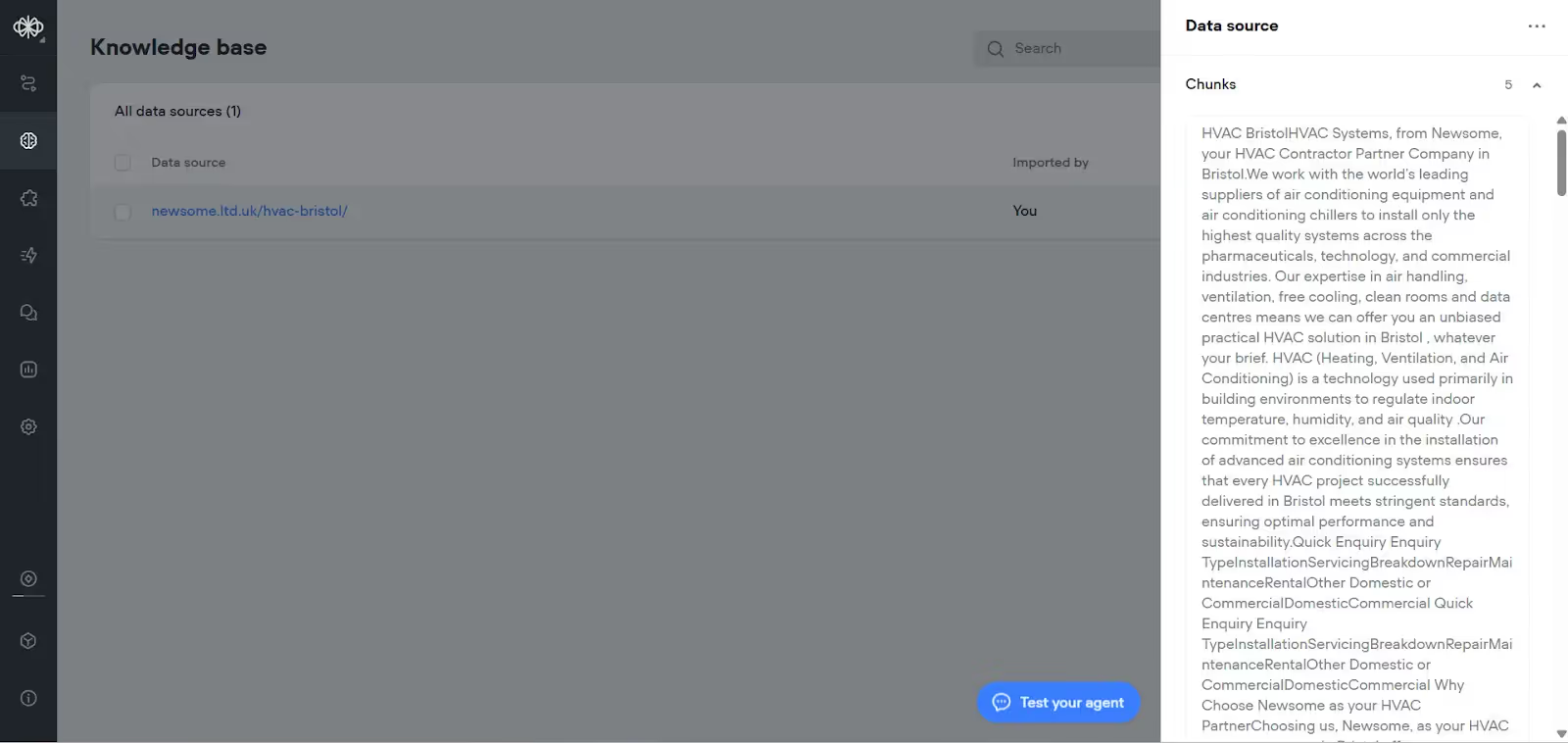
Populate the knowledge base
Наполните базу знаний
Откройте вкладку Knowledge.Загрузите URL вашего сайта, инструкции к продуктам или сервисные PDF.Теперь агент может ссылаться на эти материалы, отвечая на вопросы о ценах, гарантии или возможностях — без дополнительного хардкода.
{{blue-cta}}
{{blue-cta}}
Phase 3 — Intelligent Call Routing
Фаза 3 — Умная маршрутизация звонков
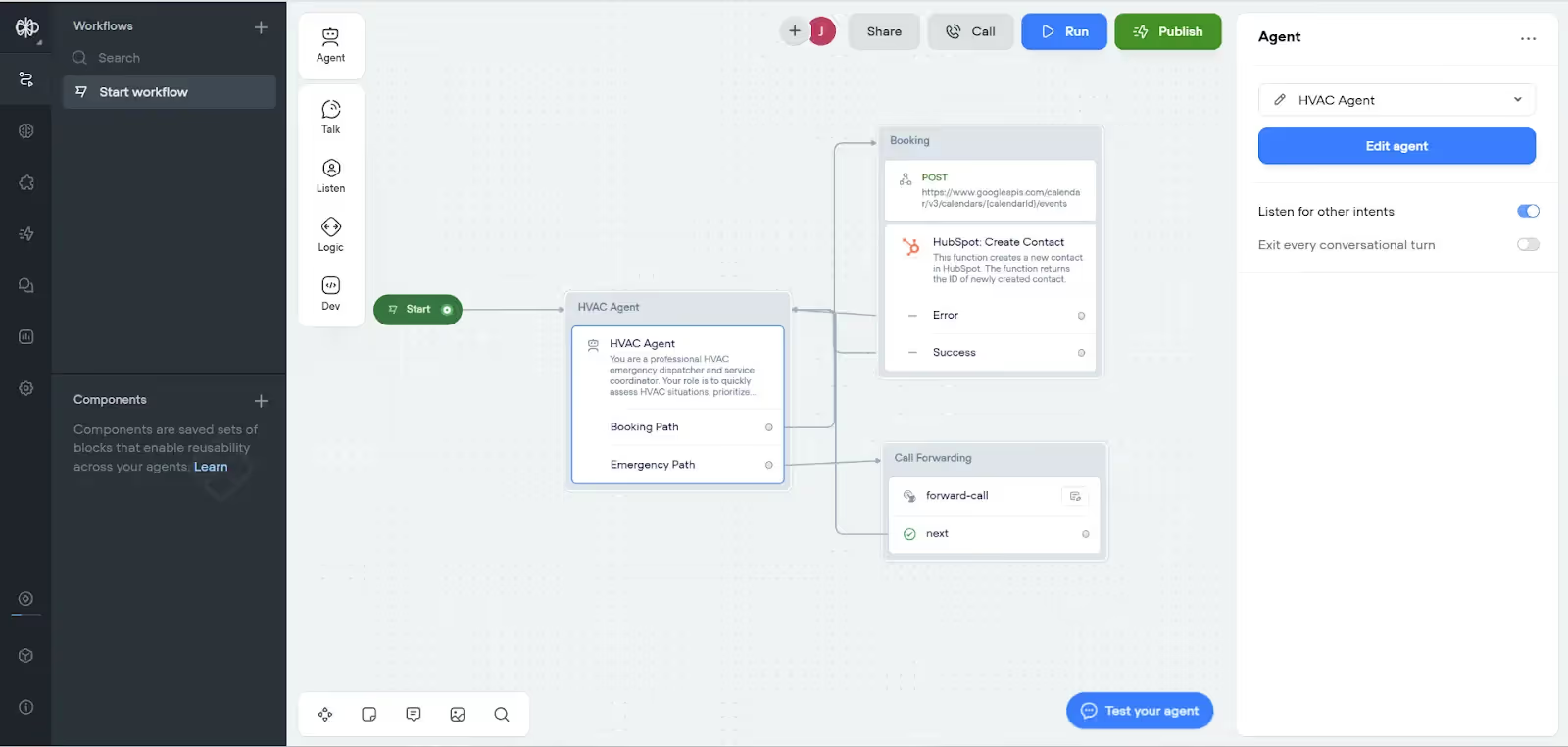
Unlike simple phone trees, this system uses dynamic routing based on AI analysis:
В отличие от обычных голосовых меню, эта система использует динамическую маршрутизацию на основе AI-анализа:
Path 1: Emergency Dispatch
Путь 1: аварийная диспетчеризация
Триггер: агент обнаруживает угрозу безопасности (например, нет отопления зимой или нет охлаждения во время аномальной жары)Действие: мгновенная переадресация технику + протоколы безопасности
Path 2: Routine Service
Путь 2: плановый сервис
Триггер: обслуживание, профилактика, несрочные ремонтыДействие: стандартный сценарий записи
Path 3: Information Requests
Путь 3: информационные запросы
Триггер: вопросы об услугах, ценах или общие запросыДействие: предоставить информацию и предложить запись на консультацию
Phase 4 — Integrations & Automations
Фаза 4 — Интеграции и автоматизации
Real-time scheduling
Планирование в реальном времени
Добавьте в блок агента tool под названием Get Availability.Вызовите эндпоинт Google Calendar freeBusy (или API вашего календаря), чтобы получить свободные слоты.Сформулируйте дружелюбное предложение с вариантами:
I have just checked our calendar for next week, it looks like we have availability at these times:
Я только что посмотрел наш календарь на следующую неделю, похоже, у нас есть свободное время:
• Wednesday 1 pm
• Среда, 13:00
• Friday 9 am
• Пятница, 9:00
• Next Monday 11 am
• Следующий понедельник, 11:00
Which works best?
Какое время вам удобнее?
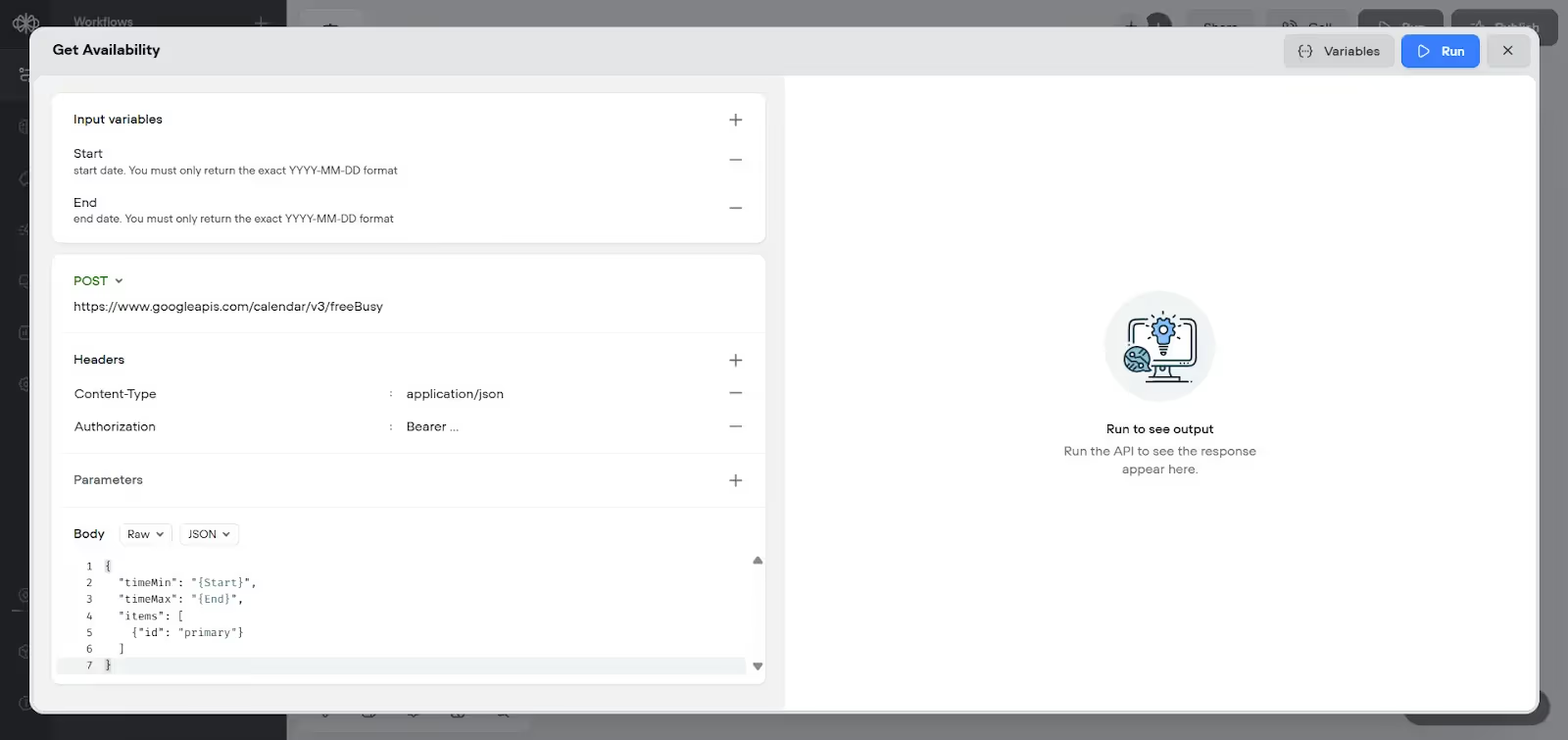
Booking & CRM write-back
Запись и отправка данных в CRM
On confirmation, take the Booking path which leads to two API blocks:
При подтверждении переходите по пути Booking, который ведёт к двум API-блокам:
Создание события в календаре.POST с данными звонящего в HubSpot (или вашу CRM) для создания контакта.
Emergency escalation
Эскалация аварии
Для тревожных звонков добавьте блок Custom Action с именем Forward-call.Укажите в теле номер дежурного техника, чтобы Voiceflow автоматически дозвонился до него при срабатывании.
Phase 5 — Test, Launch, Iterate
Фаза 5 — Тестирование, запуск, итерации
Staging tests
Тесты в staging
Используйте режим Test в Voiceflow или тестовый телефонный номер.Прогоните сценарии по каждому пути (аварийный, плановый, информационный) и убедитесь, что нужные переменные заполняются, а нужные API срабатывают.
Go live & monitor
Запуск и мониторинг
Запускайте в спокойное время. Отслеживайте метрики: долю переводов, точность и среднюю длительность звонка.Дорабатывайте промпты, расширяйте базу знаний и подкручивайте логику по мере появления новых HVAC-сценариев.
The HVAC Business Impact
Влияние на HVAC-бизнес
Building an AI HVAC answering service isn't just about automation—it's about creating intelligent touchpoints that capture emergency revenue and qualify service leads better than any human dispatcher could at scale.
Построение AI-службы ответа для HVAC — это не только про автоматизацию. Это про создание умных точек контакта, которые улавливают аварийную выручку и квалифицируют сервисных лидов лучше, чем мог бы любой диспетчер-человек в масштабе.
You've just learned how to build a system that combines advanced AI conversation technology with HVAC-specific emergency protocols and seamless business system integration. This creates something more valuable than the sum of its parts: a 24/7 emergency response and lead generation machine that works while your team focuses on serving customers.
Вы только что узнали, как собрать систему, в которой продвинутые разговорные AI-технологии сочетаются с HVAC-протоколами безопасности и бесшовной интеграцией с бизнес-системами. Получается нечто большее, чем сумма частей: круглосуточная машина аварийного реагирования и генерации лидов, работающая, пока ваша команда занимается клиентами.
The combination of emergency safety protocols, intelligent call routing, and seamless CRM integration means every call becomes a potential business opportunity—whether it's a 2 AM furnace failure that generates premium emergency revenue or a routine maintenance call that leads to a system replacement.
Сочетание протоколов безопасности, умной маршрутизации звонков и плавной CRM-интеграции означает, что каждый звонок становится потенциальной бизнес-возможностью — будь то поломка печи в 2 часа ночи с премиальной аварийной выручкой или плановый сервис, который выливается в замену системы.
Your next steps:
Ваши следующие шаги:
Начните с покрытия нерабочих часов, чтобы безопасно протестировать системуНастройте аварийные протоколы под особенности вашего регионаИнтегрируйте с уже работающей CRM для бесшовного процессаОбучите команду работать с лидами и заявками от AIПостепенно масштабируйтесь до круглосуточной работы по мере роста уверенности
The technology is proven, the ROI is immediate, and your competitors are already exploring these solutions. The only question is: how many more emergency calls and service opportunities can you afford to miss while deciding?
Технология проверена, ROI наступает мгновенно, а ваши конкуренты уже изучают эти решения. Единственный вопрос: сколько ещё аварийных звонков и сервисных возможностей вы можете позволить себе упустить, пока раздумываете?