How to Integrate with LinkedIn
Статья рассказывает о новой интеграции Lavender с LinkedIn, которая позволяет составлять прямые сообщения прямо в интерфейсе LinkedIn без копирования и вставки. Lavender автоматически появляется в разделе Messages при создании нового сообщения или ответе на существующую переписку. Интеграция использует ChatGPT с инсайтами Lavender для написания более персонализированных сообщений и предлагает корректировки тона на основе данных. Если расширение Lavender уже установлено в Chrome, никаких дополнительных шагов не требуется. Функция доступна на тарифах Starter, Pro и Teams, а также включена в бесплатный 7-дневный пробный период. При проблемах с отображением рекомендуется проверить установку расширения, очистить кэш браузера или обратиться в поддержку.

How to Integrate with LinkedIn
Как интегрироваться с LinkedIn
Unlock the full potential of your LinkedIn communication with Lavender, our latest integration that streamlines your messaging experience.
Раскройте весь потенциал общения в LinkedIn с помощью Lavender — нашей новой интеграции, которая упрощает работу с сообщениями.
By using Lavender with LinkedIn, you can craft Direct Messages to prospects, customers, and more - all directly in LinkedIn's messages!
Используя Lavender вместе с LinkedIn, вы можете составлять прямые сообщения потенциальным клиентам, заказчикам и другим адресатам — прямо в интерфейсе сообщений LinkedIn!
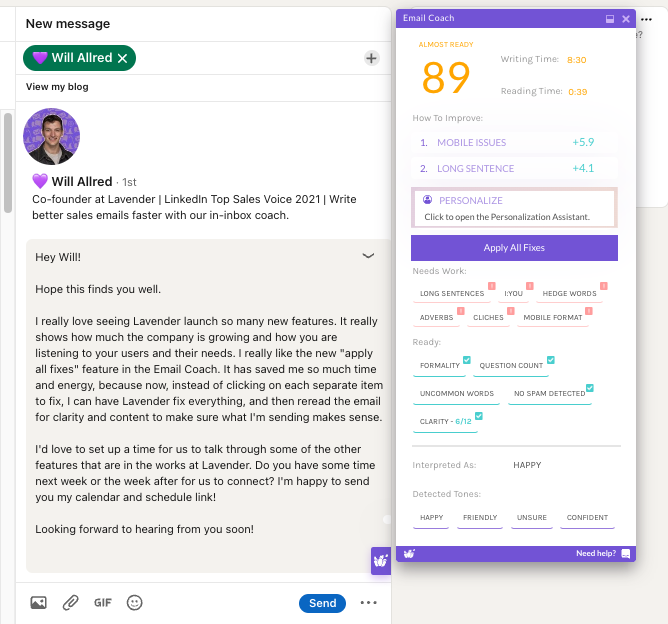
Benefits of using Lavender with LinkedIn
Преимущества использования Lavender с LinkedIn
Lavender автоматически появится в разделе Messages в LinkedIn, когда вы составляете новое сообщение или отвечаете на существующую переписку. Больше никакого копирования и вставки! Используйте ChatGPT вместе с инсайтами Lavender, чтобы писать более персонализированные сообщения. Корректируйте предложения и тон с помощью рекомендаций Lavender, основанных на данных.
How to set up Lavender with LinkedIn
Как настроить Lavender с LinkedIn
If you already have Lavender installed on Chrome, that’s it - no additional steps are needed! 🎉
Если Lavender уже установлен у вас в Chrome — это всё, никаких дополнительных шагов не требуется! 🎉
You should see Lavender appear when you open a message under your Messages section of LinkedIn.
Вы увидите Lavender при открытии сообщения в разделе Messages в LinkedIn.
Don’t have Lavender installed? Visit install.lavender.ai to get started!
У вас не установлен Lavender? Перейдите на install.lavender.ai, чтобы начать!
Troubleshooting Lavender with LinkedIn
Устранение неполадок Lavender с LinkedIn
Is Lavender not appearing in your LinkedIn messages?
Lavender не отображается в сообщениях LinkedIn?
Убедитесь, что расширение Lavender установлено в вашем браузере. Попробуйте очистить кэш браузера. В Google Chrome откройте раздел «Расширения» и нажмите «Подробнее» под Lavender. Убедитесь, что в разделе «Доступ к сайту» выбрано «На всех сайтах».
Still not appearing? Reach out to support@lavender.ai, and we’ll be happy to help troubleshoot!
Всё ещё не отображается? Напишите нам на support@lavender.ai, и мы с радостью поможем разобраться!
Prerequisites
Предварительные требования
Lavender for LinkedIn is available on our Starter, Pro, and Teams plans.
Lavender для LinkedIn доступен на наших тарифах Starter, Pro и Teams.
Not sure which plan you have? You can check your plan type (and upgrade if necessary!) on the Billing page of your Dashboard.
Не уверены, какой у вас тариф? Вы можете проверить тип тарифа (и при необходимости перейти на более высокий!) на странице Billing в вашем Dashboard.
Lavender for LinkedIn is also included as part of our free 7-day trial!
Lavender для LinkedIn также включён в наш бесплатный 7-дневный пробный период!
About the Author
Об авторе