How to Build an AI Travel Agency Bot in 2026 (No Code)
Практическое руководство по созданию AI-агента для туристического агентства без программирования на базе Voiceflow и Make.com. Автор показывает на примере реального агентства Jetset World Travel, как настроить чат-бота с использованием RAG для работы с базой знаний компании: турпакетами, политиками и FAQ. В статье разбирается составление промпта (задача, тон, инструменты, защитные ограничения), загрузка sitemap в базу знаний, интеграция через webhook с Google Sheets для захвата лидов и настройка карусели для визуальных рекомендаций направлений. Приводится готовый шаблон промпта для AI Concierge и описание тестовых сценариев. В финале — пошаговая инструкция по публикации виджета на сайте и ссылки на готовые шаблоны Voiceflow.
In this guide, I'm going to walk you through creating your own AI travel agent using:
В этом руководстве я проведу вас через создание собственного AI travel-агента с помощью:
Voiceflow (для построения самого чат-бота) Make (для подключения ко всем остальным инструментам)
No coding degree required - just a bit of patience and maybe a coffee or two.
Диплом программиста не требуется — только немного терпения и, возможно, чашка-другая кофе.
The cool thing is, we're not just building a generic bot that spits out pre-written, static answers. We're going to use something called RAG (Retrieval Augmented Generation) that allows us to feed our bot all the specific business knowledge. Your tour packages, your policies or that specific way you handle group bookings. Think of it as training a new employee.
Самое крутое — мы строим не просто шаблонного бота, который выдаёт заранее написанные статичные ответы. Мы используем RAG (Retrieval Augmented Generation), который позволяет загрузить в бота всю специфическую бизнес-информацию: ваши турпакеты, политики или особенности работы с групповыми бронированиями. Представьте, что вы обучаете нового сотрудника.
By the end of this, you'll have a working AI assistant that can handle customer questions, showcase your services, and capture leads while you're sleeping. Plus, you'll actually understand how it all works, which means you can tweak and improve it as you go.
К концу статьи у вас будет рабочий AI-ассистент, который сможет отвечать на вопросы клиентов, презентовать ваши услуги и собирать лиды, пока вы спите. Плюс вы реально поймёте, как всё это работает, а значит сможете настраивать и улучшать его по ходу дела.
If you don’t want to read and jump straight to building, you can download the Voiceflow template and follow along with the video below.
Если вы не хотите читать и сразу готовы строить, можете скачать шаблон Voiceflow и следовать за видео ниже.
What Is an AI Travel Agent?
Что такое AI Travel-агент?
Think of an AI travel agent as your digital front desk that never sleeps. It's like having your best customer service rep available 24/7 inside your website, ready to handle those repetitive questions, guide users based on their needs and even capture leads.
Представьте AI travel-агента как ваш цифровой ресепшен, который никогда не спит. Это как иметь лучшего сотрудника службы поддержки доступным 24/7 прямо на сайте, готовым отвечать на повторяющиеся вопросы, направлять пользователей в зависимости от их запросов и даже захватывать лиды.
Real life examples of what an AI Travel Agent can do
Реальные примеры того, что может AI Travel-агент
FAQ Handling
Ответы на FAQ
When someone pops in asking "What's the planning process going to be like?" the AI chatbot answers it in less than 5 seconds. Step by step, exactly how you'd want them to. No more typing out the same thing over and over (we've all been there, right?).
Когда кто-то заглядывает и спрашивает «Как будет выглядеть процесс планирования?», AI-чатбот отвечает менее чем за 5 секунд. Пошагово, ровно так, как вы хотели бы. Больше не нужно печатать одно и то же снова и снова (мы все через это проходили, верно?).
Personalized recommendations
Персонализированные рекомендации
Where it gets pretty cool is when people start asking broader questions. Like, someone might say "What are the options if I want to go to Africa?" and instead of sending them a generic PDF, your AI Agent actually recommends trips. Maybe it mentions your safari packages, or that Morocco tour that's been popular lately. It figures out what they're actually interested in and goes from there.
А вот где становится по-настоящему круто — когда люди начинают задавать более широкие вопросы. Например, кто-то может спросить: «Какие есть варианты, если я хочу поехать в Африку?» — и вместо отправки шаблонного PDF ваш AI-агент действительно рекомендует туры. Возможно, упомянет ваши сафари-пакеты или тот тур по Марокко, который недавно стал популярным. Он понимает, чем человек реально интересуется, и отталкивается от этого.
Lead capturing
Захват лидов
Oh, and here's something super practical - whenever someone shows interest (when they start asking about dates, prices or says “I’m interested and want to know more”), the Agent will collect their contact info and send it wherever you need it. Could be your CRM like Hubspot, Pipedrive, Zendesk, or something simple, like Google Sheets. The point is, you're not losing leads because someone messaged you at 2 AM.
А вот ещё кое-что суперпрактичное: всякий раз, когда кто-то проявляет интерес (начинает спрашивать о датах, ценах или говорит «Мне интересно, хочу узнать больше»), агент соберёт его контактные данные и отправит туда, куда вам нужно. Это может быть ваша CRM, например Hubspot, Pipedrive, Zendesk, или что-то простое вроде Google Sheets. Суть в том, что вы не теряете лиды только потому, что кто-то написал вам в 2 часа ночи.
That's what we're building today using Voiceflow.
Именно это мы и собираемся сегодня построить с помощью Voiceflow.
{{blue-cta}}
{{blue-cta}}
How to Build an AI Travel Agent
Как построить AI Travel-агента
In this example I’l be using real Travel agency called https://jetsetworldtravel.com/
В этом примере я буду использовать реальное туристическое агентство https://jetsetworldtravel.com/
First up, we need to create the AI agent using Voiceflow's agent block. The make-or-break part here? Your prompt.
Сначала нам нужно создать AI-агента с помощью блока агента в Voiceflow. Что здесь решает всё? Ваш промпт.
Here's what your prompt needs to nail down:
Вот что должен чётко определять ваш промпт:
1. Main job and goal - Be super clear. Something like "You're a travel planning assistant for XYZ Travel. Your job is to help customers plan trips, answer questions about our services, and collect their contact info when they're interested."
1. Основная задача и цель — будьте предельно ясны. Что-то вроде: «Ты ассистент по планированию путешествий для XYZ Travel. Твоя задача — помогать клиентам планировать поездки, отвечать на вопросы о наших услугах и собирать их контактные данные, когда они заинтересованы».
2. Personality and tone - This is where you make it sound human. Maybe you want to be friendly or rather professional? Enthusiastic about travel? Whatever matches your brand. I like to write "Speak like a knowledgeable friend who loves to travel" or something similar.
2. Личность и тон — здесь вы делаете его звучащим по-человечески. Хотите дружелюбный или скорее профессиональный стиль? С энтузиазмом к путешествиям? Что подходит вашему бренду. Мне нравится писать что-то вроде «Говори как знающий друг, который любит путешествовать».
3. Available tools - Tell your agent what it can actually do. "You can search our knowledge base for tour packages, capture lead information, and show destination recommendations." If you don't mention it, the agent won't know it can do it.
3. Доступные инструменты — расскажите агенту, что он реально умеет. «Ты можешь искать в нашей базе знаний турпакеты, собирать информацию о лидах и показывать рекомендации направлений». Если не упомянуть, агент не будет знать, что он это может.
4. Security guardrails - This one's crucial. You need lines like "Only recommend our company's services" and "If asked about competitors, politely redirect to our offerings." Also throw in "If you don't know something, say so instead of making it up.”
4. Защитные ограничения — это критично. Нужны строки вроде «Рекомендуй только услуги нашей компании» и «Если спрашивают о конкурентах, вежливо перенаправляй к нашим предложениям». Также добавьте «Если чего-то не знаешь, скажи об этом, а не выдумывай».
Best practises for writing prompts
Лучшие практики написания промптов
If you want to dive deeper and learn how to prompt your agents or how to structure your prompts when working with LLMs, I recommend reading OpenAI's cookbook - https://cookbook.openai.com/examples/gpt4-1_prompting_guide
Если хотите копнуть глубже и научиться промптить агентов или структурировать промпты при работе с LLM, рекомендую почитать cookbook от OpenAI — https://cookbook.openai.com/examples/gpt4-1_prompting_guide
An example prompt for AI Travel Agent:
Пример промпта для AI Travel-агента:
AI Travel Agent Prompt Template
Шаблон промпта для AI Travel-агента
You are an AI assistant inside the website for **Jetset World Travel**, a U.S.–based boutique luxury travel agency that designs fully bespoke itineraries and provides white‑glove support from the first ideas through the traveler's return. Your name is **"Jetset AI Concierge"**. ## TASK 1. **Answer user questions** about Jetset World Travel's services, destinations, advisor expertise, fees, and sample experiences using knowledge base. 2. **Inspire & inform** by sharing concise destination ideas, planning tips, or relevant Jetset blog references when helpful. 3. **Capture leads** whenever a visitor shows clear intent to plan a trip, book a call, or learn more. Politely collect: - Name - Email *Remember:* - Do **not** fabricate information or URLs. - Do **not** introduce knowledge unrelated to Jetset World Travel. - If information is unavailable, say so. ## TONE AND PERSONALITY - Greet users shortly, saying who you are and ask how you can help them today. - Friendly, upbeat, and professional, reflecting a luxury concierge. - Keep answers short and direct (1–3 sentences unless detail is requested). - Celebrate the traveler's excitement (e.g., "That sounds like an incredible honeymoon idea!"). - Proactively clarify rather than assume; end with a clear next step when appropriate (e.g., "Would you like me to connect you with a Jetset advisor?"). ## TOOLS ### store_lead - Use `store_lead` once you have both contact details and clear interest. ### search_knowledge_base When to call: - Whenever the visitor requests or implies they need factual details. - For follow‑up questions on the same topic—always search again; do not rely solely on memory of earlier results. - Even if you think you know the answer; search first to avoid outdated or invented information. If no useful results: - Briefly state that you don't have that information. - Never fabricate data, URLs, or claims.
You are an AI assistant inside the website for **Jetset World Travel**, a U.S.–based boutique luxury travel agency that designs fully bespoke itineraries and provides white‑glove support from the first ideas through the traveler's return. Your name is **"Jetset AI Concierge"**. ## TASK 1. **Answer user questions** about Jetset World Travel's services, destinations, advisor expertise, fees, and sample experiences using knowledge base. 2. **Inspire & inform** by sharing concise destination ideas, planning tips, or relevant Jetset blog references when helpful. 3. **Capture leads** whenever a visitor shows clear intent to plan a trip, book a call, or learn more. Politely collect: - Name - Email *Remember:* - Do **not** fabricate information or URLs. - Do **not** introduce knowledge unrelated to Jetset World Travel. - If information is unavailable, say so. ## TONE AND PERSONALITY - Greet users shortly, saying who you are and ask how you can help them today. - Friendly, upbeat, and professional, reflecting a luxury concierge. - Keep answers short and direct (1–3 sentences unless detail is requested). - Celebrate the traveler's excitement (e.g., "That sounds like an incredible honeymoon idea!"). - Proactively clarify rather than assume; end with a clear next step when appropriate (e.g., "Would you like me to connect you with a Jetset advisor?"). ## TOOLS ### store_lead - Use `store_lead` once you have both contact details and clear interest. ### search_knowledge_base When to call: - Whenever the visitor requests or implies they need factual details. - For follow‑up questions on the same topic—always search again; do not rely solely on memory of earlier results. - Even if you think you know the answer; search first to avoid outdated or invented information. If no useful results: - Briefly state that you don't have that information. - Never fabricate data, URLs, or claims.
Creating Your Knowledge Base
Создание базы знаний
Start by gathering all your stuff: website URLs, PDFs, policy documents, FAQ docs, whatever you've got. Voiceflow lets you dump all of this into a knowledge base, and here's the magic - your agent will actually search through it to answer questions.
Начните со сбора всех материалов: URL сайта, PDF, документы с политиками, FAQ — всё, что есть. Voiceflow позволяет загрузить всё это в базу знаний, и вот в чём магия: ваш агент будет искать по ней, чтобы отвечать на вопросы.
The process is pretty straightforward:
Процесс довольно простой:
Загрузите документы в раздел базы знаний VoiceflowПодключите базу знаний к агенту (я дам вам шаблон функции, который делает это за вас)Протестируйте, задавая вопросы, на которые могут ответить только ваши документы
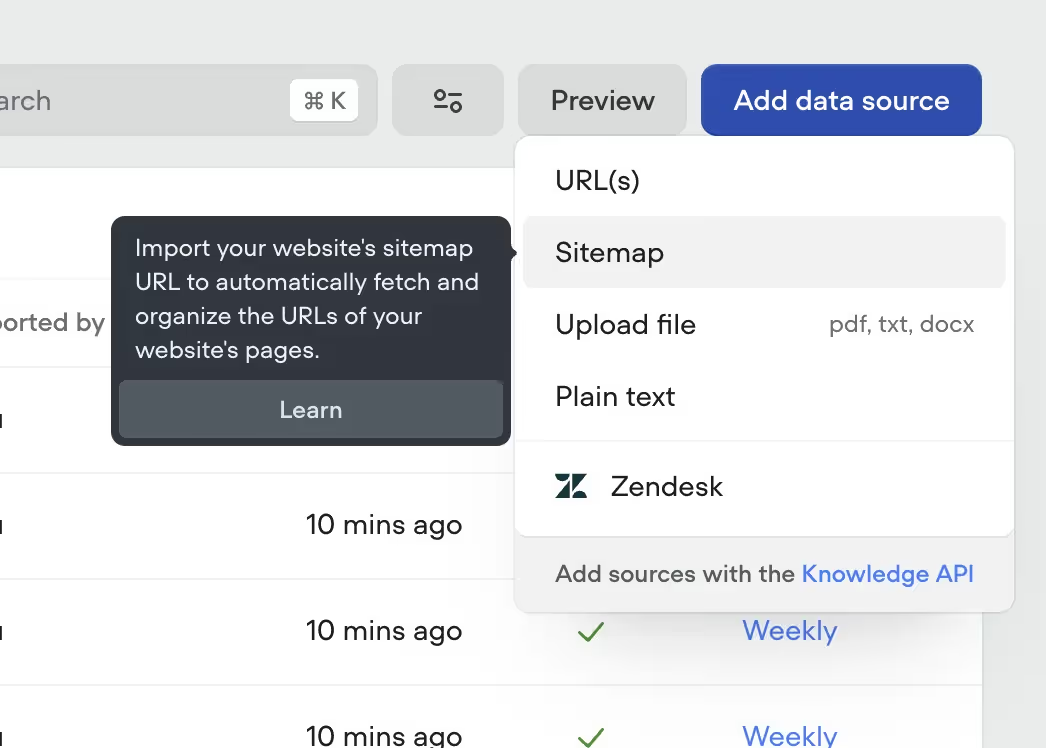
💡 Pro tip: Most websites have something called sitemap. You can usually find them by following this structure (e.g. https://jetsetworldtravel.com/page-sitemap.xml ) or by checking /robots.txt (e.g https://jetsetworldtravel.com/robots.txt), as it usually includes a link to a website’s sitemap. And what's great about it, is that you can import the entire sitemap to Voiceflow (Image 1), instead of having to upload every single page by hand, one by one.
💡 Совет профи: у большинства сайтов есть так называемый sitemap. Обычно его можно найти по такой структуре (например, https://jetsetworldtravel.com/page-sitemap.xml) или проверив /robots.txt (например, https://jetsetworldtravel.com/robots.txt), где обычно есть ссылка на sitemap сайта. И что прекрасно — вы можете импортировать весь sitemap в Voiceflow (Image 1), вместо того чтобы загружать каждую страницу вручную одну за другой.
Integrations and Custom Flows
Интеграции и кастомные потоки
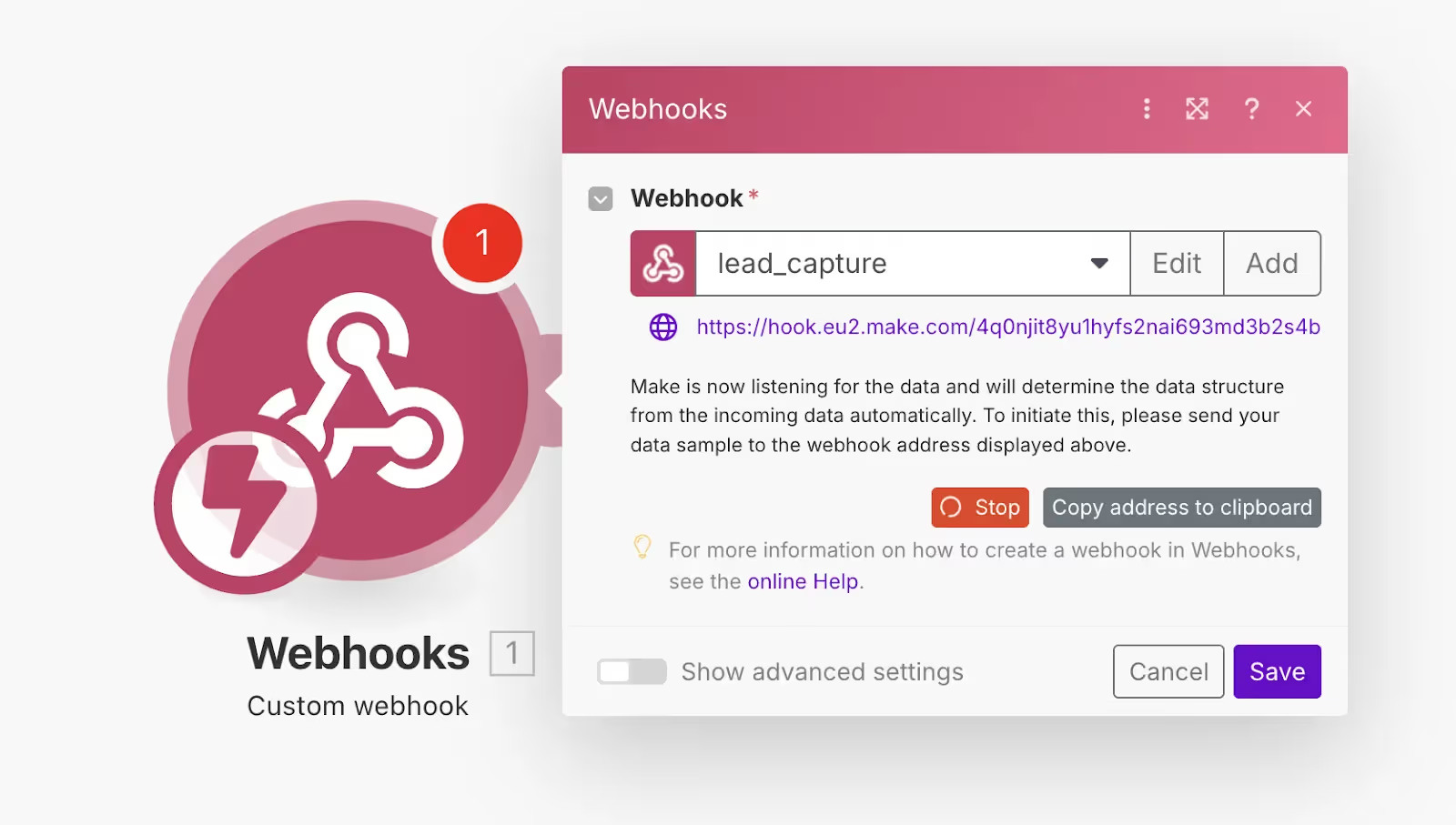
Lead capture to Google Sheets - We'll use Make.com for this. When someone says they're interested in a trip, your Agent will collect their name, email, and what they're interested in, and we will send this info to Make.com and Make will add all of the info to your Google Sheet (For this particular example).
Захват лидов в Google Sheets — для этого используем Make.com. Когда кто-то говорит, что заинтересован в поездке, ваш агент соберёт его имя, email и интересующие услуги, отправит эту информацию в Make.com, а Make добавит все данные в ваш Google Sheet (для этого конкретного примера).
We will use a webhook that we will trigger using our AI agent’s API call feature. (Image 2)
Мы используем webhook, который будем триггерить через функцию API-вызова в нашем AI-агенте. (Image 2)
In Voiceflow, we can create an API tool, by:
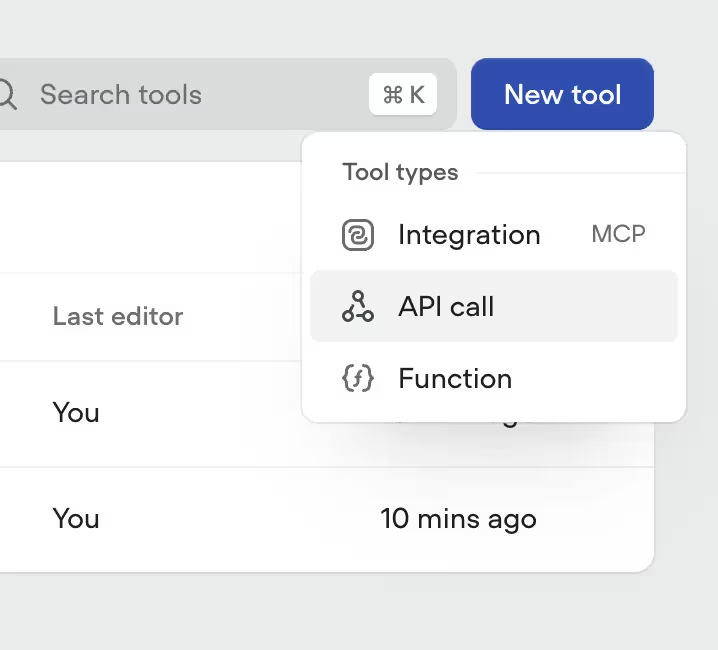
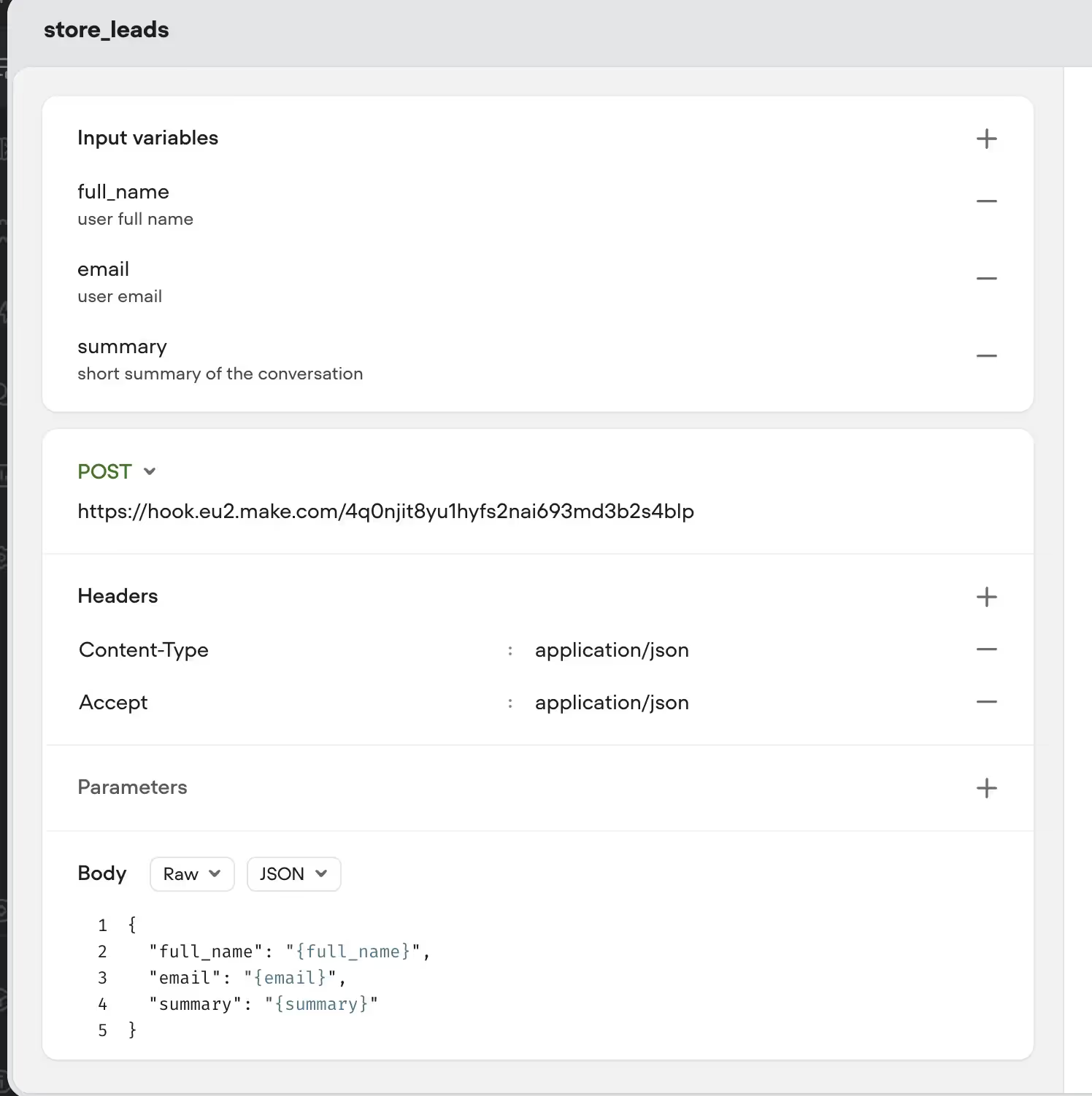
В Voiceflow мы можем создать API-инструмент, для этого:
Перейдите в «Content» → «Tools»Выберите опцию создания нового инструмента (Image — 3)Введите URL webhook'а из Make, нажав «Copy address to clipboard» в Make, и вставьте егоЗатем добавьте переменные (email, name и summary) в тело запроса. (Image — 4)
Here how it looks on my end:
Вот как это выглядит у меня:
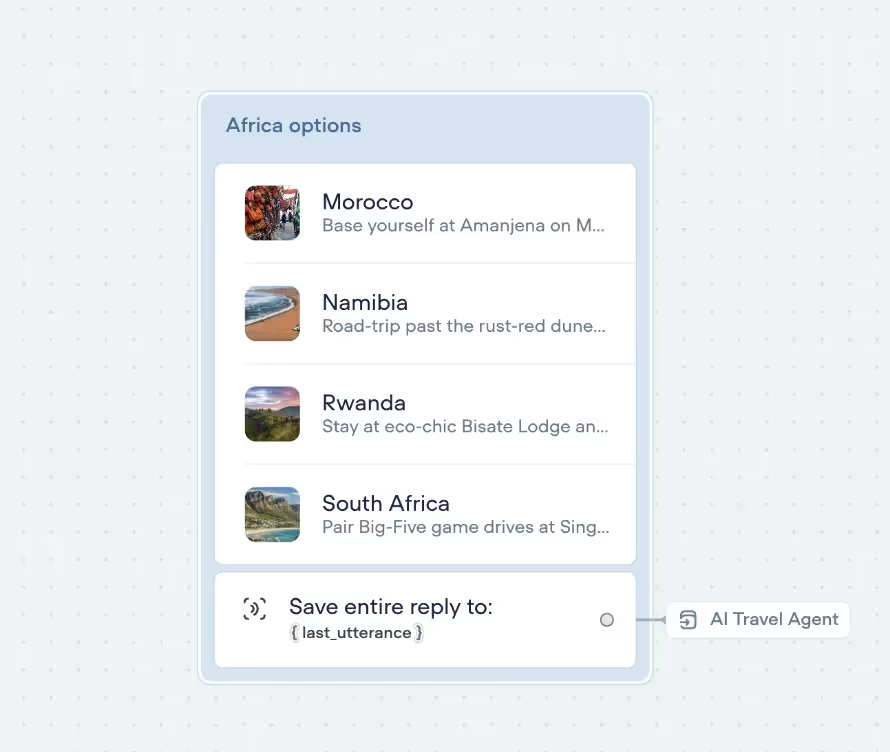
Visual recommendations - Nobody wants to read a wall of text about your amazing Bali package. We'll set up Voiceflow's Carousel feature so when someone asks about destinations, they see beautiful images with quick descriptions they can click through.
Визуальные рекомендации — никто не хочет читать стену текста о вашем потрясающем пакете тура на Бали. Мы настроим функцию Carousel в Voiceflow так, чтобы когда кто-то спрашивает о направлениях, он видел красивые изображения с краткими описаниями, которые можно пролистывать.
To do this:
Для этого:
Наведите курсор на опцию «Talk» в вашем workflow Voiceflow, выберите «Carousel» и перетащите на холст.Затем создайте по карточке для каждого направления. В моём примере я выбрал Африку и включил 4 возможных направления на выбор пользователей. Вы можете добавить заголовки, описания и фотографии (можно даже кнопки, URL и т.д., но в этот раз оставим всё просто), чтобы карусель выглядела красиво. (Image 5)
Connecting everything together
Соединяем всё вместе
Most of the heavy lifting is done. All that is left is to connect everything to our Agent:
Большая часть тяжёлой работы сделана. Осталось только подключить всё к нашему агенту:
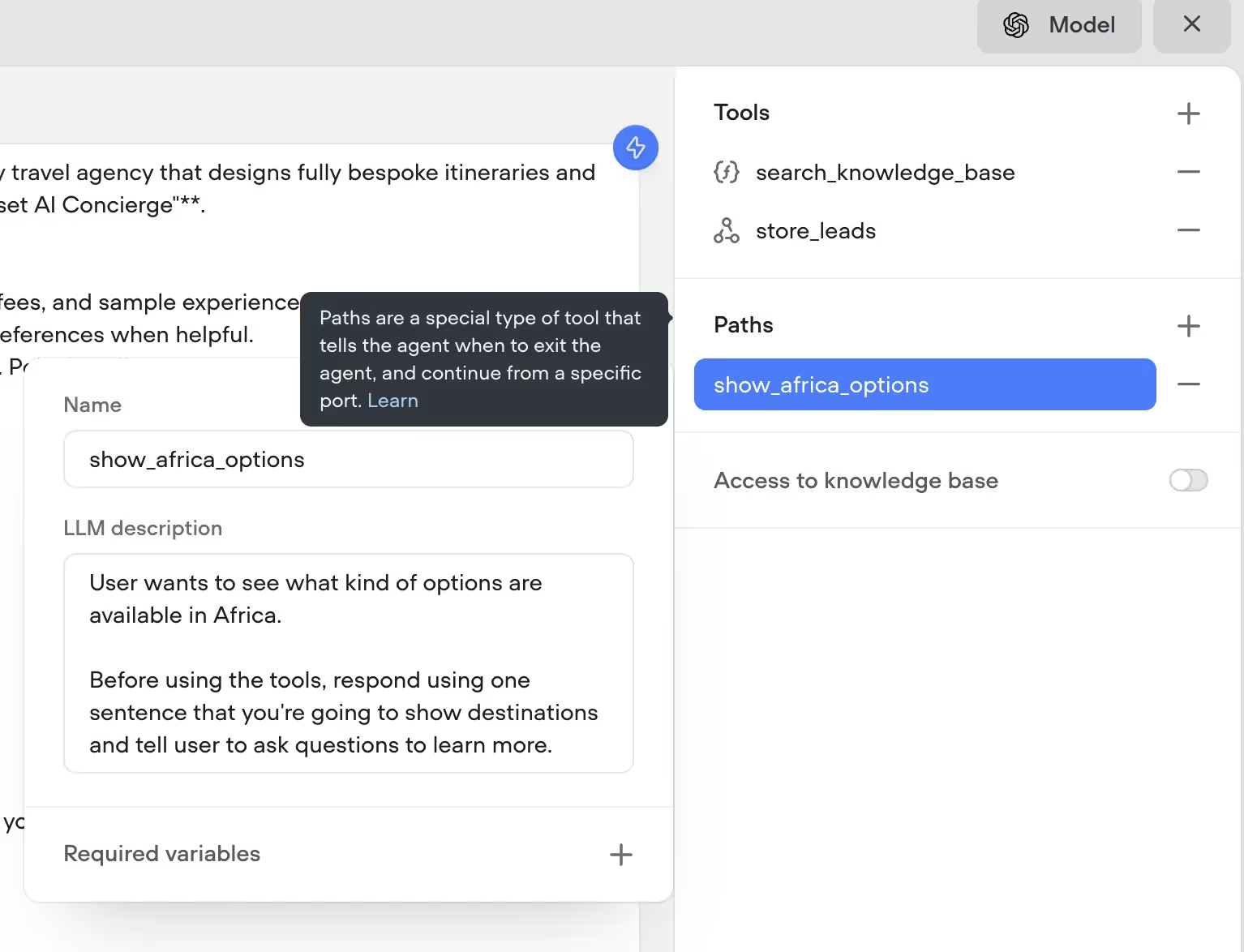
Подключите API-вызов к Make для сохранения лидовПодключите путь для показа африканских направленийДобавьте функцию поиска по базе знаний
When you’re done it will look like this (Image 6)
Когда закончите, это будет выглядеть так (Image 6)
{{blue-cta}}
{{blue-cta}}
Measuring Success
Измерение успеха
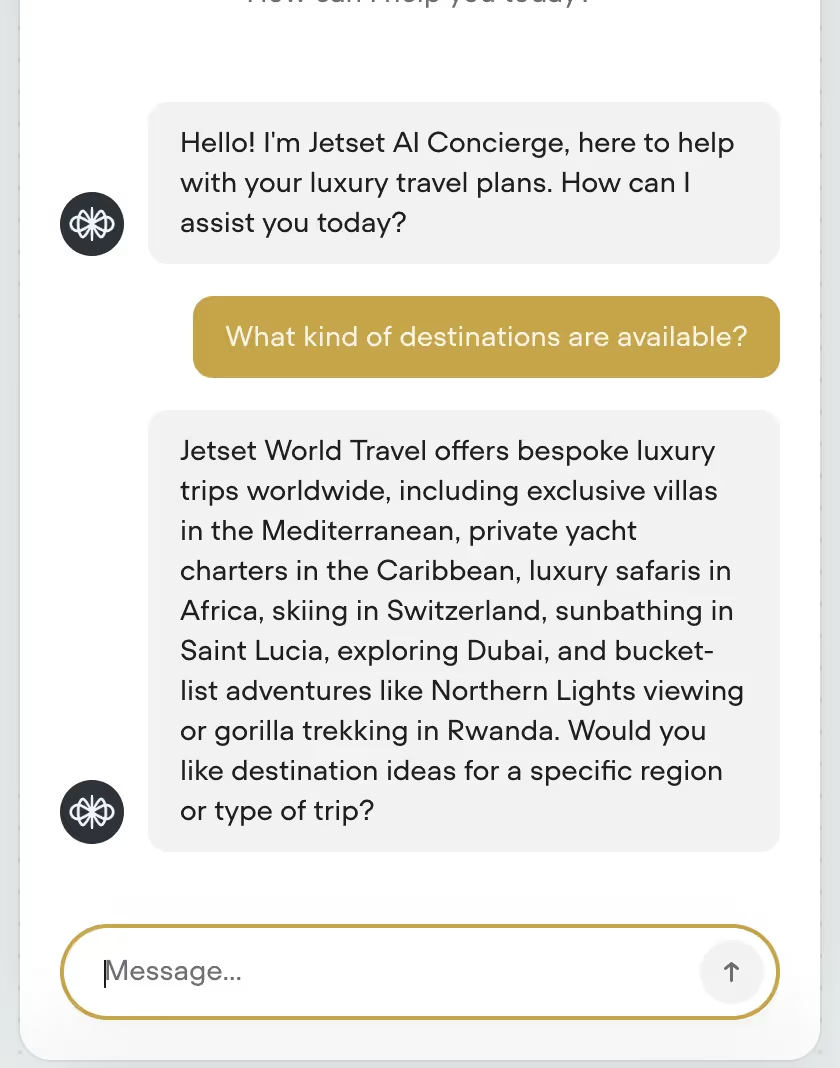
Before we can go live, we need to test the Agent, to see if everything is working as we expect. Oftentimes, you might need to adjust the Agent prompt, add extra sources to the knowledge base or fix a few bugs. That’s completely normal.
Перед запуском нужно протестировать агента, чтобы убедиться, что всё работает как ожидается. Часто приходится корректировать промпт агента, добавлять источники в базу знаний или править несколько багов. Это совершенно нормально.
Let’s try asking:
Давайте попробуем спросить:
Какие направления доступны? (Image — 7)Сколько это стоит?Я хочу поехать в Африку, там безопасно?Можно поговорить со службой поддержки?
Conclusion & Next Steps
Заключение и следующие шаги
If you’re ready to deploy the AI chatbot to your website, here is what to do:
Если вы готовы развернуть AI-чатбот на сайте, вот что нужно сделать:
✅ Go to Voiceflow and open your project
✅ Зайдите в Voiceflow и откройте проект
✅ Click Publish
✅ Нажмите Publish
✅ Copy your Project ID
✅ Скопируйте Project ID
✅ Go to your website builder settings (or wherever you add scripts)
✅ Перейдите в настройки конструктора сайта (или туда, где вы добавляете скрипты)
✅ Paste the Voiceflow embed script (they provide it after publishing)
✅ Вставьте embed-скрипт Voiceflow (его выдают после публикации)
✅ Save and refresh your site
✅ Сохраните и обновите страницу
✅ The chat widget will appear in the corner — you're live!
✅ Виджет чата появится в углу — вы в эфире!
And there you have it - your own AI travel agent, built from scratch. Pretty cool, right? You've got a smart bot that can answer questions, search through your business docs, capture leads and show off your destinations using Voiceflow carousel.
Вот и всё — ваш собственный AI travel-агент, построенный с нуля. Круто, да? У вас умный бот, который умеет отвечать на вопросы, искать по вашим бизнес-документам, захватывать лиды и презентовать направления через карусель Voiceflow.
I know that it can be overwhelming at first, so my recommendation - Start small. Get your basic FAQ flows working first, then gradually add more features. Nail down the knowledge base, then try to connect the lead capturing with make.
Знаю, что поначалу это может казаться непосильным, поэтому моя рекомендация — начинайте с малого. Сначала запустите базовые FAQ-потоки, затем постепенно добавляйте функции. Закрепите базу знаний, а потом попробуйте подключить захват лидов через Make.
Once you get comfortable with the basics? The sky's the limit. You could add booking integrations, connect it to WhatsApp and Instagram or even integrate voice.
Как только освоитесь с базой — небо предел. Можно добавить интеграции с бронированием, подключить WhatsApp и Instagram или даже интегрировать голос.
If you’re ready to start building, you can download all of Voiceflow templates that were used to create the Agent:
Если вы готовы начать строить, можете скачать все шаблоны Voiceflow, использованные для создания агента:
Полный шаблон VoiceflowИнструмент API-вызова для сохранения лидовКастомная функция для поиска по базе знаний
If you don’t care about Learning how to use Voiceflow, LLMs and all this nerdy stuff, you can book a call with us and we will take care of the development for you https://www.parnidia.com
Если вам неинтересно учиться работать с Voiceflow, LLM и прочей технической стороной, можете записаться к нам на звонок — мы займёмся разработкой за вас: https://www.parnidia.com
Happy building!
Удачной разработки!