How to Build an AI Travel Agency Bot in 2026 (No Code)
Практическое руководство по созданию AI-агента для туристического агентства без программирования на базе Voiceflow и Make.com. Автор показывает на примере реального агентства Jetset World Travel, как настроить чат-бота с использованием RAG для работы с базой знаний компании: турпакетами, политиками и FAQ. В статье разбирается составление промпта (задача, тон, инструменты, защитные ограничения), загрузка sitemap в базу знаний, интеграция через webhook с Google Sheets для захвата лидов и настройка карусели для визуальных рекомендаций направлений. Приводится готовый шаблон промпта для AI Concierge и описание тестовых сценариев. В финале — пошаговая инструкция по публикации виджета на сайте и ссылки на готовые шаблоны Voiceflow.
In this guide, I'm going to walk you through creating your own AI travel agent using:
No coding degree required - just a bit of patience and maybe a coffee or two.
The cool thing is, we're not just building a generic bot that spits out pre-written, static answers. We're going to use something called RAG (Retrieval Augmented Generation) that allows us to feed our bot all the specific business knowledge. Your tour packages, your policies or that specific way you handle group bookings. Think of it as training a new employee.
By the end of this, you'll have a working AI assistant that can handle customer questions, showcase your services, and capture leads while you're sleeping. Plus, you'll actually understand how it all works, which means you can tweak and improve it as you go.
If you don’t want to read and jump straight to building, you can download the Voiceflow template and follow along with the video below.
What Is an AI Travel Agent?
Think of an AI travel agent as your digital front desk that never sleeps. It's like having your best customer service rep available 24/7 inside your website, ready to handle those repetitive questions, guide users based on their needs and even capture leads.
Real life examples of what an AI Travel Agent can do
FAQ Handling
When someone pops in asking "What's the planning process going to be like?" the AI chatbot answers it in less than 5 seconds. Step by step, exactly how you'd want them to. No more typing out the same thing over and over (we've all been there, right?).
Personalized recommendations
Where it gets pretty cool is when people start asking broader questions. Like, someone might say "What are the options if I want to go to Africa?" and instead of sending them a generic PDF, your AI Agent actually recommends trips. Maybe it mentions your safari packages, or that Morocco tour that's been popular lately. It figures out what they're actually interested in and goes from there.
Lead capturing
Oh, and here's something super practical - whenever someone shows interest (when they start asking about dates, prices or says “I’m interested and want to know more”), the Agent will collect their contact info and send it wherever you need it. Could be your CRM like Hubspot, Pipedrive, Zendesk, or something simple, like Google Sheets. The point is, you're not losing leads because someone messaged you at 2 AM.
That's what we're building today using Voiceflow.
{{blue-cta}}
How to Build an AI Travel Agent
In this example I’l be using real Travel agency called https://jetsetworldtravel.com/
First up, we need to create the AI agent using Voiceflow's agent block. The make-or-break part here? Your prompt.
Here's what your prompt needs to nail down:
1. Main job and goal - Be super clear. Something like "You're a travel planning assistant for XYZ Travel. Your job is to help customers plan trips, answer questions about our services, and collect their contact info when they're interested."
2. Personality and tone - This is where you make it sound human. Maybe you want to be friendly or rather professional? Enthusiastic about travel? Whatever matches your brand. I like to write "Speak like a knowledgeable friend who loves to travel" or something similar.
3. Available tools - Tell your agent what it can actually do. "You can search our knowledge base for tour packages, capture lead information, and show destination recommendations." If you don't mention it, the agent won't know it can do it.
4. Security guardrails - This one's crucial. You need lines like "Only recommend our company's services" and "If asked about competitors, politely redirect to our offerings." Also throw in "If you don't know something, say so instead of making it up.”
Best practises for writing prompts
If you want to dive deeper and learn how to prompt your agents or how to structure your prompts when working with LLMs, I recommend reading OpenAI's cookbook - https://cookbook.openai.com/examples/gpt4-1_prompting_guide
An example prompt for AI Travel Agent:
AI Travel Agent Prompt Template
You are an AI assistant inside the website for **Jetset World Travel**, a U.S.–based boutique luxury travel agency that designs fully bespoke itineraries and provides white‑glove support from the first ideas through the traveler's return. Your name is **"Jetset AI Concierge"**. ## TASK 1. **Answer user questions** about Jetset World Travel's services, destinations, advisor expertise, fees, and sample experiences using knowledge base. 2. **Inspire & inform** by sharing concise destination ideas, planning tips, or relevant Jetset blog references when helpful. 3. **Capture leads** whenever a visitor shows clear intent to plan a trip, book a call, or learn more. Politely collect: - Name - Email *Remember:* - Do **not** fabricate information or URLs. - Do **not** introduce knowledge unrelated to Jetset World Travel. - If information is unavailable, say so. ## TONE AND PERSONALITY - Greet users shortly, saying who you are and ask how you can help them today. - Friendly, upbeat, and professional, reflecting a luxury concierge. - Keep answers short and direct (1–3 sentences unless detail is requested). - Celebrate the traveler's excitement (e.g., "That sounds like an incredible honeymoon idea!"). - Proactively clarify rather than assume; end with a clear next step when appropriate (e.g., "Would you like me to connect you with a Jetset advisor?"). ## TOOLS ### store_lead - Use `store_lead` once you have both contact details and clear interest. ### search_knowledge_base When to call: - Whenever the visitor requests or implies they need factual details. - For follow‑up questions on the same topic—always search again; do not rely solely on memory of earlier results. - Even if you think you know the answer; search first to avoid outdated or invented information. If no useful results: - Briefly state that you don't have that information. - Never fabricate data, URLs, or claims.
Creating Your Knowledge Base
Start by gathering all your stuff: website URLs, PDFs, policy documents, FAQ docs, whatever you've got. Voiceflow lets you dump all of this into a knowledge base, and here's the magic - your agent will actually search through it to answer questions.
The process is pretty straightforward:
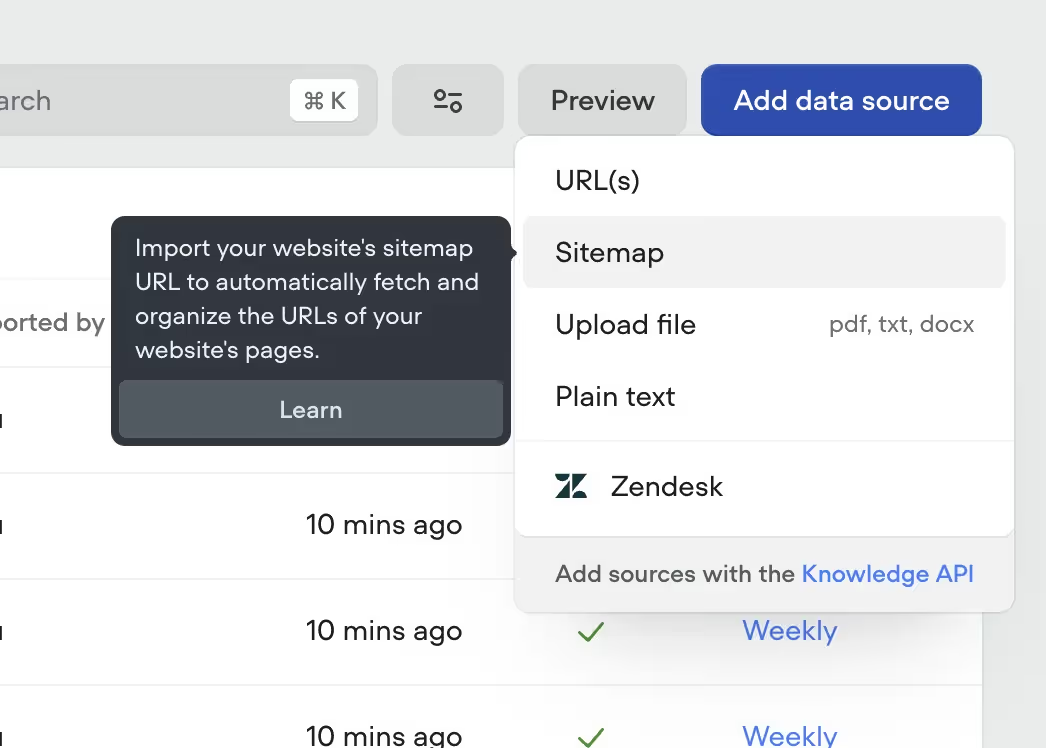
💡 Pro tip: Most websites have something called sitemap. You can usually find them by following this structure (e.g. https://jetsetworldtravel.com/page-sitemap.xml ) or by checking /robots.txt (e.g https://jetsetworldtravel.com/robots.txt), as it usually includes a link to a website’s sitemap. And what's great about it, is that you can import the entire sitemap to Voiceflow (Image 1), instead of having to upload every single page by hand, one by one.
Integrations and Custom Flows
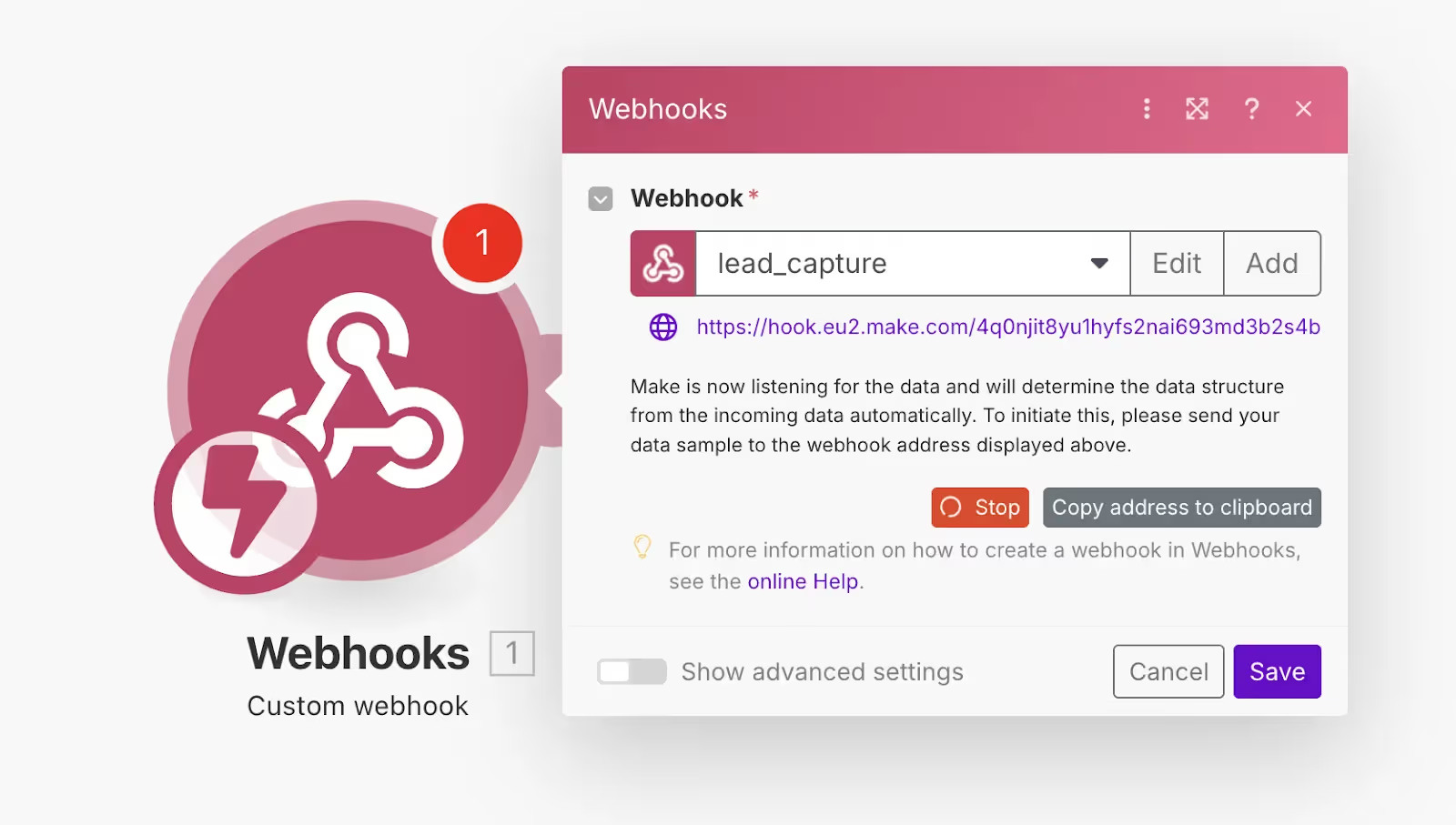
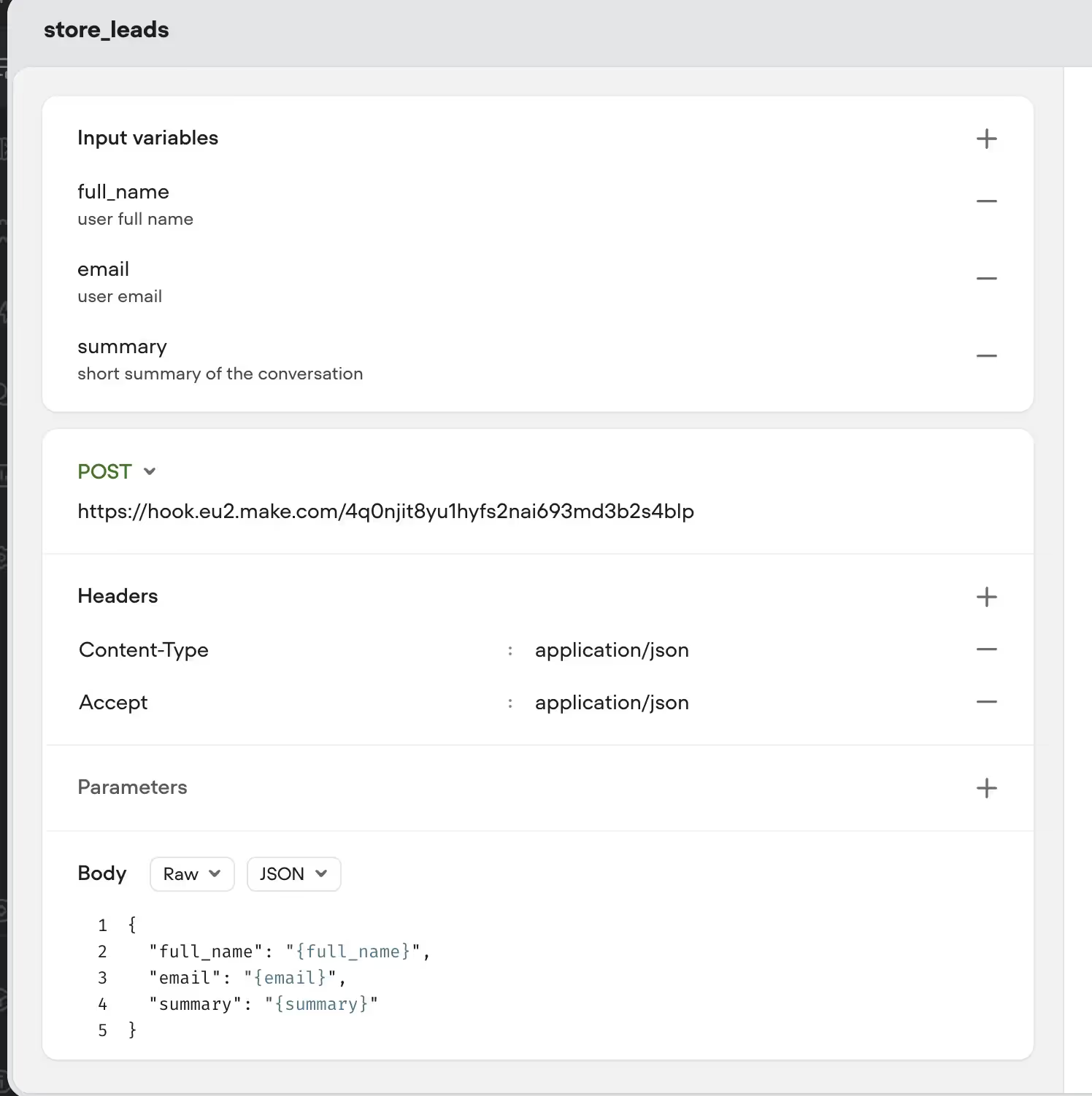
Lead capture to Google Sheets - We'll use Make.com for this. When someone says they're interested in a trip, your Agent will collect their name, email, and what they're interested in, and we will send this info to Make.com and Make will add all of the info to your Google Sheet (For this particular example).
We will use a webhook that we will trigger using our AI agent’s API call feature. (Image 2)
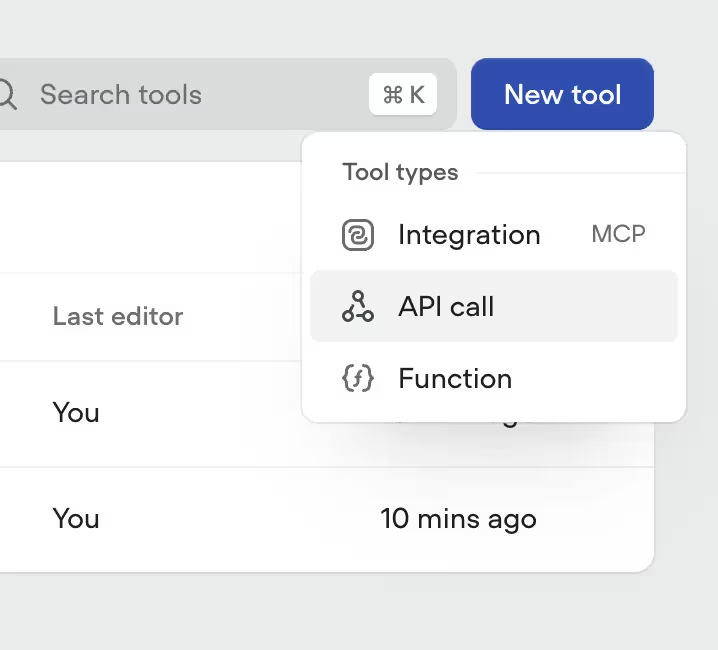
In Voiceflow, we can create an API tool, by:
Here how it looks on my end:
Visual recommendations - Nobody wants to read a wall of text about your amazing Bali package. We'll set up Voiceflow's Carousel feature so when someone asks about destinations, they see beautiful images with quick descriptions they can click through.
To do this:
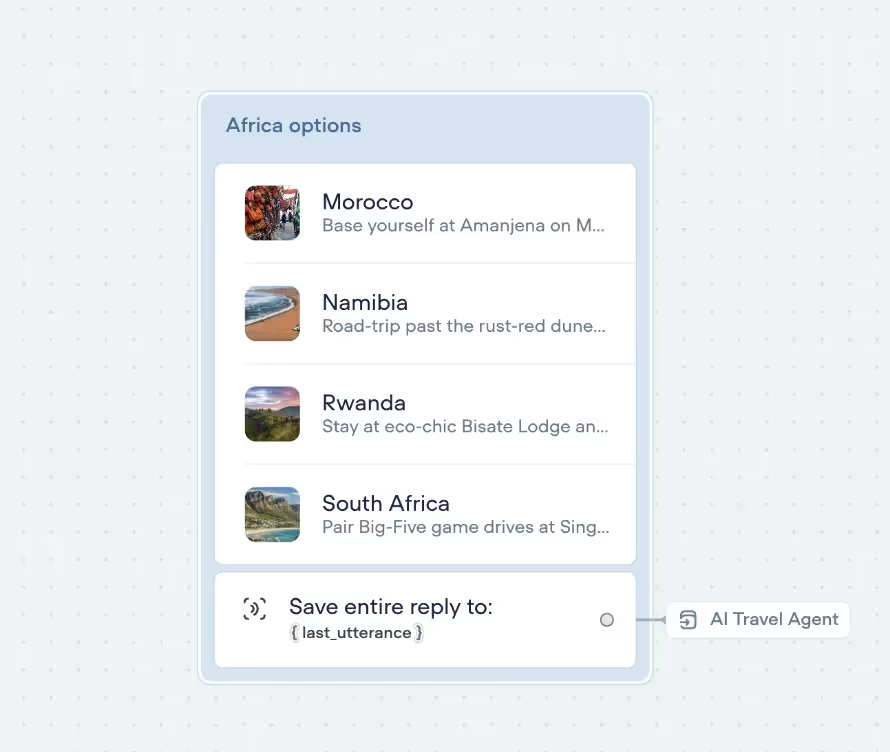
Connecting everything together
Most of the heavy lifting is done. All that is left is to connect everything to our Agent:
When you’re done it will look like this (Image 6)
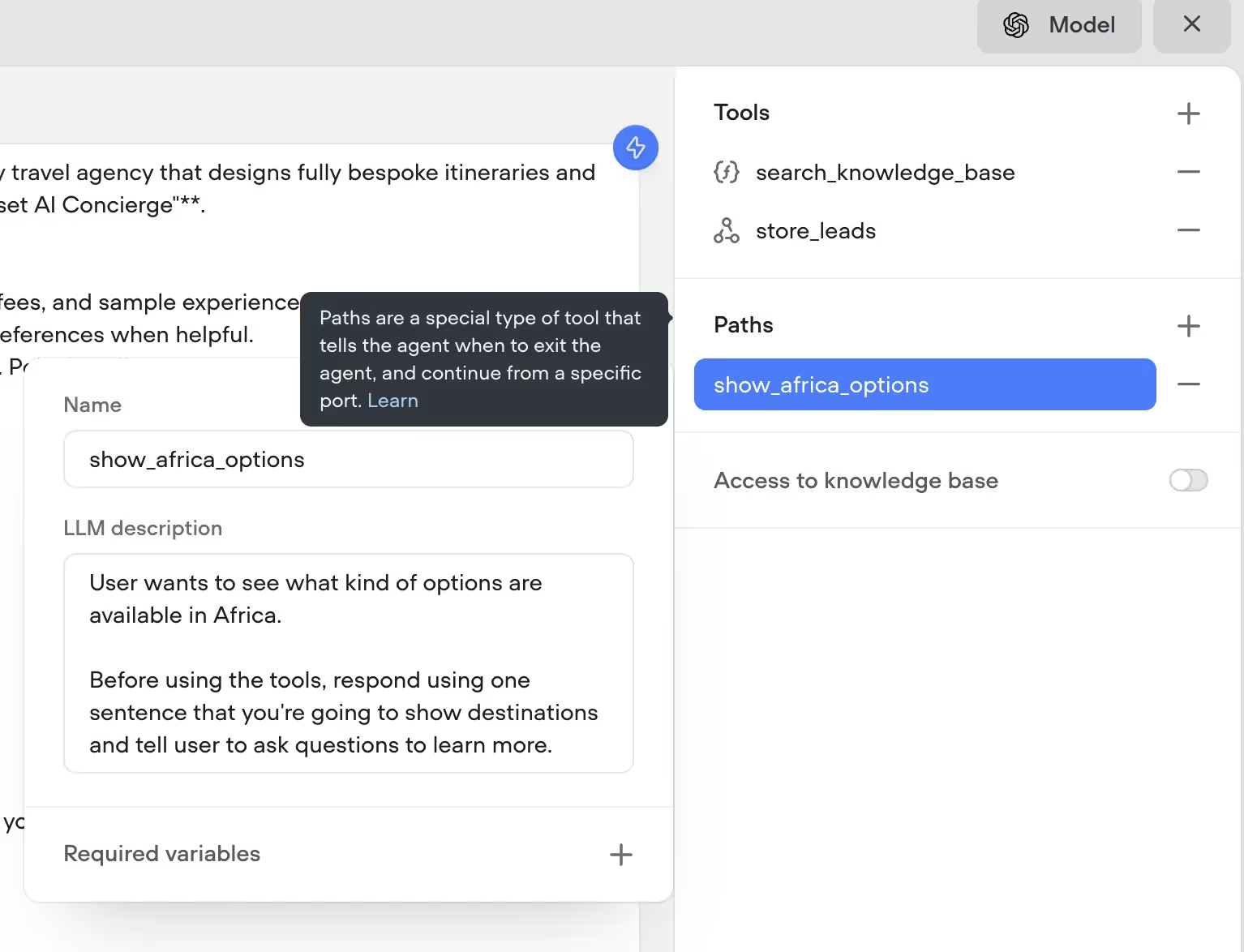
{{blue-cta}}
Measuring Success
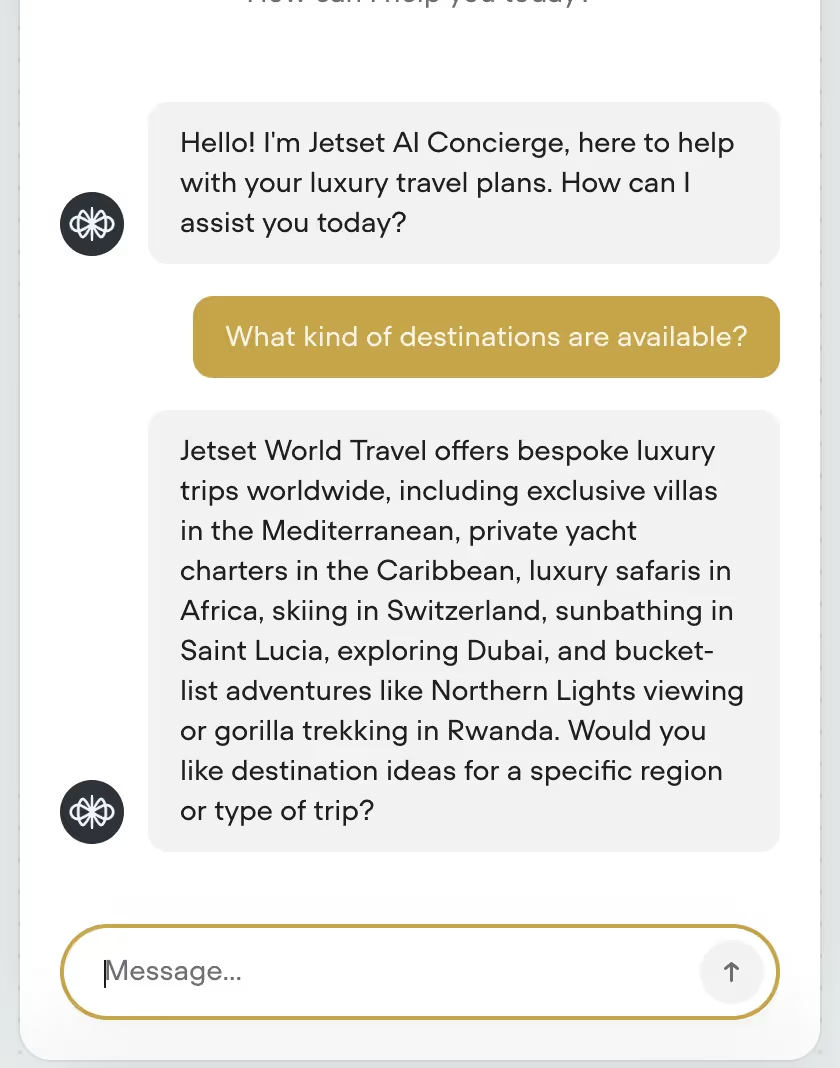
Before we can go live, we need to test the Agent, to see if everything is working as we expect. Oftentimes, you might need to adjust the Agent prompt, add extra sources to the knowledge base or fix a few bugs. That’s completely normal.
Let’s try asking:
Conclusion & Next Steps
If you’re ready to deploy the AI chatbot to your website, here is what to do:
✅ Go to Voiceflow and open your project
✅ Click Publish
✅ Copy your Project ID
✅ Go to your website builder settings (or wherever you add scripts)
✅ Paste the Voiceflow embed script (they provide it after publishing)
✅ Save and refresh your site
✅ The chat widget will appear in the corner — you're live!
And there you have it - your own AI travel agent, built from scratch. Pretty cool, right? You've got a smart bot that can answer questions, search through your business docs, capture leads and show off your destinations using Voiceflow carousel.
I know that it can be overwhelming at first, so my recommendation - Start small. Get your basic FAQ flows working first, then gradually add more features. Nail down the knowledge base, then try to connect the lead capturing with make.
Once you get comfortable with the basics? The sky's the limit. You could add booking integrations, connect it to WhatsApp and Instagram or even integrate voice.
If you’re ready to start building, you can download all of Voiceflow templates that were used to create the Agent:
If you don’t care about Learning how to use Voiceflow, LLMs and all this nerdy stuff, you can book a call with us and we will take care of the development for you https://www.parnidia.com
Happy building!